Spring Ioc注解式开发
回顾注解
注解的存在主要是为了简化XML配置,方便开发。Spring6倡导全注解开发
注解怎么定义?注解的属性怎么定义?
1
2
3
4
5
| @Target(value = {ElementType.TYPE})
@Retention(value = RetentionPolicy.RUNTIME)
public @interface Component {
String value();
}
|
- 以上就是自定义了一个简单注解:
Component - 该注解上修饰的注解包括:
Target注解和Retention注解,这两个注解又称为元注解。- Target注解来设置Component注解可以出现的位置,以上设置表示Component注解只能修饰类和接口上
- Retention注解来设置Component注解的保留位置,以上设置表示Component注解保留在运行时,
可以通过反射读取到该注解。
- value是Component注解中的一个属性,该属性类型为String,属性名是value。
注解怎么使用?
1
2
3
| @Component(value = "userBean")
public class User {
}
|
userBean为什么使用双引号括起来,因为value属性是String类型,字符串。
另外如果属性名是value,则在使用的时候可以省略属性名,例如:1
2
3
4
|
@Component("userBean")
public class User {
}
|
怎么通过反射读取注解?
- 写一段程序完成该功能:当Bean类上Component注解时,实例化Bean对象,如果没有则不实例化对象
1
2
3
| @Component("userBean")
public class User {
}
|
- 假设当前只知道包名,包下有多少个Bean类,哪些Bean有注解,哪些Bean没有注解都不知道。
1
2
3
4
5
6
7
8
9
10
11
12
13
14
15
16
17
18
19
20
21
22
23
24
25
26
27
28
| public class Test {
public static void main(String[] args) throws Exception {
Map<String,Object> beanMap = new HashMap<>();
String packageName = "com.powernode.bean";
String path = packageName.replaceAll("\\.", "/");
URL url = ClassLoader.getSystemClassLoader().getResource(path);
File file = new File(url.getPath());
File[] files = file.listFiles();
Arrays.stream(files).forEach(f -> {
String className = packageName + "." + f.getName().split("\\.")[0];
try {
Class<?> clazz = Class.forName(className);
if (clazz.isAnnotationPresent(Component.class)) {
Component component = clazz.getAnnotation(Component.class);
String beanId = component.value();
Object bean = clazz.newInstance();
beanMap.put(beanId, bean);
}
} catch (Exception e) {
e.printStackTrace();
}
});
System.out.println(beanMap);
}
}
|
声明Bean的注解
负责声明Bean的注解,常见的包括四个:
- @Component
- @Controller
- @Service
- @Repository
1
2
3
4
5
6
7
8
9
10
11
12
13
| package com.powernode.annotation;
import java.lang.annotation.ElementType;
import java.lang.annotation.Retention;
import java.lang.annotation.RetentionPolicy;
import java.lang.annotation.Target;
@Target(value = {ElementType.TYPE})
@Retention(value = RetentionPolicy.RUNTIME)
public @interface Component {
    String value();
}
|
1
2
3
4
5
6
7
8
9
10
11
12
13
14
15
16
17
18
19
20
| package org.springframework.stereotype;
import java.lang.annotation.Documented;
import java.lang.annotation.ElementType;
import java.lang.annotation.Retention;
import java.lang.annotation.RetentionPolicy;
import java.lang.annotation.Target;
import org.springframework.core.annotation.AliasFor;
@Target({ElementType.TYPE})
@Retention(RetentionPolicy.RUNTIME)
@Documented
@Component
public @interface Controller {
@AliasFor(
annotation = Component.class
)
String value() default "";
}
|
1
2
3
4
5
6
7
8
9
10
11
12
13
14
15
16
17
18
19
20
| package org.springframework.stereotype;
import java.lang.annotation.Documented;
import java.lang.annotation.ElementType;
import java.lang.annotation.Retention;
import java.lang.annotation.RetentionPolicy;
import java.lang.annotation.Target;
import org.springframework.core.annotation.AliasFor;
@Target({ElementType.TYPE})
@Retention(RetentionPolicy.RUNTIME)
@Documented
@Component
public @interface Service {
@AliasFor(
annotation = Component.class
)
String value() default "";
}
|
1
2
3
4
5
6
7
8
9
10
11
12
13
14
15
16
17
18
19
20
| package org.springframework.stereotype;
import java.lang.annotation.Documented;
import java.lang.annotation.ElementType;
import java.lang.annotation.Retention;
import java.lang.annotation.RetentionPolicy;
import java.lang.annotation.Target;
import org.springframework.core.annotation.AliasFor;
@Target({ElementType.TYPE})
@Retention(RetentionPolicy.RUNTIME)
@Documented
@Component
public @interface Repository {
@AliasFor(
annotation = Component.class
)
String value() default "";
}
|
- 从源码可以看到,
@Controller、@Service、@Repository这三个注解都是@Component注解的别名,也就是这几个注解功能一样,用哪个都可以。 - 为了增强程序可读性,建议:
- 控制器上使用
@Controller注解 - 服务层上使用
@Service注解 - 数据访问层上使用
@Repository注解
- 这几个注解都只有一个value属性,该属性值就是Bean的id,也就是Bean的名字。
Spring注解的使用
- 如何使用前面的这几个注解呢?
- 第一步:加入aop的依赖
- 第二步:在配置文件中添加context命名空间
- 第三步:在配置文件中指定扫描的包
- 第四步:在Bean类上使用注解
第一步:加入aop的依赖
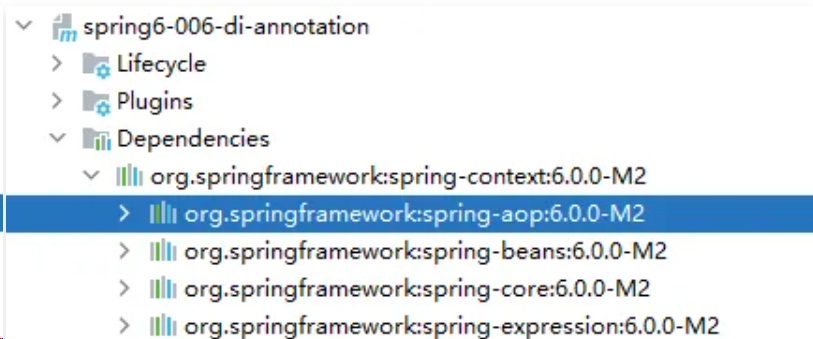
当加入spring-context依赖之后,会关联加入aop的依赖。所以这一步不用做。
第二步:在配置文件中添加context命名空间
1
2
3
4
5
6
7
8
| <?xml version="1.0" encoding="UTF-8"?>
<beans xmlns="http://www.springframework.org/schema/beans"
xmlns:xsi="http://www.w3.org/2001/XMLSchema-instance"
xmlns:context="http://www.springframework.org/schema/context"
xsi:schemaLocation="http://www.springframework.org/schema/beans http://www.springframework.org/schema/beans/spring-beans.xsd
http://www.springframework.org/schema/context http://www.springframework.org/schema/context/spring-context.xsd">
</beans>
|
第三步:在配置文件中指定要扫描的包
1
2
3
4
5
6
7
8
| <?xml version="1.0" encoding="UTF-8"?>
<beans xmlns="http://www.springframework.org/schema/beans"
xmlns:xsi="http://www.w3.org/2001/XMLSchema-instance"
xmlns:context="http://www.springframework.org/schema/context"
xsi:schemaLocation="http://www.springframework.org/schema/beans http://www.springframework.org/schema/beans/spring-beans.xsd
http://www.springframework.org/schema/context http://www.springframework.org/schema/context/spring-context.xsd">
<context:component-scan base-package="com.powernode.spring6.bean"/>
</beans>
|
第四步:在Bean类上使用注解
1
2
3
| @Component(value = "userBean")
public class User {
}
|
1
2
3
4
5
6
7
8
| public class AnnotationTest {
@Test
public void testBean(){
ApplicationContext applicationContext = new ClassPathXmlApplicationContext("spring.xml");
User userBean = applicationContext.getBean("userBean", User.class);
System.out.println(userBean);
}
}
|
如果注解的属性名是value,那么value是可以省略的。
1
2
3
| @Component("vipBean")
public class Vip {
}
|
1
2
3
4
5
6
7
8
| public class AnnotationTest {
@Test
public void testBean(){
ApplicationContext applicationContext = new ClassPathXmlApplicationContext("spring.xml");
Vip vipBean = applicationContext.getBean("vipBean", Vip.class);
System.out.println(vipBean);
}
}
|
如果把value属性彻底去掉,spring会被Bean自动取名吗?会的。并且默认名字的规律是:Bean类名首字母小写。
1
2
3
| @Component
public class BankDao {
}
|
也就是说,这个BankDao的bean的名字为:bankDao
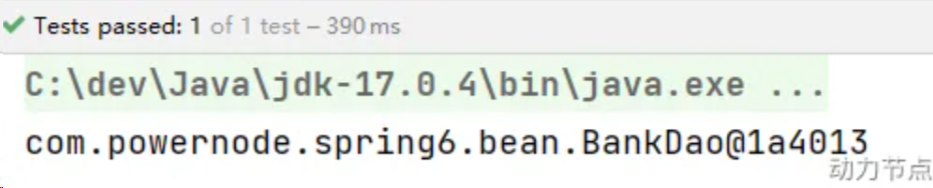
测试一下
1
2
3
4
5
6
7
8
| public class AnnotationTest {
@Test
public void testBean(){
ApplicationContext applicationContext = new ClassPathXmlApplicationContext("spring.xml");
BankDao bankDao = applicationContext.getBean("bankDao", BankDao.class);
System.out.println(bankDao);
}
}
|
如果是多个包怎么办?有两种解决方案:
- 第一种:在配置文件中指定多个包,用逗号隔开。
- 第二种:指定多个包的共同父包。
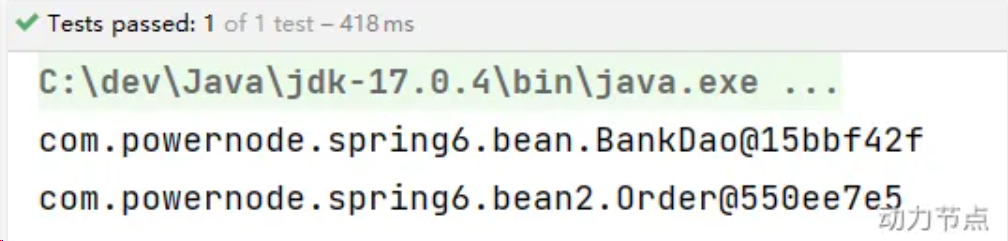
先来测试一下逗号(英文)的方式:
创建一个新的包:bean2,定义一个Bean类。
1
2
3
| @Service
public class Order {
}
|
配置文件修改:
1
2
3
4
5
6
7
8
| <?xml version="1.0" encoding="UTF-8"?>
<beans xmlns="http://www.springframework.org/schema/beans"
xmlns:xsi="http://www.w3.org/2001/XMLSchema-instance"
xmlns:context="http://www.springframework.org/schema/context"
xsi:schemaLocation="http://www.springframework.org/schema/beans http://www.springframework.org/schema/beans/spring-beans.xsd
http://www.springframework.org/schema/context http://www.springframework.org/schema/context/spring-context.xsd">
<context:component-scan base-package="com.powernode.spring6.bean,com.powernode.spring6.bean2"/>
</beans>
|
1
2
3
4
5
6
7
8
9
10
11
12
13
14
15
16
17
18
| package com.powernode.spring6.test;
import com.powernode.spring6.bean.BankDao;
import com.powernode.spring6.bean2.Order;
import org.junit.Test;
import org.springframework.context.ApplicationContext;
import org.springframework.context.support.ClassPathXmlApplicationContext;
public class AnnotationTest {
@Test
public void testBean(){
ApplicationContext applicationContext = new ClassPathXmlApplicationContext("spring.xml");
BankDao bankDao = applicationContext.getBean("bankDao", BankDao.class);
System.out.println(bankDao);
Order order = applicationContext.getBean("order", Order.class);
System.out.println(order);
}
}
|
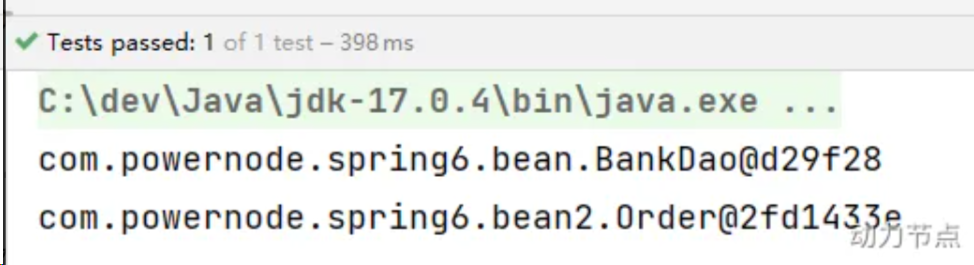
指定共同的父包:
1
2
3
4
5
6
7
8
| <?xml version="1.0" encoding="UTF-8"?>
<beans xmlns="http://www.springframework.org/schema/beans"
xmlns:xsi="http://www.w3.org/2001/XMLSchema-instance"
xmlns:context="http://www.springframework.org/schema/context"
xsi:schemaLocation="http://www.springframework.org/schema/beans http://www.springframework.org/schema/beans/spring-beans.xsd
http://www.springframework.org/schema/context http://www.springframework.org/schema/context/spring-context.xsd">
<context:component-scan base-package="com.powernode.spring6"/>
</beans>
|
执行测试程序:
选择性实例化Bean
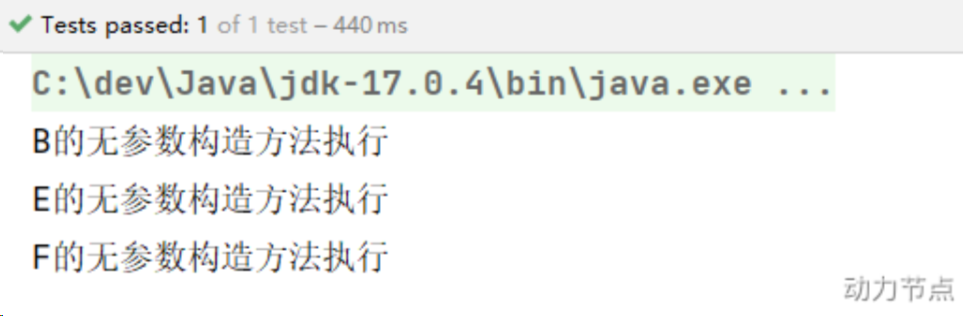
假设在某个包下有许多Bean,有的Bean上标注了Component,有的标注了Controller,有的标注了Service,有的标注了Repository,现在由于某种特殊业务的需要,只允许其中所有的Controller参与Bean管理,其他的都不实例化。这应该怎么办呢?
1
2
3
4
5
6
7
8
9
10
11
12
13
14
15
16
17
18
19
20
21
22
23
24
25
26
27
28
29
30
31
32
33
34
35
36
37
38
39
40
41
| @Component
public class A {
public A() {
System.out.println("A的无参数构造方法执行");
}
}
@Controller
class B {
public B() {
System.out.println("B的无参数构造方法执行");
}
}
@Service
class C {
public C() {
System.out.println("C的无参数构造方法执行");
}
}
@Repository
class D {
public D() {
System.out.println("D的无参数构造方法执行");
}
}
@Controller
class E {
public E() {
System.out.println("E的无参数构造方法执行");
}
}
@Controller
class F {
public F() {
System.out.println("F的无参数构造方法执行");
}
}
|
- 想仅仅实例化Conroller层,应修改配置文件
1
2
3
4
5
6
7
8
9
10
11
12
| <?xml version="1.0" encoding="UTF-8"?>
<beans xmlns="http://www.springframework.org/schema/beans"
xmlns:xsi="http://www.w3.org/2001/XMLSchema-instance"
xmlns:context="http://www.springframework.org/schema/context"
xsi:schemaLocation="http://www.springframework.org/schema/beans http://www.springframework.org/schema/beans/spring-beans.xsd
http://www.springframework.org/schema/context http://www.springframework.org/schema/context/spring-context.xsd">
<context:component-scan base-package="com.powernode.spring6.bean3" use-default-filters="false">
<context:include-filter type="annotation" expression="org.springframework.stereotype.Controller"/>
</context:component-scan>
</beans>
|
use-default-filters="true" 表示:使用spring默认的规则,只要有Component、Controller、Service、Repository中的任意一个注解标注,则进行实例化。use-default-filters="false" 表示:不再spring默认实例化规则,即使有Component、Controller、Service、Repository这些注解标注,也不再实例化。- 表示只有Controller进行实例化。
1
2
3
4
| @Test
public void testChoose(){
ApplicationContext applicationContext = new ClassPathXmlApplicationContext("spring-choose.xml");
}
|
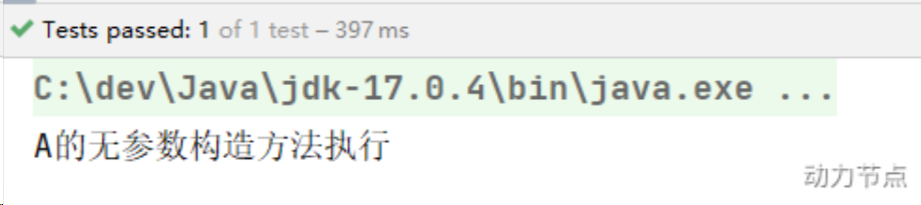
- 该方法是设置只有Controller进行实例化,也可以继续保持默认全部实例化,而将不需要的注解排除。
1
2
3
4
5
| <context:component-scan base-package="com.powernode.spring6.bean3">
<context:exclude-filter type="annotation" expression="org.springframework.stereotype.Repository"/>
<context:exclude-filter type="annotation" expression="org.springframework.stereotype.Service"/>
<context:exclude-filter type="annotation" expression="org.springframework.stereotype.Controller"/>
</context:component-scan>
|
负责注入的注解
@Component @Controller @Service @Repository这四个注解是用来声明Bean的,声明后这些Bean将被实例化。而给Bean属性赋值需要用到这些注解:
@Value@Autowired@Qualifier@Resource
@Value
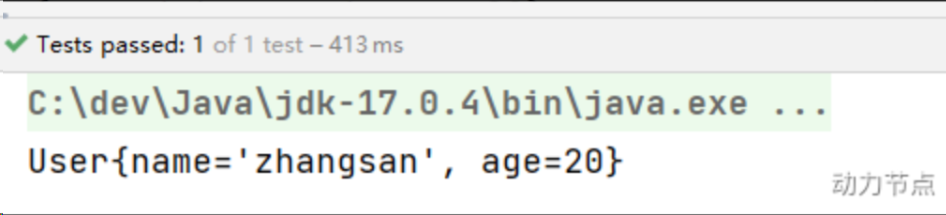
当属性的类型是简单类型时,可以直接使用@Value注解进行注入。
1
2
3
4
5
6
7
8
9
10
11
12
13
14
15
| @Component
public class User {
@Value(value = "zhangsan")
private String name;
@Value("20")
private int age;
@Override
public String toString() {
return "User{" +
"name='" + name + '\'' +
", age=" + age +
'}';
}
}
|
开启包扫描
- 使用注解声明Bean时必须要被Spring扫描到才能被Spring管理,因此必须在配置中写上包扫描
- 属性注入时,只要是已经交给Spring管理的Bean就可以注入属性,不需要单独开启包扫描
- 严格来说,包扫描时为了找到并注册Bean,和@Value无关
1
2
3
4
5
6
7
8
| <?xml version="1.0" encoding="UTF-8"?>
<beans xmlns="http://www.springframework.org/schema/beans"
xmlns:xsi="http://www.w3.org/2001/XMLSchema-instance"
xmlns:context="http://www.springframework.org/schema/context"
xsi:schemaLocation="http://www.springframework.org/schema/beans http://www.springframework.org/schema/beans/spring-beans.xsd
http://www.springframework.org/schema/context http://www.springframework.org/schema/context/spring-context.xsd">
<context:component-scan base-package="com.powernode.spring6.bean4"/>
</beans>
|
1
2
3
4
5
6
| @Test
public void testValue(){
ApplicationContext applicationContext = new ClassPathXmlApplicationContext("spring-injection.xml");
Object user = applicationContext.getBean("user");
System.out.println(user);
}
|
通过以上代码可以发现,即使没给属性提供setter方法,但仍然可以完成属性赋值。
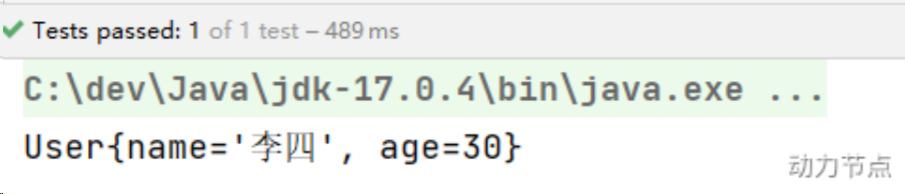
如果提供setter方法,并且在setter方法上添加@Value注解,可以完成注入吗?尝试一下:
1
2
3
4
5
6
7
8
9
10
11
12
13
14
15
16
17
18
19
20
21
22
23
24
25
| @Component
public class User {
private String name;
private int age;
@Value("李四")
public void setName(String name) {
this.name = name;
}
@Value("30")
public void setAge(int age) {
this.age = age;
}
@Override
public String toString() {
return "User{" +
"name='" + name + '\'' +
", age=" + age +
'}';
}
}
|
- 通过测试可以得知,@Value注解可以直接使用在属性上,也可以使用在setter方法上。都可以完成属性的赋值。
- 为了简化代码,以后我们一般不提供setter方法,直接在属性上使用@Value注解完成属性赋值。
- 出于好奇,我们再来测试一下,是否能够通过构造方法完成注入:
1
2
3
4
5
6
7
8
9
10
11
12
13
14
15
16
17
18
19
20
| @Component
public class User {
private String name;
private int age;
public User(@Value("隔壁老王") String name, @Value("33") int age) {
this.name = name;
this.age = age;
}
@Override
public String toString() {
return "User{" +
"name='" + name + '\'' +
", age=" + age +
'}';
}
}
|
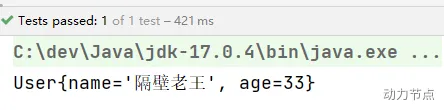
通过测试得知:@Value注解可以出现在属性上、setter方法上、以及构造方法的形参上。可见Spring给我们提供了多样化的注入。
@Autowired与@Qualifier
前面提到@Value可以注入简单类型,而@Autowired注解可以用来注入非简单类型。被翻译为:自动连线的,或者自动装配。单独使用@Autowired注解,默认根据类型装配。【默认是byType】
看一下它的源码:
1
2
3
4
5
6
| @Target({ElementType.CONSTRUCTOR, ElementType.METHOD, ElementType.PARAMETER, ElementType.FIELD, ElementType.ANNOTATION_TYPE})
@Retention(RetentionPolicy.RUNTIME)
@Documented
public @interface Autowired {
boolean required() default true;
}
|
源码中有两处需要注意:
- 第一处:该注解可以标注在哪里?
- 第二处:该注解有一个required属性,默认值是true,表示在注入的时候要求被注入的Bean必须是存在的,如果不存在则报错。如果required属性设置为false,表示注入的Bean存在或者不存在都没关系,存在的话就注入,不存在的话,也不报错。
我们先在属性上使用@Autowired注解:
1
2
3
4
5
| package com.powernode.spring6.dao;
public interface UserDao {
void insert();
}
|
1
2
3
4
5
6
7
| @Repository
public class UserDaoForMySQL implements UserDao{
@Override
public void insert() {
System.out.println("正在向mysql数据库插入User数据");
}
}
|
1
2
3
4
5
6
7
8
9
10
11
12
| @Service
public class UserService {
@Autowired
private UserDao userDao;
public void save(){
userDao.insert();
}
}
|
1
2
3
4
5
6
7
8
| <?xml version="1.0" encoding="UTF-8"?>
<beans xmlns="http://www.springframework.org/schema/beans"
xmlns:xsi="http://www.w3.org/2001/XMLSchema-instance"
xmlns:context="http://www.springframework.org/schema/context"
xsi:schemaLocation="http://www.springframework.org/schema/beans http://www.springframework.org/schema/beans/spring-beans.xsd
http://www.springframework.org/schema/context http://www.springframework.org/schema/context/spring-context.xsd">
<context:component-scan base-package="com.powernode.spring6.dao,com.powernode.spring6.service"/>
</beans>
|
1
2
3
4
5
6
| @Test
public void testAutowired(){
ApplicationContext applicationContext = new ClassPathXmlApplicationContext("spring-injection.xml");
UserService userService = applicationContext.getBean("userService", UserService.class);
userService.save();
}
|
以上构造方法和setter方法都没有提供,经过测试,仍然可以注入成功。在构造方法,set方法,形参上使用的验证方法一致,此处省略
- 此时我们已经清楚
@Autowired注解可以出现在哪些位置了。 - @Autowired注解默认是
byType进行注入的,也就是说根据类型注入的,如果以上程序中,UserDao接口还有另外一个实现类,会出现问题吗?
1
2
3
4
5
6
7
| @Repository
public class UserDaoForOracle implements UserDao{
@Override
public void insert() {
System.out.println("正在向Oracle数据库插入User数据");
}
}
|
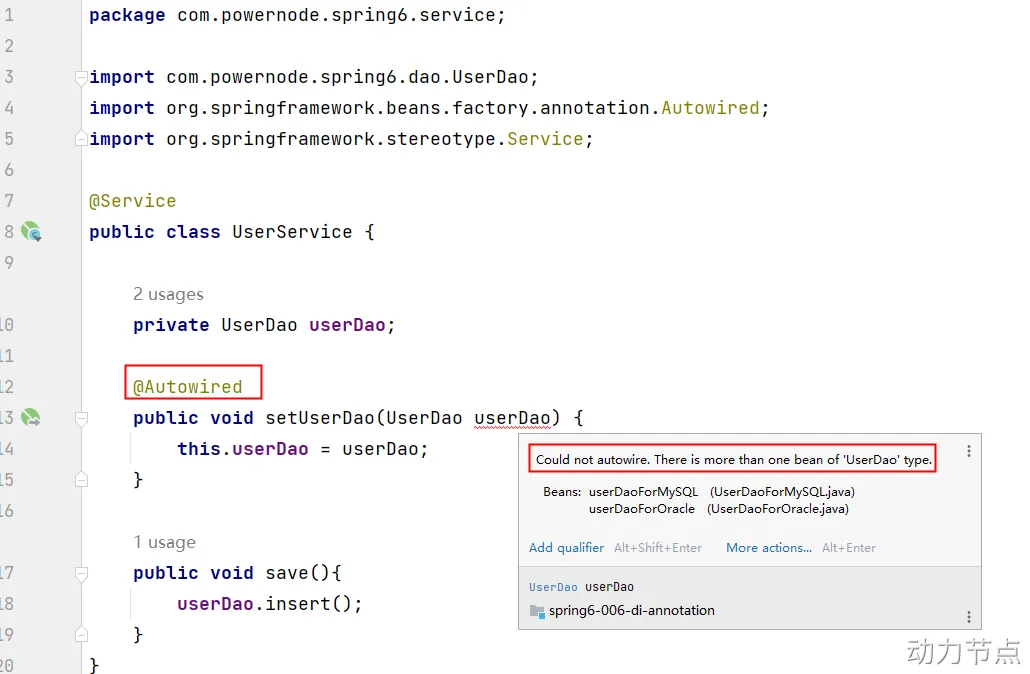
当写完这个新的实现类之后,此时IDEA工具已经提示错误信息了:
错误信息中说:不能装配,UserDao这个Bean的数量大于1.怎么解决这个问题呢?这时候就要根据名称进行装配了。
@Autowired注解和@Qualifier注解联合起来才可以根据名称进行装配,在@Qualifier注解中指定Bean名称。
1
2
3
4
5
6
7
| @Repository
public class UserDaoForOracle implements UserDao{
@Override
public void insert() {
System.out.println("正在向Oracle数据库插入User数据");
}
}
|
1
2
3
4
5
6
7
8
9
10
11
12
13
14
| @Service
public class UserService {
private UserDao userDao;
@Autowired
@Qualifier("userDaoForOracle")
public void setUserDao(UserDao userDao) {
this.userDao = userDao;
}
public void save(){
userDao.insert();
}
}
|
- @Autowired注解可以出现在:属性上、构造方法上、构造方法的参数上、setter方法上。
- 当带参数的构造方法只有一个,@Autowired注解可以省略。
- @Autowired默认根据类型注入。如果要根据名称注入的话,需要配合@Qualifier一起使用。
@Resource
@Resource注解也可以完成非简单类型注入。它和@Autowired注解有什么区别?
- @Resource注解是JDK扩展包中的,也就是说属于JDK的一部分。所以该注解是标准注解,更加具有通用性。(JSR-250标准中制定的注解类型。JSR是Java规范提案。)
- @Autowired注解是Spring框架自己的。
- @Resource注解默认根据名称装配byName,未指定name时,使用属性名作为name。 通过name找不到的话会自动启动通过类型byType装配。
- @Autowired注解默认根据类型装配byType。如果想根据名称装配,需要配合@Qualifier注解一起用。
- @Resource注解用在属性上、setter方法上。
- @Autowired注解用在属性上、setter方法上、构造方法上、构造方法参数上。
- @Resource注解属于JDK扩展包,所以不在JDK当中,需要额外引入以下依赖:【如果是JDK8的话不需要额外引入依赖。高于JDK11或低于JDK8需要引入以下依赖。】
- 需要注意的是,如果使用的是
Spring6,要知道Spring6不再支持JavaEE,它支持的是JakartaEE9。(Oracle把JavaEE贡献给Apache了,Apache把JavaEE的名字改成JakartaEE了,大家之前所接触的所有的 javax. 包名统一修改为 jakarta.包名了。)
1
2
3
4
5
| <dependency>
<groupId>jakarta.annotation</groupId>
<artifactId>jakarta.annotation-api</artifactId>
<version>2.1.1</version>
</dependency>
|
1
2
3
4
5
| <dependency>
<groupId>javax.annotation</groupId>
<artifactId>javax.annotation-api</artifactId>
<version>1.3.2</version>
</dependency>
|
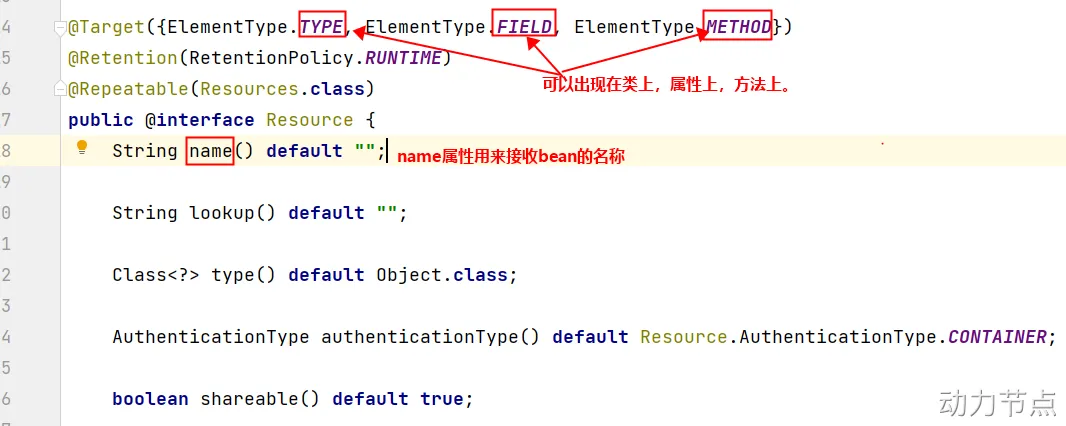
@Resource注解的源码如下:
测试是否为根据Bean的Id进行装配
1
2
3
4
5
6
7
| @Repository("xyz")
public class UserDaoForOracle implements UserDao{
@Override
public void insert() {
System.out.println("正在向Oracle数据库插入User数据");
}
}
|
1
2
3
4
5
6
7
8
9
10
| @Service
public class UserService {
@Resource(name = "xyz")
private UserDao userDao;
public void save(){
userDao.insert();
}
}
|
测试@Resource注解没有指定name时,如何查找
把UserDaoForOracle的名字xyz修改为userDao,让这个Bean的名字和UserService类中的UserDao属性名一致:
1
2
3
4
5
6
7
| @Repository("userDao")
public class UserDaoForOracle implements UserDao{
@Override
public void insert() {
System.out.println("正在向Oracle数据库插入User数据");
}
}
|
1
2
3
4
5
6
7
8
9
10
| @Service
public class UserService {
@Resource
private UserDao userDao;
public void save(){
userDao.insert();
}
}
|
通过测试得知,当@Resource注解使用时没有指定name的时候,还是根据name进行查找,这个name是属性名。
接下来把UserService类中的属性名修改一下重新测试:
1
2
3
4
5
6
7
8
9
10
| @Service
public class UserService {
@Resource
private UserDao userDao2;
public void save(){
userDao2.insert();
}
}
|
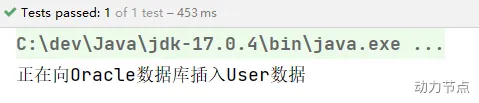
执行结果:
根据异常信息得知:显然当通过name找不到的时候,自然会启动byType进行注入。以上的错误是因为UserDao接口下有两个实现类导致的。所以根据类型注入就会报错。
测试@Resource注解使用在Setter方法上
1
2
3
4
5
6
7
8
9
10
11
12
13
14
| @Service
public class UserService {
private UserDao userDao;
@Resource
public void setUserDao(UserDao userDao) {
this.userDao = userDao;
}
public void save(){
userDao.insert();
}
}
|
注意这个setter方法的方法名,setUserDao去掉set之后,将首字母变小写userDao,userDao就是name
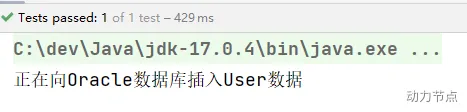
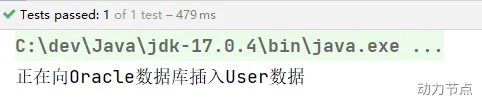
执行结果:
一句话总结@Resource注解:默认byName注入,没有指定name时把属性名当做name,根据name找不到时,才会byType注入。byType注入时,某种类型的Bean只能有一个。
全注解式开发
全注解开发就是不再使用spring配置文件了。写一个配置类来代替配置文件。
1
2
3
4
| @Configuration
@ComponentScan({"com.powernode.spring6.dao", "com.powernode.spring6.service"})
public class Spring6Configuration {
}
|
不再使用配置文件,因此编写测试程序时,不再需要new ClassPathXmlApplicationContext()对象了。
1
2
3
4
5
6
| @Test
public void testNoXml(){
ApplicationContext applicationContext = new AnnotationConfigApplicationContext(Spring6Configuration.class);
UserService userService = applicationContext.getBean("userService", UserService.class);
userService.save();
}
|
GoF之代理模式
对代理模式的理解
举例
- 生活场景1:牛村的牛二看上了隔壁村小花,牛二不好意思直接找小花,于是牛二找来了媒婆王妈妈。这里面就有一个非常典型的代理模式。牛二不能和小花直接对接,只能找一个中间人。其中王妈妈是代理类,牛二是目标类。王妈妈代替牛二和小花先见个面。(现实生活中的婚介所)【在程序中,对象A和对象B无法直接交互时。】
- 生活场景2:你刚到北京,要租房子,可以自己找,也可以找链家帮你找。其中链家是代理类,你是目标类。你们两个都有共同的行为:找房子。不过链家除了满足你找房子,另外会收取一些费用的。(现实生活中的房产中介)【在程序中,功能需要增强时。】
- 西游记场景:八戒和高小姐的故事。八戒要强抢民女高翠兰。悟空得知此事之后怎么做的?悟空幻化成高小姐的模样。代替高小姐与八戒会面。其中八戒是客户端程序。悟空是代理类。高小姐是目标类。那天夜里,在八戒眼里,眼前的就是高小姐,对于八戒来说,他是不知道眼前的高小姐是悟空幻化的,在他内心里这就是高小姐。所以悟空代替高小姐和八戒亲了嘴儿。这是非常典型的代理模式实现的保护机制。
代理模式中有一个非常重要的特点:对于客户端程序来说,使用代理对象时就像在使用目标对象一样。
代理模式是GoF23种设计模式之一。属于结构型设计模式。
代理模式的作用是:为其他对象提供一种代理以控制对这个对象的访问。在某些情况下,一个客户不想或者不能直接引用一个对象,此时可以通过一个称之为代理的第三者来实现间接引用。代理对象可以在客户端和目标对象之间起到中介的作用,并且可以通过代理对象去掉客户不应该看到的内容和服务或者添加客户需要的额外服务。 通过引入一个新的对象来实现对真实对象的操作或者将新的对象作为真实对象的一个替身,这种实现机制即为代理模式,通过引入代理对象来间接访问一个对象,这就是代理模式的模式动机。
代理模式中的角色:
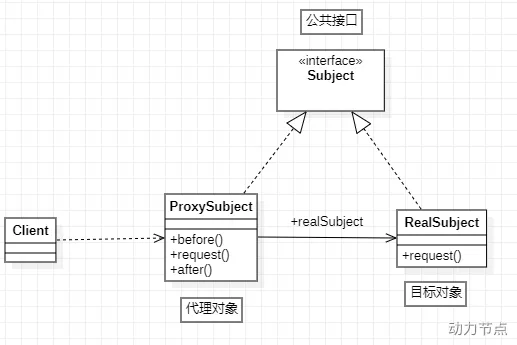
- 代理类
- 目标类
- 代理类和目标类的公共接口:客户端在使用代理类时就像在使用目标类,不被客户端所察觉,所以代理类和目标类要有共同的行为,也就是
实现共同的接口。
代理模式的类图:
静态代理
现在有这样一个接口和实现类:
1
2
3
4
5
6
7
8
9
10
11
12
13
14
15
16
| public interface OrderService {
void generate();
void detail();
void modify();
}
|
1
2
3
4
5
6
7
8
9
10
11
12
13
14
15
16
17
18
19
20
21
22
23
24
25
26
27
28
29
30
31
| public class OrderServiceImpl implements OrderService {
@Override
public void generate() {
try {
Thread.sleep(1234);
} catch (InterruptedException e) {
e.printStackTrace();
}
System.out.println("订单已生成");
}
@Override
public void detail() {
try {
Thread.sleep(2541);
} catch (InterruptedException e) {
e.printStackTrace();
}
System.out.println("订单信息如下:******");
}
@Override
public void modify() {
try {
Thread.sleep(1010);
} catch (InterruptedException e) {
e.printStackTrace();
}
System.out.println("订单已修改");
}
}
|
其中Thread.sleep()方法的调用是为了模拟操作耗时。项目已上线,并且运行正常,但是客户反馈系统有一些地方运行较慢,要求项目组对系统进行优化。于是项目负责人就下达了这个需求。首先需要搞清楚是哪些业务方法耗时较长,于是让我们统计每个业务方法所耗费的时长。如果是你,你该怎么做呢?
第一种方案:直接修改Java源代码
- 直接在每个业务方法中添加统计时间的逻辑
1
2
3
4
5
6
7
8
9
10
11
12
13
14
15
16
17
18
19
20
21
22
23
24
25
26
27
28
29
30
31
32
33
34
35
36
37
38
39
40
| public class OrderServiceImpl implements OrderService {
@Override
public void generate() {
long begin = System.currentTimeMillis();
try {
Thread.sleep(1234);
} catch (InterruptedException e) {
e.printStackTrace();
}
System.out.println("订单已生成");
long end = System.currentTimeMillis();
System.out.println("耗费时长"+(end - begin)+"毫秒");
}
@Override
public void detail() {
long begin = System.currentTimeMillis();
try {
Thread.sleep(2541);
} catch (InterruptedException e) {
e.printStackTrace();
}
System.out.println("订单信息如下:******");
long end = System.currentTimeMillis();
System.out.println("耗费时长"+(end - begin)+"毫秒");
}
@Override
public void modify() {
long begin = System.currentTimeMillis();
try {
Thread.sleep(1010);
} catch (InterruptedException e) {
e.printStackTrace();
}
System.out.println("订单已修改");
long end = System.currentTimeMillis();
System.out.println("耗费时长"+(end - begin)+"毫秒");
}
}
|
第二种方案:编写一个子类继承
- 第二种方案:编写一个子类继承OrderServiceImpl,在子类中重写每个方法,代码如下:
1
2
3
4
5
6
7
8
9
10
11
12
13
14
15
16
17
18
19
20
21
22
23
24
25
| public class OrderServiceImplSub extends OrderServiceImpl{
@Override
public void generate() {
long begin = System.currentTimeMillis();
super.generate();
long end = System.currentTimeMillis();
System.out.println("耗时"+(end - begin)+"毫秒");
}
@Override
public void detail() {
long begin = System.currentTimeMillis();
super.detail();
long end = System.currentTimeMillis();
System.out.println("耗时"+(end - begin)+"毫秒");
}
@Override
public void modify() {
long begin = System.currentTimeMillis();
super.modify();
long end = System.currentTimeMillis();
System.out.println("耗时"+(end - begin)+"毫秒");
}
}
|
这种方式可以解决,但是存在两个问题:
- 第一个问题:假设系统中有100个这样的业务类,需要提供100个子类,并且之前写好的创建Service对象的代码,都要修改为创建子类对象。
- 第二个问题:由于采用了继承的方式,导致代码之间的耦合度较高。
</ul>
</div>
这种方案也不可取。
可以为OrderService接口提供一个代理类。
1
2
3
4
5
6
7
8
9
10
11
12
13
14
15
16
17
18
19
20
21
22
23
24
25
26
27
28
29
30
31
32
33
34
35
36
37
| public class OrderServiceProxy implements OrderService{
private OrderService orderService;
public OrderServiceProxy(OrderService orderService) {
this.orderService = orderService;
}
@Override
public void generate() {
long begin = System.currentTimeMillis();
orderService.generate();
long end = System.currentTimeMillis();
System.out.println("耗时"+(end - begin)+"毫秒");
}
@Override
public void detail() {
long begin = System.currentTimeMillis();
orderService.detail();
long end = System.currentTimeMillis();
System.out.println("耗时"+(end - begin)+"毫秒");
}
@Override
public void modify() {
long begin = System.currentTimeMillis();
orderService.modify();
long end = System.currentTimeMillis();
System.out.println("耗时"+(end - begin)+"毫秒");
}
}
|
1
2
3
4
5
6
7
8
9
10
11
12
| public class Client {
public static void main(String[] args) {
OrderService target = new OrderServiceImpl();
OrderService proxy = new OrderServiceProxy(target);
proxy.generate();
proxy.modify();
proxy.detail();
}
}
|
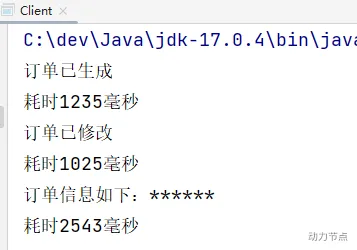
这种方式的优点:符合OCP开闭原则,同时采用的是关联关系,所以程序的耦合度较低。所以这种方案是被推荐的。
以上就是代理模式中的静态代理,其中OrderService接口是代理类和目标类的共同接口。OrderServiceImpl是目标类。OrderServiceProxy是代理类。
静态代理适合较小项目使用,如果项目较大,系统中业务接口很多,一个接口对应一个代理类,使用静态代理便需要创建很多代理类,造成类爆炸。而接下来的动态代理就可以解决该问题。
动态代理
在程序运行阶段,在内存中动态生成代理类的字节码,被称为动态代理。动态代理能帮助我们减少代理类的数量。解决代码复用的问题。
在内存当中动态生成类的技术常见的包括:
JDK动态代理技术:只能代理接口。CGLIB动态代理技术:CGLIB(Code Generation Library)是一个开源项目。是一个强大的,高性能,高质量的Code生成类库,它可以在运行期扩展Java类与实现Java接口。既可以代理接口,又可以代理类,底层是通过继承的方式实现的。性能比JDK动态代理要好。(底层有一个小而快的字节码处理框架ASM。)- Javassist动态代理技术:Javassist是一个开源的分析、编辑和创建Java字节码的类库。是由东京工业大学的数学和计算机科学系的 Shigeru Chiba (千叶 滋)所创建的。它已加入了开放源代码JBoss 应用服务器项目,通过使用Javassist对字节码操作为JBoss实现动态”AOP”框架。
JDK动态代理
还是使用静态代理中的例子:一个接口和一个实现类。
1
2
3
4
5
6
7
8
9
10
11
12
13
14
15
16
| public interface OrderService {
void generate();
void detail();
void modify();
}
|
1
2
3
4
5
6
7
8
9
10
11
12
13
14
15
16
17
18
19
20
21
22
23
24
25
26
27
28
29
30
31
| public class OrderServiceImpl implements OrderService {
@Override
public void generate() {
try {
Thread.sleep(1234);
} catch (InterruptedException e) {
e.printStackTrace();
}
System.out.println("订单已生成");
}
@Override
public void detail() {
try {
Thread.sleep(2541);
} catch (InterruptedException e) {
e.printStackTrace();
}
System.out.println("订单信息如下:******");
}
@Override
public void modify() {
try {
Thread.sleep(1010);
} catch (InterruptedException e) {
e.printStackTrace();
}
System.out.println("订单已修改");
}
}
|
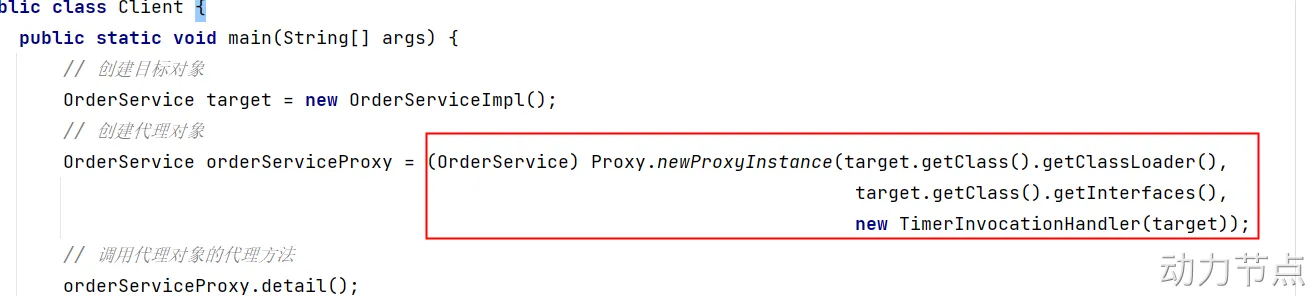
在静态代理时,除了以上一个接口和一个实现类之外,要需要写一个代理类UserServiceProxy,而在动态代理中UserServiceProxy代理类可以动态生成。所以这个类不需要写。我们直接写客户端程序即可:
1
2
3
4
5
6
7
8
9
10
11
12
| public class Client {
public static void main(String[] args) {
OrderService target = new OrderServiceImpl();
OrderService orderServiceProxy = Proxy.newProxyInstance(target.getClass().getClassLoader(), target.getClass().getInterfaces(), 调用处理器对象);
orderServiceProxy.detail();
orderServiceProxy.modify();
orderServiceProxy.generate();
}
}
|
OrderService orderServiceProxy = Proxy.newProxyInstance(target.getClass().getClassLoader(), target.getClass().getInterfaces(), 调用处理器对象)这行代码做了两件事:
- 第一件事:在内存中生成了代理类的字节码
- 第二件事:创建代理对象
Proxy类全名:java.lang.reflect.Proxy。这是JDK提供的一个类(所以称为JDK动态代理)。主要是通过这个类在内存中生成代理类的字节码。
其中newProxyInstance()方法有三个参数:
- 第一个参数:类加载器。在内存中生成了字节码,要想执行这个字节码,也是需要先把这个字节码加载到内存当中的。所以要指定使用哪个类加载器加载。
- 第二个参数:接口类型。代理类和目标类实现相同的接口,所以要通过这个参数告诉JDK动态代理生成的类要实现哪些接口。
- 第三个参数:调用处理器。这是一个JDK动态代理规定的接口,接口全名:java.lang.reflect.InvocationHandler。显然这是一个回调接口,也就是说调用这个接口中方法的程序已经写好了,就差这个接口的实现类了。
所以接下来我们要写一下java.lang.reflect.InvocationHandler接口的实现类,并且实现接口中的方法,代码如下:
1
2
3
4
5
6
| public class TimerInvocationHandler implements InvocationHandler {
@Override
public Object invoke(Object proxy, Method method, Object[] args) throws Throwable {
return null;
}
}
|
InvocationHandler接口中有一个方法invoke,这个invoke方法上有三个参数:
- 第一个参数:Object proxy。代理对象。设计这个参数只是为了后期的方便,如果想在invoke方法中使用代理对象的话,尽管通过这个参数来使用。
- 第二个参数:Method method。目标方法。
- 第三个参数:Object[] args。目标方法调用时要传的参数。
我们想要调用目标对象的目标方法,首先需要有目标对象的存在,所以我们通过给TimerInvocationHandler类添加一个构造方法,将目标对象传给TimerInvocationHandler类。
1
2
3
4
5
6
7
8
9
10
11
12
13
14
| public class TimerInvocationHandler implements InvocationHandler {
private Object target;
public TimerInvocationHandler(Object target) {
this.target = target;
}
@Override
public Object invoke(Object proxy, Method method, Object[] args) throws Throwable {
return null;
}
}
|
有了目标对象我们就可以在invoke()方法中调用目标方法了。代码如下:
1
2
3
4
5
6
7
8
9
10
11
12
13
14
15
16
17
18
19
20
21
22
| public class TimerInvocationHandler implements InvocationHandler {
private Object target;
public TimerInvocationHandler(Object target) {
this.target = target;
}
@Override
public Object invoke(Object proxy, Method method, Object[] args) throws Throwable {
long begin = System.currentTimeMillis();
Object retValue = method.invoke(target, args);
long end = System.currentTimeMillis();
System.out.println("耗时"+(end - begin)+"毫秒");
return retValue;
}
}
|
到此为止,调用处理器就完成了。接下来继续完善Client程序:
1
2
3
4
5
6
7
8
9
10
11
12
13
14
| public class Client {
public static void main(String[] args) {
OrderService target = new OrderServiceImpl();
OrderService orderServiceProxy = (OrderService) Proxy.newProxyInstance(target.getClass().getClassLoader(),
target.getClass().getInterfaces(),
new TimerInvocationHandler(target));
orderServiceProxy.detail();
orderServiceProxy.modify();
orderServiceProxy.generate();
}
}
|
- 这样我们需要的几个类都写完了,但是发现这几个类都没有调用invoke方法,这是为什么?
- 当我们调用代理对象的代理方法时,invoke方法就会被系统调用。
- 折腾半天,这不还是要写接口的实现类,也没省什么劲呀,那还用什么动态代理呢?
- 使用动态代理后无论多少Service接口,多少业务类,实现一个代理功能只需要写一次TimerInvocationHandler接口,使代码得到了复用,且防止类爆炸。
下面这段看上去很繁琐,可以提供一个工具类,封装一下下面的方法
我们可以提供一个工具类:ProxyUtil,封装一个方法:
1
2
3
4
5
6
7
| public class ProxyUtil {
public static Object newProxyInstance(Object target) {
return Proxy.newProxyInstance(target.getClass().getClassLoader(),
target.getClass().getInterfaces(),
new TimerInvocationHandler(target));
}
}
|
此时客户端代码就不需要写那么繁琐了:
1
2
3
4
5
6
7
8
9
10
11
12
| public class Client {
public static void main(String[] args) {
OrderService target = new OrderServiceImpl();
OrderService orderServiceProxy = (OrderService) ProxyUtil.newProxyInstance(target);
orderServiceProxy.detail();
orderServiceProxy.modify();
orderServiceProxy.generate();
}
}
|
CGLIB动态代理
CGLIB既可以代理接口,又可以代理类。底层采用继承的方式实现。所以被代理的目标类不能使用final修饰。
使用CGLIB,需要引入它的依赖:
1
2
3
4
5
| <dependency>
<groupId>cglib</groupId>
<artifactId>cglib</artifactId>
<version>3.3.0</version>
</dependency>
|
准备一个没有实现接口的类,如下:
1
2
3
4
5
6
7
8
9
10
| public class UserService {
public void login(){
System.out.println("用户正在登录系统....");
}
public void logout(){
System.out.println("用户正在退出系统....");
}
}
|
使用CGLIB在内存中为UserService类生成代理类,并创建对象:
1
2
3
4
5
6
7
8
9
10
11
12
13
14
15
| public class Client {
public static void main(String[] args) {
Enhancer enhancer = new Enhancer();
enhancer.setSuperclass(UserService.class);
enhancer.setCallback(方法拦截器对象);
UserService userServiceProxy = (UserService)enhancer.create();
userServiceProxy.login();
userServiceProxy.logout();
}
}
|
和JDK动态代理原理差不多,在CGLIB中需要提供的不是InvocationHandler,而是:net.sf.cglib.proxy.MethodInterceptor
编写MethodInterceptor接口实现类:
1
2
3
4
5
6
| public class TimerMethodInterceptor implements MethodInterceptor {
@Override
public Object intercept(Object target, Method method, Object[] objects, MethodProxy methodProxy) throws Throwable {
return null;
}
}
|
MethodInterceptor接口中有一个方法intercept(),该方法有4个参数:
- 第一个参数:目标对象
- 第二个参数:目标方法
- 第三个参数:目标方法调用时的实参
- 第四个参数:代理方法
在MethodInterceptor的intercept()方法中调用目标以及添加增强:
1
2
3
4
5
6
7
8
9
10
11
12
13
14
| public class TimerMethodInterceptor implements MethodInterceptor {
@Override
public Object intercept(Object target, Method method, Object[] objects, MethodProxy methodProxy) throws Throwable {
long begin = System.currentTimeMillis();
Object retValue = methodProxy.invokeSuper(target, objects);
long end = System.currentTimeMillis();
System.out.println("耗时" + (end - begin) + "毫秒");
return retValue;
}
}
|
写完回调后接下来修改客户端
1
2
3
4
5
6
7
8
9
10
11
12
13
14
15
16
| public class Client {
public static void main(String[] args) {
Enhancer enhancer = new Enhancer();
enhancer.setSuperclass(UserService.class);
enhancer.setCallback(new TimerMethodInterceptor());
UserService userServiceProxy = (UserService)enhancer.create();
userServiceProxy.login();
userServiceProxy.logout();
}
}
|
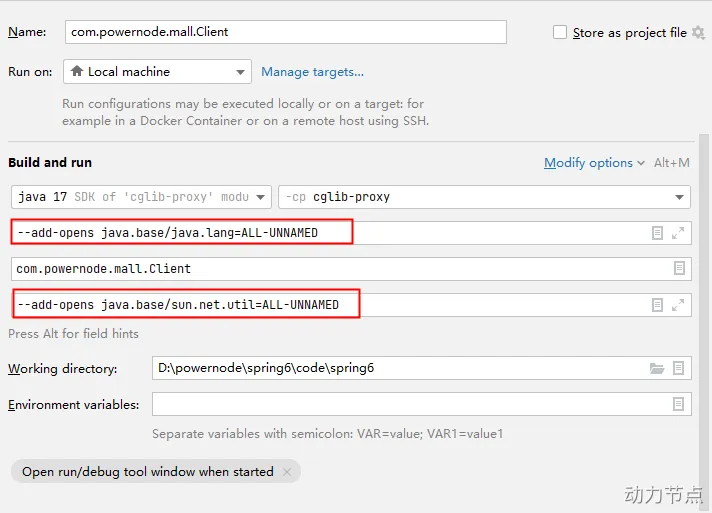
对于高版本的JDK,如果使用CGLIB,需要在启动项中添加两个启动参数:
- —add-opens java.base/java.lang=ALL-UNNAMED
- —add-opens java.base/sun.net.util=ALL-UNNAMED
面向切面编程AOP
AOP(Aspect Oriented Programming):面向切面编程,面向方- AOP是对OOP的补充延伸。
- AOP底层使用的就是动态代理来实现的。
IoC使软件组件松耦合。AOP让你能够捕捉系统中经常使用的功能,把它转化成组件。
Spring的AOP使用的动态代理是:JDK动态代理 + CGLIB动态代理。Spring在这两种动态代理中灵活切换,如果是代理接口,会默认使用JDK动态代理,如果要代理某个类,这个类没有实现接口,就会切换使用CGLIB。当然,你也可以强制通过一些配置让Spring只使用CGLIB。
AOP介绍
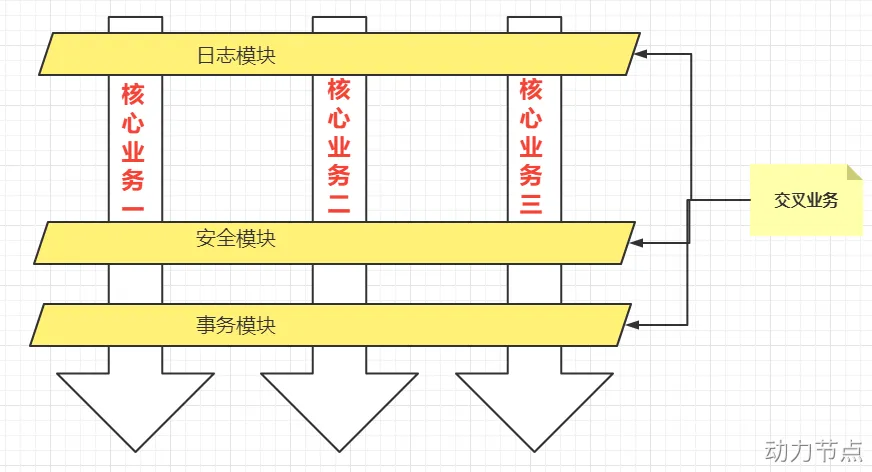
一般一个系统当中都会有一些系统服务,例如:日志、事务管理、安全等。这些系统服务被称为:交叉业务
这些交叉业务几乎是通用的,不管是做银行账户转账,还是删除用户数据。日志、事务管理、安全,这些都是需要做的。
如果每一个业务处理过程中,都需要掺杂这些交叉业务代码进去的话,存在两方面问题:
- 第一:交叉业务代码在多个业务流程中反复出现,代码没有得到复用,且修改业务代码需要多处修改
- 第二:程序员无法专注核心业务代码的编写,在编写核心业务代码的同时还需要处理这些交叉业务。
使用AOP可以很轻松的解决以上问题。
快速理解AOP的思想:
用一句话总结AOP:将与核心业务无关的代码独立的抽取出来,形成一个独立的组件,然后以横向交叉的方式应用到业务流程当中的过程被称为AOP。AOP的优点:
- 第一:代码复用性增强。
- 第二:代码易维护。
- 第三:使开发者更关注业务逻辑。
AOP的七大术语
1
2
3
4
5
6
7
8
9
10
11
12
13
14
15
16
17
18
19
20
21
22
23
24
25
| public class UserService{
public void do1(){
System.out.println("do 1");
}
public void do2(){
System.out.println("do 2");
}
public void do3(){
System.out.println("do 3");
}
public void do4(){
System.out.println("do 4");
}
public void do5(){
System.out.println("do 5");
}
public void service(){
do1();
do2();
do3();
do5();
}
}
|
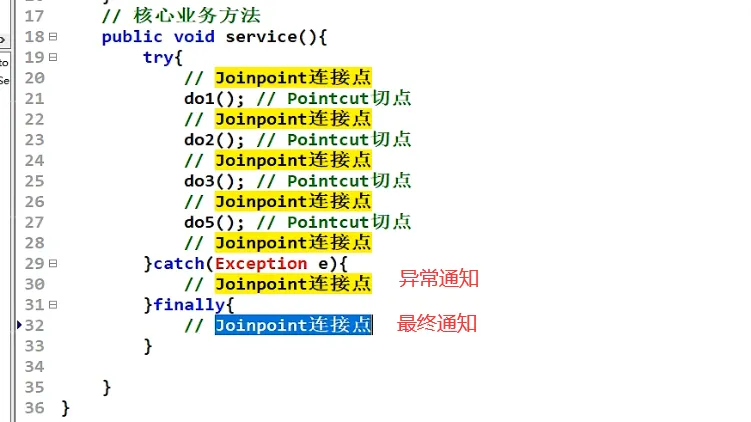
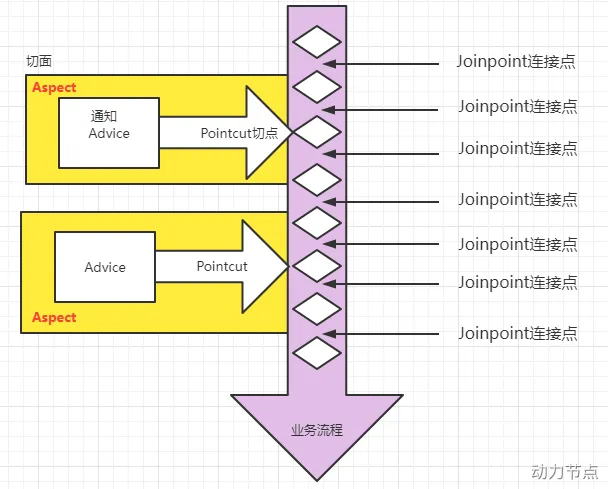
- 连接点 Joinpoint
- 在程序的整个执行流程中,可以织入切面的位置。方法的执行前后,异常抛出之后等位置。
- 切点 Pointcut
- 在程序执行流程中,真正织入切面的方法。(一个切点对应多个连接点)
通知 Advice
切面 Aspect
织入 Weaving
代理对象 Proxy
目标对象 Target
通过下图,大家可以很好的理解AOP的相关术语:
切点表达式
切点表达式用来定义通知(Advice)往哪些方法上切入。
切入点表达式语法格式:
1
| execution([访问控制权限修饰符] 返回值类型 [全限定类名]方法名(形式参数列表) [异常])
|
访问控制权限修饰符:
- 可选项。
- 没写,就是4个权限都包括。
- 写public就表示只包括公开的方法。
返回值类型:
全限定类名:
- 可选项。
- 两个点“..”代表当前包以及子包下的所有类。
- 省略时表示所有的类。
方法名:
- 必填项。
- *表示所有方法。
- set*表示所有的set方法。
形式参数列表:
- 必填项
- () 表示没有参数的方法
- (..) 参数类型和个数随意的方法
- (*) 只有一个参数的方法
- (*, String) 第一个参数类型随意,第二个参数是String的。
异常:
理解以下的切点表达式:
1
2
3
4
5
6
|
execution(public * com.powernode.mall.service.*.delete*(..))
execution(* com.powernode.mall..*(..))
execution(* *(..))
|
使用Spring的AOP
Spring对AOP的实现包括以下3种方式:
- 第一种方式:Spring框架结合AspectJ框架实现的AOP,基于注解方式。
- 第二种方式:Spring框架结合AspectJ框架实现的AOP,基于XML方式。
- 第三种方式:Spring框架自己实现的AOP,基于XML配置方式。
实际开发中,都是Spring+AspectJ来实现AOP。所以重点学习第一种和第二种方式。
- 什么是AspectJ?
- AspectJ是一个支持AOP的框架。AspectJ框架是独立于Spring框架之外一个框架。
准备工作
使用Spring+AspectJ的AOP需要引入的依赖如下:
1
2
3
4
5
6
7
8
9
10
11
12
13
14
15
16
17
18
|
<dependency>
<groupId>org.springframework</groupId>
<artifactId>spring-context</artifactId>
<version>6.0.0-M2</version>
</dependency>
<dependency>
<groupId>org.springframework</groupId>
<artifactId>spring-aop</artifactId>
<version>6.0.0-M2</version>
</dependency>
<dependency>
<groupId>org.springframework</groupId>
<artifactId>spring-aspects</artifactId>
<version>6.0.0-M2</version>
</dependency>
|
Spring配置文件中添加context命名空间和aop命名空间
1
2
3
4
5
6
7
8
9
10
| <?xml version="1.0" encoding="UTF-8"?>
<beans xmlns="http://www.springframework.org/schema/beans"
xmlns:xsi="http://www.w3.org/2001/XMLSchema-instance"
xmlns:context="http://www.springframework.org/schema/context"
xmlns:aop="http://www.springframework.org/schema/aop"
xsi:schemaLocation="http://www.springframework.org/schema/beans http://www.springframework.org/schema/beans/spring-beans.xsd
http://www.springframework.org/schema/context http://www.springframework.org/schema/context/spring-context.xsd
http://www.springframework.org/schema/aop http://www.springframework.org/schema/aop/spring-aop.xsd">
</beans>
|
基于AspectJ的AOP注解式开发
实现步骤
第一步:定义目标类以及目标方法
1
2
3
4
5
6
7
|
public class OrderService {
public void generate(){
System.out.println("订单已生成!");
}
}
|
第二步:定义切面类
1
2
3
4
|
@Aspect
public class MyAspect {
}
|
第三步:目标类和切面类都纳入spring bean管理
在目标类OrderService上添加 @Component注解。
在切面类MyAspect类上添加 @Component注解。
第四步:在spring配置文件中添加组建扫描
1
2
3
4
5
6
7
8
9
10
11
| <?xml version="1.0" encoding="UTF-8"?>
<beans xmlns="http://www.springframework.org/schema/beans"
xmlns:xsi="http://www.w3.org/2001/XMLSchema-instance"
xmlns:context="http://www.springframework.org/schema/context"
xmlns:aop="http://www.springframework.org/schema/aop"
xsi:schemaLocation="http://www.springframework.org/schema/beans http://www.springframework.org/schema/beans/spring-beans.xsd
http://www.springframework.org/schema/context http://www.springframework.org/schema/context/spring-context.xsd
http://www.springframework.org/schema/aop http://www.springframework.org/schema/aop/spring-aop.xsd">
<context:component-scan base-package="com.powernode.spring6.service"/>
</beans>
|
第五步:在切面类中添加通知
1
2
3
4
5
6
7
8
9
|
@Aspect
@Component
public class MyAspect {
public void advice(){
System.out.println("我是一个通知");
}
}
|
第六步:在通知上添加切点表达式
1
2
3
4
5
6
7
8
9
10
11
12
|
@Aspect
@Component
public class MyAspect {
@Before("execution(* com.powernode.spring6.service.OrderService.*(..))")
public void advice(){
System.out.println("我是一个通知");
}
}
|
注解@Before表示前置通知。
第七步:在spring配置文件中启用自动代理
1
2
3
4
5
6
7
8
9
10
11
12
13
| <?xml version="1.0" encoding="UTF-8"?>
<beans xmlns="http://www.springframework.org/schema/beans"
xmlns:xsi="http://www.w3.org/2001/XMLSchema-instance"
xmlns:context="http://www.springframework.org/schema/context"
xmlns:aop="http://www.springframework.org/schema/aop"
xsi:schemaLocation="http://www.springframework.org/schema/beans http://www.springframework.org/schema/beans/spring-beans.xsd
http://www.springframework.org/schema/context http://www.springframework.org/schema/context/spring-context.xsd
http://www.springframework.org/schema/aop http://www.springframework.org/schema/aop/spring-aop.xsd">
<context:component-scan base-package="com.powernode.spring6.service"/>
<aop:aspectj-autoproxy proxy-target-class="true"/>
</beans>
|
开启自动代理之后,凡事带有@Aspect注解的bean都会生成代理对象。
proxy-target-class=”true” 表示采用cglib动态代理。
proxy-target-class=”false” 表示采用jdk动态代理。默认值是false。即使写成false,当没有接口的时候,也会自动选择cglib生成代理类。
测试程序:
1
2
3
4
5
6
7
8
9
10
11
| package com.powernode.spring6.test;
public class AOPTest {
@Test
public void testAOP(){
ApplicationContext applicationContext = new ClassPathXmlApplicationContext("spring-aspectj-aop-annotation.xml");
OrderService orderService = applicationContext.getBean("orderService", OrderService.class);
orderService.generate();
}
}
|
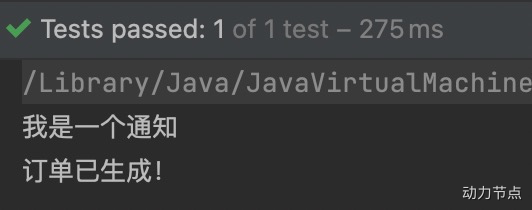
运行结果:
通知类型
通知类型包括:
- 前置通知:@Before 目标方法执行之前的通知
- 后置通知:@AfterReturning 目标方法执行之后的通知
- 环绕通知:@Around 目标方法之前添加通知,同时目标方法执行之后添加通知。
- 异常通知:@AfterThrowing 发生异常之后执行的通知
- 最终通知:@After 放在finally语句块中的通知
接下来,编写程序来测试这几个通知的执行顺序:
1
2
3
4
5
6
7
8
9
10
11
12
13
14
15
16
17
18
19
20
21
22
23
24
25
26
27
28
29
30
31
32
33
34
35
36
37
38
39
40
41
42
43
44
45
46
47
48
49
50
51
52
53
54
55
56
57
58
59
60
61
62
63
64
65
66
67
| package com.powernode.spring6.service;
import org.aspectj.lang.ProceedingJoinPoint;
import org.aspectj.lang.annotation.*;
import org.springframework.stereotype.Component;
@Component
@Aspect
public class MyAspect {
@Around("execution(* com.powernode.spring6.service.OrderService.*(..))")
public void aroundAdvice(ProceedingJoinPoint proceedingJoinPoint) throws Throwable {
System.out.println("环绕通知开始");
proceedingJoinPoint.proceed();
System.out.println("环绕通知结束");
}
@Before("execution(* com.powernode.spring6.service.OrderService.*(..))")
public void beforeAdvice(){
System.out.println("前置通知");
}
@AfterReturning("execution(* com.powernode.spring6.service.OrderService.*(..))")
public void afterReturningAdvice(){
System.out.println("后置通知");
}
@AfterThrowing("execution(* com.powernode.spring6.service.OrderService.*(..))")
public void afterThrowingAdvice(){
System.out.println("异常通知");
}
@After("execution(* com.powernode.spring6.service.OrderService.*(..))")
public void afterAdvice(){
System.out.println("最终通知");
}
}
package com.powernode.spring6.service;
import org.springframework.stereotype.Component;
@Component
public class OrderService {
public void generate(){
System.out.println("订单已生成!");
}
}
package com.powernode.spring6.test;
import com.powernode.spring6.service.OrderService;
import org.junit.Test;
import org.springframework.context.ApplicationContext;
import org.springframework.context.support.ClassPathXmlApplicationContext;
public class AOPTest {
@Test
public void testAOP(){
ApplicationContext applicationContext = new ClassPathXmlApplicationContext("spring-aspectj-aop-annotation.xml");
OrderService orderService = applicationContext.getBean("orderService", OrderService.class);
orderService.generate();
}
}
|
执行结果:
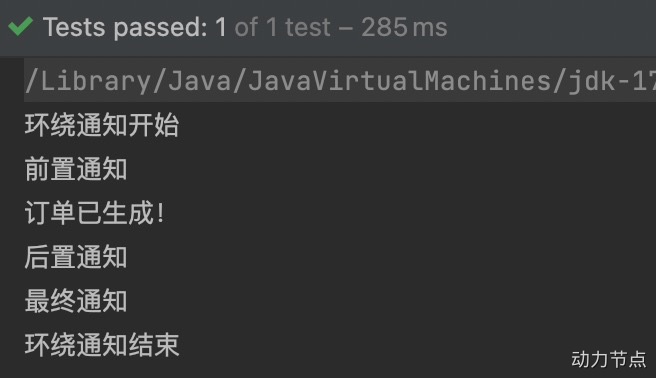
通过上面的执行结果就可以判断他们的执行顺序了,这里不再赘述。
结果中没有异常通知,这是因为目标程序执行过程中没有发生异常。我们尝试让目标方法发生异常:
1
2
3
4
5
6
7
8
9
10
11
12
13
14
15
| package com.powernode.spring6.service;
import org.springframework.stereotype.Component;
@Component
public class OrderService {
public void generate(){
System.out.println("订单已生成!");
if (1 == 1) {
throw new RuntimeException("模拟异常发生");
}
}
}
|
再次执行测试程序,结果如下:
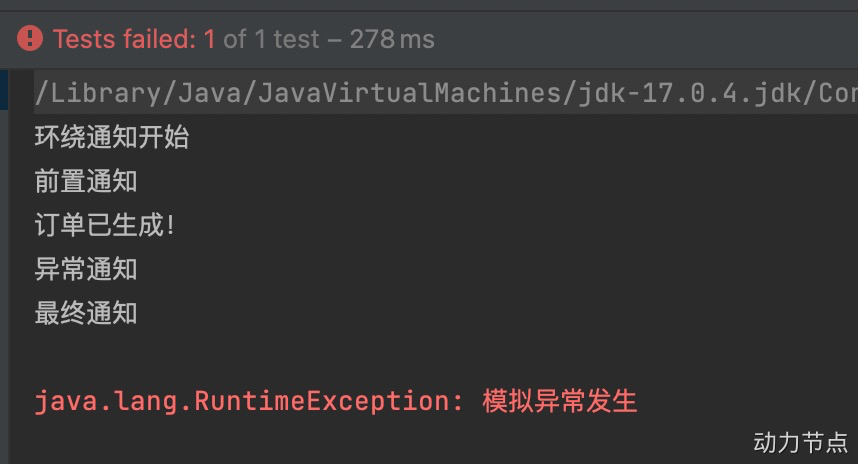
通过测试得知,当发生异常之后,最终通知也会执行,因为最终通知@After会出现在finally语句块中。
出现异常之后,后置通知和环绕通知的结束部分不会执行。
切面的先后顺序
我们知道,业务流程当中不一定只有一个切面,可能有的切面控制事务,有的记录日志,有的进行安全控制,如果多个切面的话,顺序如何控制:可以使用@Order注解来标识切面类,为@Order注解的value指定一个整数型的数字,数字越小,优先级越高。
再定义一个切面类,如下:
1
2
3
4
5
6
7
8
9
10
11
12
13
14
15
16
17
18
19
20
21
22
23
24
25
26
27
28
29
30
31
32
33
34
35
36
37
38
39
40
41
42
43
44
45
46
47
48
49
50
51
52
53
54
55
56
57
58
59
60
61
62
63
64
65
66
67
68
69
70
71
72
73
74
75
76
77
78
79
80
81
82
| package com.powernode.spring6.service;
import org.aspectj.lang.ProceedingJoinPoint;
import org.aspectj.lang.annotation.*;
import org.springframework.core.annotation.Order;
import org.springframework.stereotype.Component;
@Aspect
@Component
@Order(1)
public class YourAspect {
@Around("execution(* com.powernode.spring6.service.OrderService.*(..))")
public void aroundAdvice(ProceedingJoinPoint proceedingJoinPoint) throws Throwable {
System.out.println("YourAspect环绕通知开始");
proceedingJoinPoint.proceed();
System.out.println("YourAspect环绕通知结束");
}
@Before("execution(* com.powernode.spring6.service.OrderService.*(..))")
public void beforeAdvice(){
System.out.println("YourAspect前置通知");
}
@AfterReturning("execution(* com.powernode.spring6.service.OrderService.*(..))")
public void afterReturningAdvice(){
System.out.println("YourAspect后置通知");
}
@AfterThrowing("execution(* com.powernode.spring6.service.OrderService.*(..))")
public void afterThrowingAdvice(){
System.out.println("YourAspect异常通知");
}
@After("execution(* com.powernode.spring6.service.OrderService.*(..))")
public void afterAdvice(){
System.out.println("YourAspect最终通知");
}
}
package com.powernode.spring6.service;
import org.aspectj.lang.ProceedingJoinPoint;
import org.aspectj.lang.annotation.*;
import org.springframework.core.annotation.Order;
import org.springframework.stereotype.Component;
@Component
@Aspect
@Order(2)
public class MyAspect {
@Around("execution(* com.powernode.spring6.service.OrderService.*(..))")
public void aroundAdvice(ProceedingJoinPoint proceedingJoinPoint) throws Throwable {
System.out.println("环绕通知开始");
proceedingJoinPoint.proceed();
System.out.println("环绕通知结束");
}
@Before("execution(* com.powernode.spring6.service.OrderService.*(..))")
public void beforeAdvice(){
System.out.println("前置通知");
}
@AfterReturning("execution(* com.powernode.spring6.service.OrderService.*(..))")
public void afterReturningAdvice(){
System.out.println("后置通知");
}
@AfterThrowing("execution(* com.powernode.spring6.service.OrderService.*(..))")
public void afterThrowingAdvice(){
System.out.println("异常通知");
}
@After("execution(* com.powernode.spring6.service.OrderService.*(..))")
public void afterAdvice(){
System.out.println("最终通知");
}
}
|
执行测试程序:
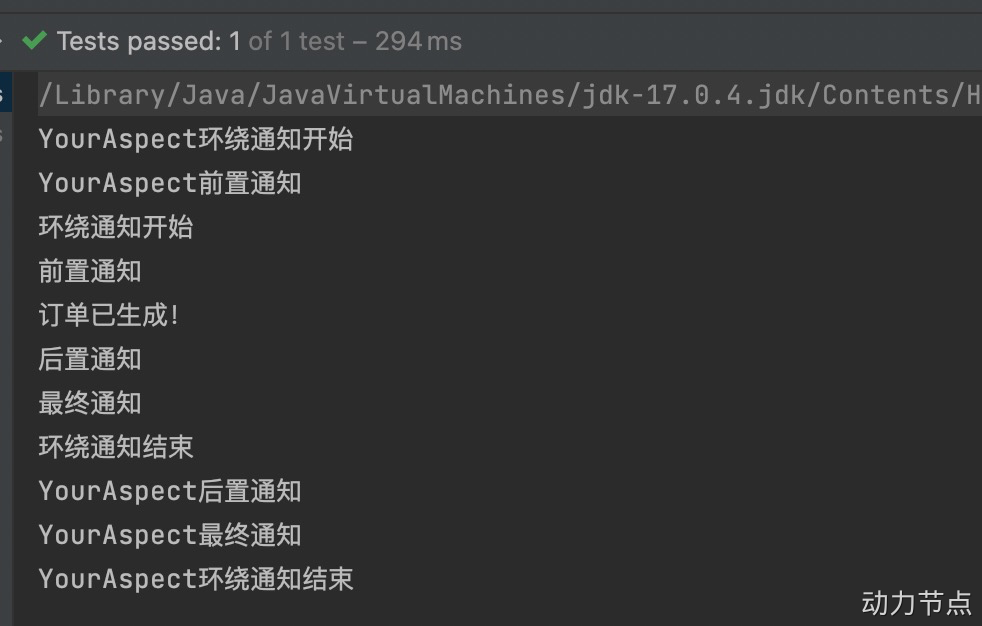
通过修改@Order注解的整数值来切换顺序,执行测试程序:
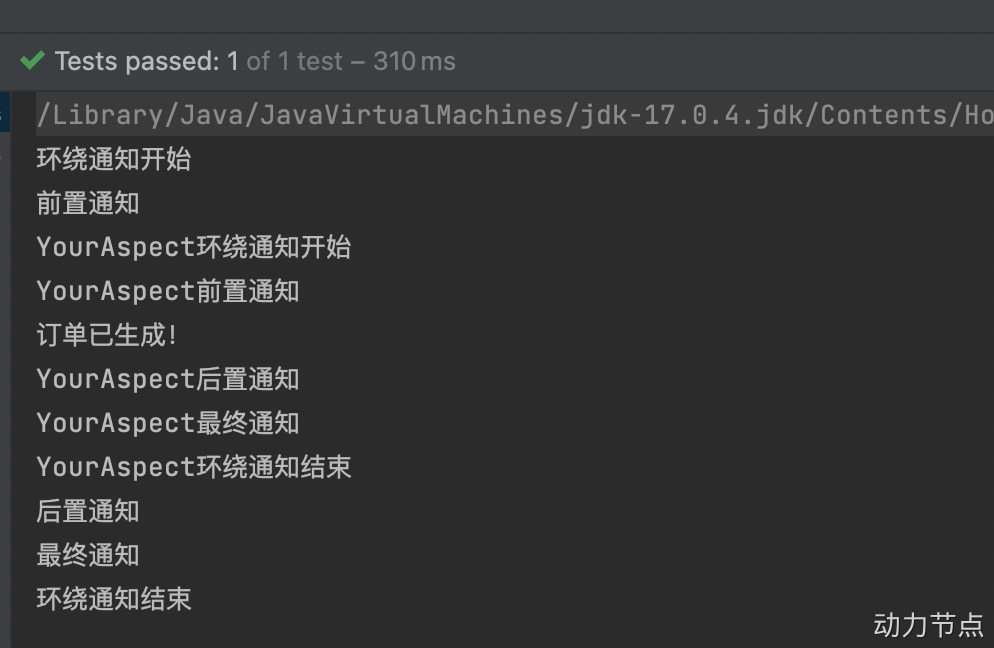
优化使用切点表达式
观看以下代码中的切点表达式:
1
2
3
4
5
6
7
8
9
10
11
12
13
14
15
16
17
18
19
20
21
22
23
24
25
26
27
28
29
30
31
32
33
34
35
36
37
38
39
40
41
42
| package com.powernode.spring6.service;
import org.aspectj.lang.ProceedingJoinPoint;
import org.aspectj.lang.annotation.*;
import org.springframework.core.annotation.Order;
import org.springframework.stereotype.Component;
@Component
@Aspect
@Order(2)
public class MyAspect {
@Around("execution(* com.powernode.spring6.service.OrderService.*(..))")
public void aroundAdvice(ProceedingJoinPoint proceedingJoinPoint) throws Throwable {
System.out.println("环绕通知开始");
proceedingJoinPoint.proceed();
System.out.println("环绕通知结束");
}
@Before("execution(* com.powernode.spring6.service.OrderService.*(..))")
public void beforeAdvice(){
System.out.println("前置通知");
}
@AfterReturning("execution(* com.powernode.spring6.service.OrderService.*(..))")
public void afterReturningAdvice(){
System.out.println("后置通知");
}
@AfterThrowing("execution(* com.powernode.spring6.service.OrderService.*(..))")
public void afterThrowingAdvice(){
System.out.println("异常通知");
}
@After("execution(* com.powernode.spring6.service.OrderService.*(..))")
public void afterAdvice(){
System.out.println("最终通知");
}
}
|
缺点是:
- 第一:切点表达式重复写了多次,没有得到复用。
- 第二:如果要修改切点表达式,需要修改多处,难维护。
可以这样做:将切点表达式单独的定义出来,在需要的位置引入即可。如下:
1
2
3
4
5
6
7
8
9
10
11
12
13
14
15
16
17
18
19
20
21
22
23
24
25
26
27
28
29
30
31
32
33
34
35
36
37
38
39
40
41
42
43
44
45
| package com.powernode.spring6.service;
import org.aspectj.lang.ProceedingJoinPoint;
import org.aspectj.lang.annotation.*;
import org.springframework.core.annotation.Order;
import org.springframework.stereotype.Component;
@Component
@Aspect
@Order(2)
public class MyAspect {
@Pointcut("execution(* com.powernode.spring6.service.OrderService.*(..))")
public void pointcut(){}
@Around("pointcut()")
public void aroundAdvice(ProceedingJoinPoint proceedingJoinPoint) throws Throwable {
System.out.println("环绕通知开始");
proceedingJoinPoint.proceed();
System.out.println("环绕通知结束");
}
@Before("pointcut()")
public void beforeAdvice(){
System.out.println("前置通知");
}
@AfterReturning("pointcut()")
public void afterReturningAdvice(){
System.out.println("后置通知");
}
@AfterThrowing("pointcut()")
public void afterThrowingAdvice(){
System.out.println("异常通知");
}
@After("pointcut()")
public void afterAdvice(){
System.out.println("最终通知");
}
}
|
使用@Pointcut注解来定义独立的切点表达式。
注意这个@Pointcut注解标注的方法随意,只是起到一个能够让@Pointcut注解编写的位置。
执行测试程序:
全注解式开发AOP
就是编写一个类,在这个类上面使用大量注解来代替spring的配置文件,spring配置文件消失了,如下:
1
2
3
4
5
6
7
8
9
10
11
| package com.powernode.spring6.service;
import org.springframework.context.annotation.ComponentScan;
import org.springframework.context.annotation.Configuration;
import org.springframework.context.annotation.EnableAspectJAutoProxy;
@Configuration
@ComponentScan("com.powernode.spring6.service")
@EnableAspectJAutoProxy(proxyTargetClass = true)
public class Spring6Configuration {
}
|
测试程序也变化了:
1
2
3
4
5
6
| @Test
public void testAOPWithAllAnnotation(){
ApplicationContext applicationContext = new AnnotationConfigApplicationContext(Spring6Configuration.class);
OrderService orderService = applicationContext.getBean("orderService", OrderService.class);
orderService.generate();
}
|
执行结果如下:
15.4.3 基于XML配置方式的AOP(了解)
第一步:编写目标类
1
2
3
4
5
6
7
8
| package com.powernode.spring6.service;
public class VipService {
public void add(){
System.out.println("保存vip信息。");
}
}
|
第二步:编写切面类,并且编写通知
1
2
3
4
5
6
7
8
9
10
11
12
13
14
15
| package com.powernode.spring6.service;
import org.aspectj.lang.ProceedingJoinPoint;
public class TimerAspect {
public void time(ProceedingJoinPoint proceedingJoinPoint) throws Throwable {
long begin = System.currentTimeMillis();
proceedingJoinPoint.proceed();
long end = System.currentTimeMillis();
System.out.println("耗时"+(end - begin)+"毫秒");
}
}
|
第三步:编写spring配置文件
1
2
3
4
5
6
7
8
9
10
11
12
13
14
15
16
17
18
19
20
21
22
23
24
| <?xml version="1.0" encoding="UTF-8"?>
<beans xmlns="http://www.springframework.org/schema/beans"
xmlns:xsi="http://www.w3.org/2001/XMLSchema-instance"
xmlns:context="http://www.springframework.org/schema/context"
xmlns:aop="http://www.springframework.org/schema/aop"
xsi:schemaLocation="http://www.springframework.org/schema/beans http://www.springframework.org/schema/beans/spring-beans.xsd
http://www.springframework.org/schema/context http://www.springframework.org/schema/context/spring-context.xsd
http://www.springframework.org/schema/aop http://www.springframework.org/schema/aop/spring-aop.xsd">
<bean id="vipService" class="com.powernode.spring6.service.VipService"/>
<bean id="timerAspect" class="com.powernode.spring6.service.TimerAspect"/>
<aop:config>
<aop:pointcut id="p" expression="execution(* com.powernode.spring6.service.VipService.*(..))"/>
<aop:aspect ref="timerAspect">
<aop:around method="time" pointcut-ref="p"/>
</aop:aspect>
</aop:config>
</beans>
|
测试程序:
1
2
3
4
5
6
7
8
9
10
11
12
13
14
15
16
| package com.powernode.spring6.test;
import com.powernode.spring6.service.VipService;
import org.junit.Test;
import org.springframework.context.ApplicationContext;
import org.springframework.context.support.ClassPathXmlApplicationContext;
public class AOPTest3 {
@Test
public void testAOPXml(){
ApplicationContext applicationContext = new ClassPathXmlApplicationContext("spring-aop-xml.xml");
VipService vipService = applicationContext.getBean("vipService", VipService.class);
vipService.add();
}
}
|
执行结果:
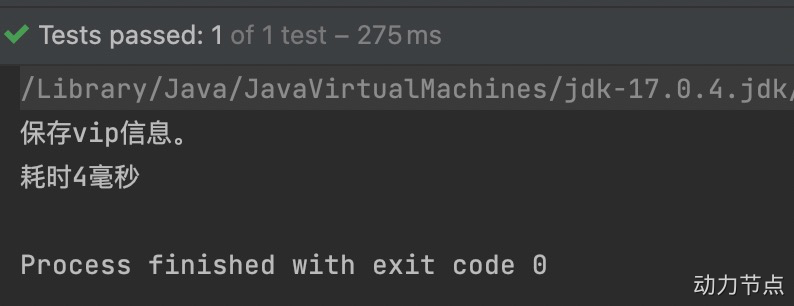
15.5 AOP的实际案例:事务处理
项目中的事务控制是在所难免的。在一个业务流程当中,可能需要多条DML语句共同完成,为了保证数据的安全,这多条DML语句要么同时成功,要么同时失败。这就需要添加事务控制的代码。例如以下伪代码:
1
2
3
4
5
6
7
8
9
10
11
12
13
14
15
16
17
18
19
20
21
22
23
24
25
26
27
28
29
30
31
32
33
34
35
36
37
38
39
40
41
42
43
44
45
46
47
48
49
50
51
52
53
54
55
56
57
58
59
60
61
62
63
64
65
66
67
68
69
70
71
72
73
74
75
76
77
78
79
80
81
82
83
84
85
86
87
88
89
90
91
92
93
94
95
96
97
98
99
100
101
102
103
104
105
106
107
108
109
110
111
112
113
114
| class 业务类1{
public void 业务方法1(){
try{
startTransaction();
step1();
step2();
step3();
....
commitTransaction();
}catch(Exception e){
rollbackTransaction();
}
}
public void 业务方法2(){
try{
startTransaction();
step1();
step2();
step3();
....
commitTransaction();
}catch(Exception e){
rollbackTransaction();
}
}
public void 业务方法3(){
try{
startTransaction();
step1();
step2();
step3();
....
commitTransaction();
}catch(Exception e){
rollbackTransaction();
}
}
}
class 业务类2{
public void 业务方法1(){
try{
startTransaction();
step1();
step2();
step3();
....
commitTransaction();
}catch(Exception e){
rollbackTransaction();
}
}
public void 业务方法2(){
try{
startTransaction();
step1();
step2();
step3();
....
commitTransaction();
}catch(Exception e){
rollbackTransaction();
}
}
public void 业务方法3(){
try{
startTransaction();
step1();
step2();
step3();
....
commitTransaction();
}catch(Exception e){
rollbackTransaction();
}
}
}
|
可以看到,这些业务类中的每一个业务方法都是需要控制事务的,而控制事务的代码又是固定的格式,都是:
1
2
3
4
5
6
7
8
9
10
11
12
13
| try{
startTransaction();
commitTransaction();
}catch(Exception e){
rollbackTransaction();
}
|
这个控制事务的代码就是和业务逻辑没有关系的“交叉业务”。以上伪代码当中可以看到这些交叉业务的代码没有得到复用,并且如果这些交叉业务代码需要修改,那必然需要修改多处,难维护,怎么解决?可以采用AOP思想解决。可以把以上控制事务的代码作为环绕通知,切入到目标类的方法当中。接下来我们做一下这件事,有两个业务类,如下:
1
2
3
4
5
6
7
8
9
10
11
12
13
14
15
16
17
18
19
20
21
22
23
24
25
26
27
28
29
30
31
32
| package com.powernode.spring6.biz;
import org.springframework.stereotype.Component;
@Component
public class AccountService {
public void transfer(){
System.out.println("正在进行银行账户转账");
}
public void withdraw(){
System.out.println("正在进行取款操作");
}
}
package com.powernode.spring6.biz;
import org.springframework.stereotype.Component;
@Component
public class OrderService {
public void generate(){
System.out.println("正在生成订单");
}
public void cancel(){
System.out.println("正在取消订单");
}
}
|
注意,以上两个业务类已经纳入spring bean的管理,因为都添加了@Component注解。
接下来我们给以上两个业务类的4个方法添加事务控制代码,使用AOP来完成:
1
2
3
4
5
6
7
8
9
10
11
12
13
14
15
16
17
18
19
20
21
22
23
24
| package com.powernode.spring6.biz;
import org.aspectj.lang.ProceedingJoinPoint;
import org.aspectj.lang.annotation.Around;
import org.aspectj.lang.annotation.Aspect;
import org.springframework.stereotype.Component;
@Aspect
@Component
public class TransactionAspect {
@Around("execution(* com.powernode.spring6.biz..*(..))")
public void aroundAdvice(ProceedingJoinPoint proceedingJoinPoint){
try {
System.out.println("开启事务");
proceedingJoinPoint.proceed();
System.out.println("提交事务");
} catch (Throwable e) {
System.out.println("回滚事务");
}
}
}
|
你看,这个事务控制代码是不是只需要写一次就行了,并且修改起来也没有成本。编写测试程序:
1
2
3
4
5
6
7
8
9
10
11
12
13
14
15
16
17
18
19
20
21
22
23
24
25
| package com.powernode.spring6.test;
import com.powernode.spring6.biz.AccountService;
import com.powernode.spring6.biz.OrderService;
import com.powernode.spring6.service.Spring6Configuration;
import org.junit.Test;
import org.springframework.context.ApplicationContext;
import org.springframework.context.annotation.AnnotationConfigApplicationContext;
public class AOPTest2 {
@Test
public void testTransaction(){
ApplicationContext applicationContext = new AnnotationConfigApplicationContext(Spring6Configuration.class);
OrderService orderService = applicationContext.getBean("orderService", OrderService.class);
AccountService accountService = applicationContext.getBean("accountService", AccountService.class);
orderService.generate();
orderService.cancel();
accountService.transfer();
accountService.withdraw();
}
}
|
执行结果:
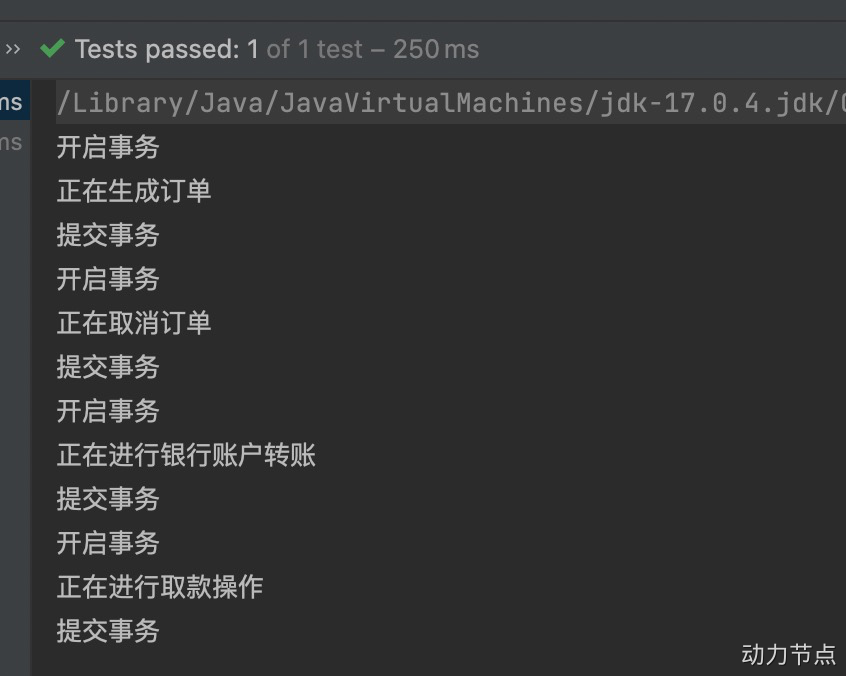
通过测试可以看到,所有的业务方法都添加了事务控制的代码。
15.6 AOP的实际案例:安全日志
需求是这样的:项目开发结束了,已经上线了。运行正常。客户提出了新的需求:凡事在系统中进行修改操作的,删除操作的,新增操作的,都要把这个人记录下来。因为这几个操作是属于危险行为。例如有业务类和业务方法:
1
2
3
4
5
6
7
8
9
10
11
12
13
14
15
16
17
18
19
20
| package com.powernode.spring6.biz;
import org.springframework.stereotype.Component;
@Component
public class UserService {
public void getUser(){
System.out.println("获取用户信息");
}
public void saveUser(){
System.out.println("保存用户");
}
public void deleteUser(){
System.out.println("删除用户");
}
public void modifyUser(){
System.out.println("修改用户");
}
}
|
1
2
3
4
5
6
7
8
9
10
11
12
13
14
15
16
17
18
19
20
| package com.powernode.spring6.biz;
import org.springframework.stereotype.Component;
@Component
public class ProductService {
public void getProduct(){
System.out.println("获取商品信息");
}
public void saveProduct(){
System.out.println("保存商品");
}
public void deleteProduct(){
System.out.println("删除商品");
}
public void modifyProduct(){
System.out.println("修改商品");
}
}
|
注意:已经添加了@Component注解。
接下来我们使用aop来解决上面的需求:编写一个负责安全的切面类
1
2
3
4
5
6
7
8
9
10
11
12
13
14
15
16
17
18
19
20
21
22
23
24
25
26
27
28
29
30
31
32
33
34
35
36
37
38
39
40
| package com.powernode.spring6.biz;
import org.aspectj.lang.JoinPoint;
import org.aspectj.lang.annotation.Aspect;
import org.aspectj.lang.annotation.Before;
import org.aspectj.lang.annotation.Pointcut;
import org.springframework.stereotype.Component;
@Component
@Aspect
public class SecurityAspect {
@Pointcut("execution(* com.powernode.spring6.biz..save*(..))")
public void savePointcut(){}
@Pointcut("execution(* com.powernode.spring6.biz..delete*(..))")
public void deletePointcut(){}
@Pointcut("execution(* com.powernode.spring6.biz..modify*(..))")
public void modifyPointcut(){}
@Before("savePointcut() || deletePointcut() || modifyPointcut()")
public void beforeAdivce(JoinPoint joinpoint){
System.out.println("XXX操作员正在操作"+joinpoint.getSignature().getName()+"方法");
}
}
@Test
public void testSecurity(){
ApplicationContext applicationContext = new AnnotationConfigApplicationContext(Spring6Configuration.class);
UserService userService = applicationContext.getBean("userService", UserService.class);
ProductService productService = applicationContext.getBean("productService", ProductService.class);
userService.getUser();
userService.saveUser();
userService.deleteUser();
userService.modifyUser();
productService.getProduct();
productService.saveProduct();
productService.deleteProduct();
productService.modifyProduct();
}
|
执行结果: