MyBatis入门 MyBatis 是一款优秀的持久层框架,用于简化 JDBC 开发https://mybatis.org/mybatis-3/zh_CN/index.html
持久层: 负责将数据到保存到数据库的那一层代码。 框架: 框架就是一个半成品软件,是一套可重用的、通用的、软件基础代码模型 在框架的基础之上构建软件编写更加高效、规范、通用、可扩展 JDBC不足 1 2 3 4 5 6 7 8 9 10 11 12 13 14 15 16 17 18 19 20 String sql = "insert into t_user(id,idCard,username,password,birth,gender,email,city,street,zipcode,phone,grade) values(?,?,?,?,?,?,?,?,?,?,?,?)" ;PreparedStatement ps = conn.prepareStatement(sql);ps.setString(1 , "1" ); ps.setString(2 , "123456789" ); ps.setString(3 , "zhangsan" ); ps.setString(4 , "123456" ); ps.setString(5 , "1980-10-11" ); ps.setString(6 , "男" ); ps.setString(7 , "zhangsan@126.com" ); ps.setString(8 , "北京" ); ps.setString(9 , "大兴区凉水河二街" ); ps.setString(10 , "1000000" ); ps.setString(11 , "16398574152" ); ps.setString(12 , "A" ); int count = ps.executeUpdate();
1 2 3 4 5 6 7 8 9 10 11 12 13 14 15 16 17 18 19 20 21 22 23 24 25 26 27 28 29 30 31 32 33 34 35 36 37 38 39 40 String sql = "select id,idCard,username,password,birth,gender,email,city,street,zipcode,phone,grade from t_user" ;PreparedStatement ps = conn.prepareStatement(sql);ResultSet rs = ps.executeQuery();List<User> userList = new ArrayList <>(); while (rs.next()){ String id = rs.getString("id" ); String idCard = rs.getString("idCard" ); String username = rs.getString("username" ); String password = rs.getString("password" ); String birth = rs.getString("birth" ); String gender = rs.getString("gender" ); String email = rs.getString("email" ); String city = rs.getString("city" ); String street = rs.getString("street" ); String zipcode = rs.getString("zipcode" ); String phone = rs.getString("phone" ); String grade = rs.getString("grade" ); User user = new User (); user.setId(id); user.setIdCard(idCard); user.setUsername(username); user.setPassword(password); user.setBirth(birth); user.setGender(gender); user.setEmail(email); user.setCity(city); user.setStreet(street); user.setZipcode(zipcode); user.setPhone(phone); user.setGrade(grade); userList.add(user); }
JDBC不足:
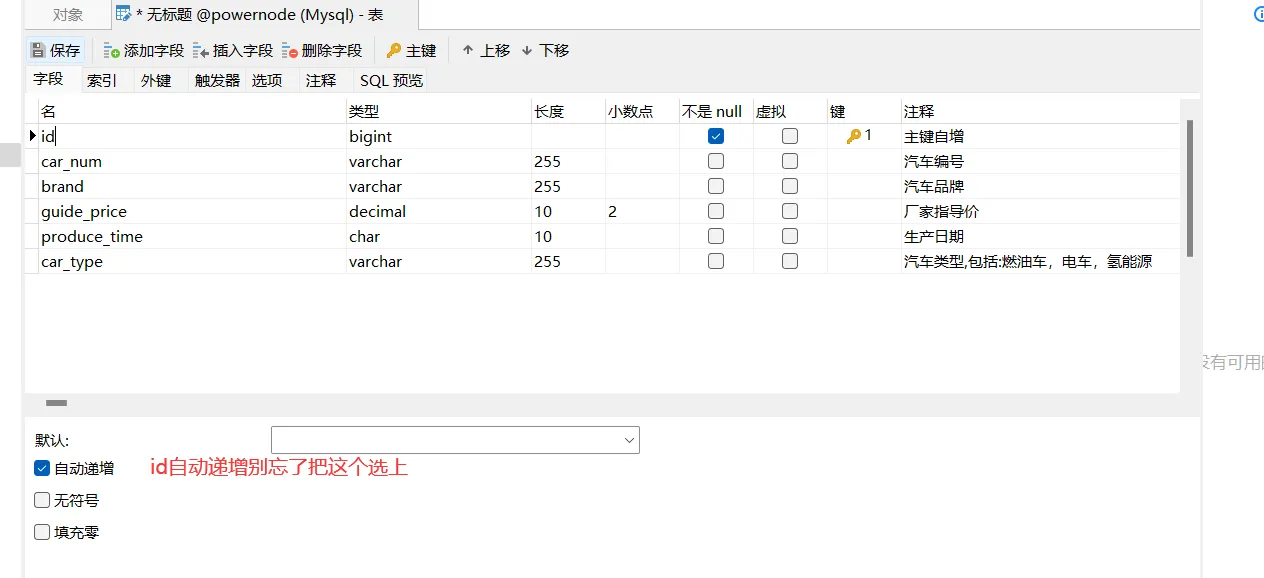
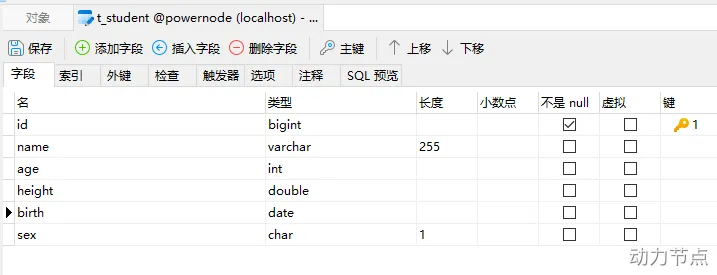
SQL语句写死在Java程序中,不灵活。改SQL的话就要改Java代码。违背OCP开闭原则。 给?传值是繁琐的。 将结果集封装成Java对象是繁琐的。 了解MyBatis MyBatis框架特点:支持定制化 SQL、存储过程、基本映射以及高级映射 支持XML开发,也支持注解式开发。【为了保证sql语句的灵活,所以mybatis大部分是采用XML方式开发。】 避免了几乎所有的 JDBC 代码中手动设置参数以及获取结果集 将接口和 Java 的 POJOs(Plain Ordinary Java Object,简单普通的Java对象)映射成数据库中的记录 体积小好学:两个jar包,两个XML配置文件。 完全做到sql解耦合。 提供基本映射标签。 提供高级映射标签。 提供XML标签,支持动态SQL的编写。 MyBatis入门程序 步骤1:汽车表t_car,字段包括:
id:主键(自增)【bigint】 car_num:汽车编号【varchar】 brand:品牌【varchar】 guide_price:厂家指导价【decimal类型,专门为财务数据准备的类型】 produce_time:生产时间【char,年月日即可,10个长度,’2022-10-11’】 car_type:汽车类型(燃油车、电车、氢能源)【varchar】 使用navicat for mysql工具建表
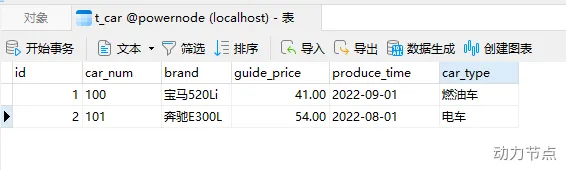
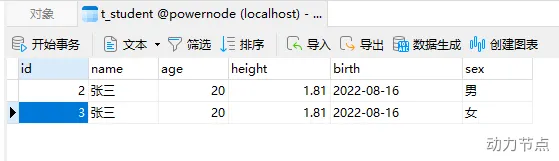
使用navicat for mysql工具向t_car表中插入两条数据,如下: 步骤2:创建项目并引入依赖(mybatis依赖 + mysql驱动依赖)1 2 3 4 5 6 7 8 9 10 11 12 <dependency > <groupId > org.mybatis</groupId > <artifactId > mybatis</artifactId > <version > 3.5.10</version > </dependency > <dependency > <groupId > mysql</groupId > <artifactId > mysql-connector-java</artifactId > <version > 8.0.30</version > </dependency >
步骤3:在resources根目录下新建mybatis-config.xml配置文件 1 2 3 4 5 6 7 8 9 10 11 12 13 14 15 16 17 18 19 20 21 <?xml version="1.0" encoding="UTF-8" ?> <!DOCTYPE configuration PUBLIC "-//mybatis.org//DTD Config 3.0//EN" "http://mybatis.org/dtd/mybatis-3-config.dtd" > <configuration > <environments default ="development" > <environment id ="development" > <transactionManager type ="JDBC" /> <dataSource type ="POOLED" > <property name ="driver" value ="com.mysql.cj.jdbc.Driver" /> <property name ="url" value ="jdbc:mysql://localhost:3306/powernode" /> <property name ="username" value ="root" /> <property name ="password" value ="root" /> </dataSource > </environment > </environments > <mappers > <mapper resource ="" /> </mappers > </configuration >
注意:
mybatis核心配置文件的文件名不一定是mybatis-config.xml,可以是其它名字。 mybatis核心配置文件存放的位置也可以随意。这里选择放在resources根下,相当于放到了类的根路径下。 步骤4:在resources根目录下新建CarMapper.xml配置文件1 2 3 4 5 6 7 8 9 10 11 12 13 14 <?xml version="1.0" encoding="UTF-8" ?> <!DOCTYPE mapper PUBLIC "-//mybatis.org//DTD Mapper 3.0//EN" "http://mybatis.org/dtd/mybatis-3-mapper.dtd" > <mapper namespace ="car" > <insert id ="insertCar" > insert into t_car (id,car_num,brand,guide_price,produce_time,car_type) values (null,'102','丰田mirai',40.30,'2014-10-05','氢能源') </insert > </mapper >
注意:
sql语句最后结尾可以不写; CarMapper.xml文件的名字不是固定的。可以使用其它名字。 CarMapper.xml文件的位置也是随意的。需要在mybatis-config.xml文件中指定CarMapper.xml文件的路径。1 <mapper resource ="CarMapper.xml" />
步骤5:编写MyBatisIntroductionTest代码 1 2 3 4 5 6 7 8 9 10 11 12 13 14 15 16 17 18 public class MyBatisIntroductionTest { public static void main (String[] args) { SqlSessionFactoryBuilder sqlSessionFactoryBuilder = new SqlSessionFactoryBuilder (); InputStream is = Thread.currentThread().getContextClassLoader().getResourceAsStream("mybatis-config.xml" ); SqlSessionFactory sqlSessionFactory = sqlSessionFactoryBuilder.build(is); SqlSession sqlSession = sqlSessionFactory.openSession(); int count = sqlSession.insert("insertCar" ); System.out.println("插入几条数据:" + count); sqlSession.commit(); sqlSession.close(); } }
默认采用的事务管理器是:JDBC。JDBC事务默认是不提交的,需要手动提交。
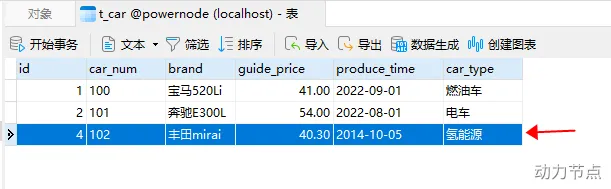
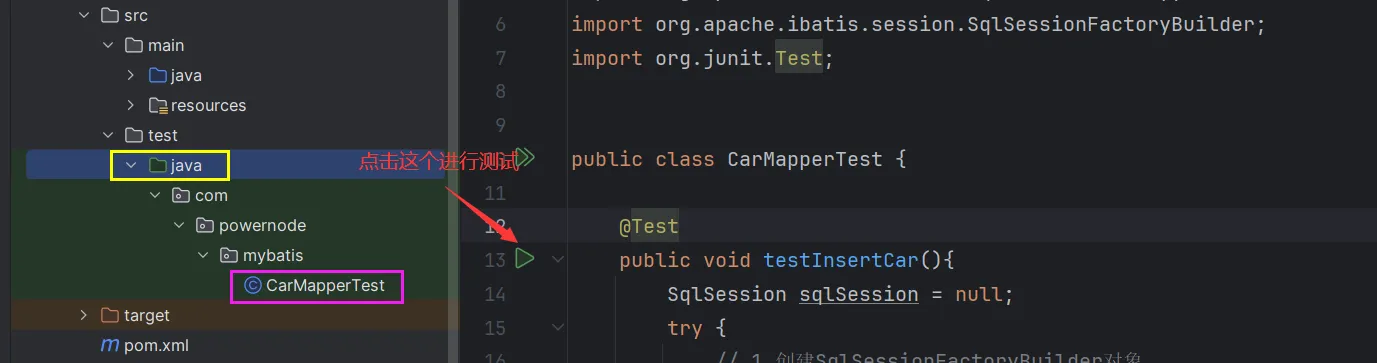
步骤6:运行程序,查看运行结果,以及数据库表中的数据 引入JUnit 1 2 3 4 5 6 7 <dependency > <groupId > junit</groupId > <artifactId > junit</artifactId > <version > 4.13.2</version > <scope > test</scope > </dependency >
1 2 3 4 5 6 7 8 9 10 11 12 13 14 15 16 17 18 19 20 21 22 23 24 25 26 27 28 29 30 31 public class CarMapperTest { @Test public void testInsertCar () { SqlSession sqlSession = null ; try { SqlSessionFactoryBuilder sqlSessionFactoryBuilder = new SqlSessionFactoryBuilder (); SqlSessionFactory sqlSessionFactory = sqlSessionFactoryBuilder.build(Resources.getResourceAsStream("mybatis-config.xml" )); sqlSession = sqlSessionFactory.openSession(); int count = sqlSession.insert("insertCar" ); System.out.println("更新了几条记录:" + count); sqlSession.commit(); } catch (Exception e) { if (sqlSession != null ) { sqlSession.rollback(); } e.printStackTrace(); } finally { if (sqlSession != null ) { sqlSession.close(); } } } }
引入日志框架logback 引入日志框架的目的是为了看清楚mybatis执行的具体sql。 启用标准日志组件,只需要在mybatis-config.xml 文件中添加以下配置:【可参考mybatis手册】 1 2 3 <settings > <setting name ="logImpl" value ="STDOUT_LOGGING" /> </settings >
标准日志也可以用,但是配置不够灵活,可以集成其他的日志组件,例如:log4j,logback等。
1 2 3 4 5 6 <dependency > <groupId > ch.qos.logback</groupId > <artifactId > logback-classic</artifactId > <version > 1.2.11</version > <scope > test</scope > </dependency >
第二步:引入logback相关配置文件(文件名叫做logback.xml或logback-test.xml,放到类路径当中) 1 2 3 4 5 6 7 8 9 10 11 12 13 14 15 16 17 18 19 20 21 22 23 24 25 26 27 28 29 30 31 32 33 34 35 36 37 38 39 40 41 <?xml version="1.0" encoding="UTF-8" ?> <configuration debug ="false" > <appender name ="STDOUT" class ="ch.qos.logback.core.ConsoleAppender" > <encoder class ="ch.qos.logback.classic.encoder.PatternLayoutEncoder" > <pattern > %d{yyyy-MM-dd HH:mm:ss.SSS} [%thread] %-5level %logger{50} - %msg%n</pattern > </encoder > </appender > <appender name ="FILE" class ="ch.qos.logback.core.rolling.RollingFileAppender" > <rollingPolicy class ="ch.qos.logback.core.rolling.TimeBasedRollingPolicy" > <FileNamePattern > ${LOG_HOME}/TestWeb.log.%d{yyyy-MM-dd}.log</FileNamePattern > <MaxHistory > 30</MaxHistory > </rollingPolicy > <encoder class ="ch.qos.logback.classic.encoder.PatternLayoutEncoder" > <pattern > %d{yyyy-MM-dd HH:mm:ss.SSS} [%thread] %-5level %logger{50} - %msg%n</pattern > </encoder > <triggeringPolicy class ="ch.qos.logback.core.rolling.SizeBasedTriggeringPolicy" > <MaxFileSize > 100MB</MaxFileSize > </triggeringPolicy > </appender > <logger name ="com.apache.ibatis" level ="TRACE" /> <logger name ="java.sql.Connection" level ="DEBUG" /> <logger name ="java.sql.Statement" level ="DEBUG" /> <logger name ="java.sql.PreparedStatement" level ="DEBUG" /> <root level ="DEBUG" > <appender-ref ref ="STDOUT" /> <appender-ref ref ="FILE" /> </root > </configuration >
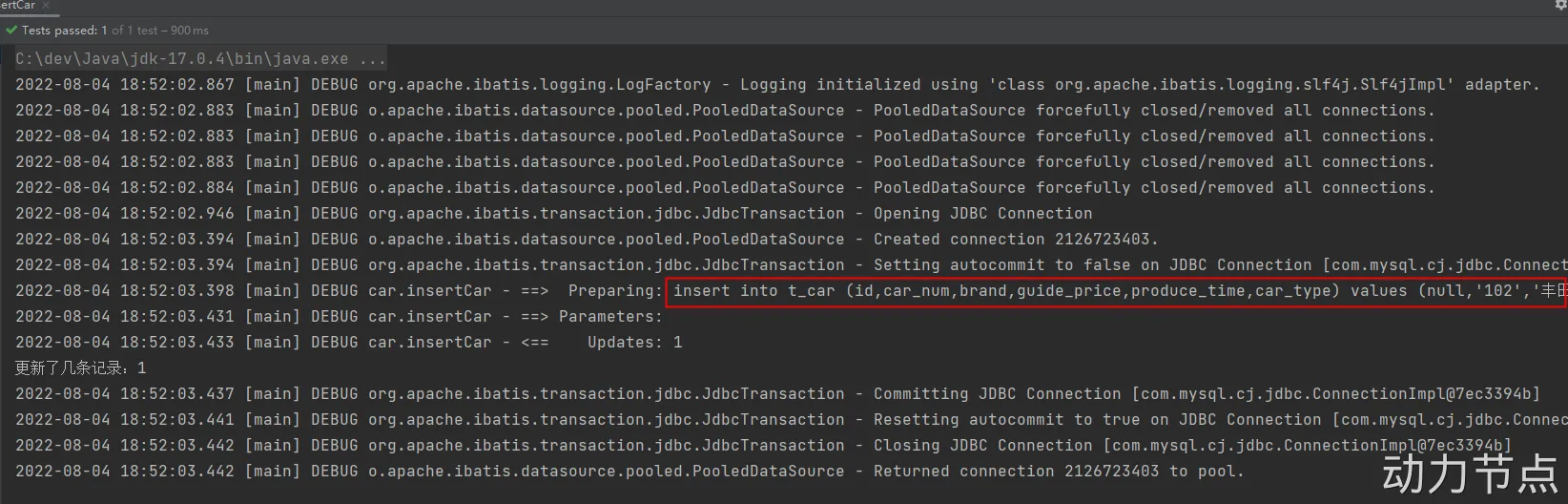
再次执行单元测试方法testInsertCar,查看控制台是否有sql语句输出 封装SqlSessionUtil 每一次获取SqlSession对象代码太繁琐,因此将其封装成一个工具类 1 2 3 4 5 6 7 8 9 10 11 12 13 14 15 16 17 18 19 20 21 22 23 24 25 public class SqlSessionUtil { private static SqlSessionFactory sqlSessionFactory; static { try { SqlSessionFactoryBuilder sqlSessionFactoryBuilder = new SqlSessionFactoryBuilder (); sqlSessionFactory = sqlSessionFactoryBuilder.build(Resources.getResourceAsStream("mybatis-config.xml" )); } catch (Exception e) { e.printStackTrace(); } } public static SqlSession openSession () { return sqlSessionFactory.openSession(true ); } }
测试工具类,改造testInsertCar()1 2 3 4 5 6 7 8 @Test public void testInsertCar () { SqlSession sqlSession = SqlSessionUtil.openSession(); int count = sqlSession.insert("insertCar" ); System.out.println("插入了几条记录:" + count); sqlSession.close(); }
使用MyBatis完成CRUD 准备工作创建一个普通的Maven工程:mybatis-002-crud pom.xml依赖:mybatis依赖 mysql驱动依赖 junit依赖 logback依赖 Lombok依赖 mybatis-config.xml放在类的根路径下 CarMapper.xml放在类的根路径下 logback.xml放在类的根路径下 封装SqlSessionUtil工具类 创建测试用例:com.powernode.mybatis.CarMapperTest insert(Create) 分析以下SQL映射文件中SQL语句存在的问题
1 2 3 4 5 6 7 8 9 10 11 <?xml version="1.0" encoding="UTF-8" ?> <!DOCTYPE mapper PUBLIC "-//mybatis.org//DTD Mapper 3.0//EN" "http://mybatis.org/dtd/mybatis-3-mapper.dtd" > <mapper namespace ="car" > <insert id ="insertCar" > insert into t_car(car_num,brand,guide_price,produce_time,car_type) values('103', '奔驰E300L', 50.3, '2022-01-01', '燃油车') </insert > </mapper >
存在的问题是:在文件中将SQL语句写死了,如果想要更换别的值,那么就需要修改文件中的SQL语句,对于这个问题JDBC是采用占位符来解决:
1 2 3 4 5 6 7 8 9 String sql = "insert into t_car(car_num,brand,guide_price,produce_time,car_type) values(?,?,?,?,?)" ;ps.setString(1 ,"103" ); ps.setString(2 ,"奔驰E300L" ); ps.setDouble(3 ,50.3 ); ps.setString(4 ,"2022-01-01" ); ps.setString(5 ,"燃油车" );
MyBatis既然封装了JDBC,那么我们就可以使用MyBatis提供的占位符,将SQL语句中的参数用占位符代替。
CarMapperTest.java CarMapper.xml 1 2 3 4 5 6 7 8 9 10 11 12 13 14 15 16 17 public class CarMapperTest { @Test public void testInsertCar () { Map<String, Object> map = new HashMap <>(); map.put("k1" , "103" ); map.put("k2" , "奔驰E300L" ); map.put("k3" , 50.3 ); map.put("k4" , "2020-10-01" ); map.put("k5" , "燃油车" ); SqlSession sqlSession = SqlSessionUtil.openSession(); int count = sqlSession.insert("insertCar" , map); System.out.println("插入了几条记录:" + count); } }
1 2 3 4 5 6 7 8 9 10 11 <?xml version="1.0" encoding="UTF-8" ?> <!DOCTYPE mapper PUBLIC "-//mybatis.org//DTD Mapper 3.0//EN" "http://mybatis.org/dtd/mybatis-3-mapper.dtd" > <mapper namespace ="car" > <insert id ="insertCar" > insert into t_car(car_num,brand,guide_price,produce_time,car_type) values(#{k1},#{k2},#{k3},#{k4},#{k5}) </insert > </mapper >
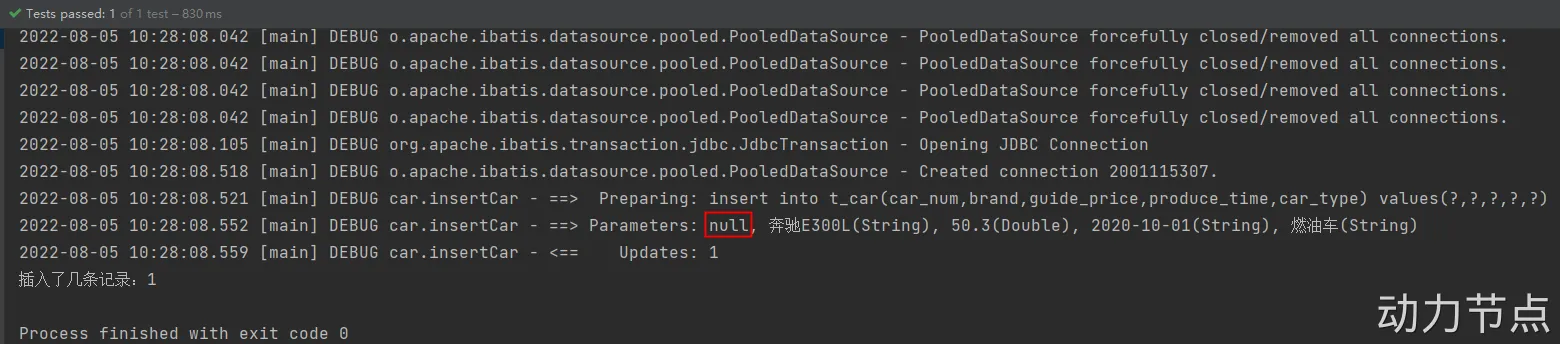
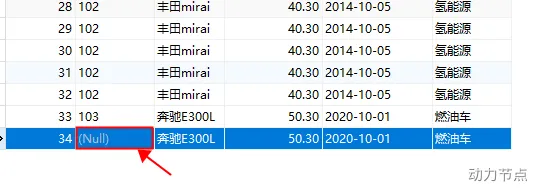
#{}里面必须填写map集合的key,不能随便写,如果#{}里写的是map集合中不存在的key会导致属性注入错误。1 2 3 4 5 6 7 8 9 10 <?xml version="1.0" encoding="UTF-8" ?> <!DOCTYPE mapper PUBLIC "-//mybatis.org//DTD Mapper 3.0//EN" "http://mybatis.org/dtd/mybatis-3-mapper.dtd" > <mapper namespace ="car" > <insert id ="insertCar" > insert into t_car(car_num,brand,guide_price,produce_time,car_type) values(#{kk},#{k2},#{k3},#{k4},#{k5}) </insert > </mapper >
运行程序:
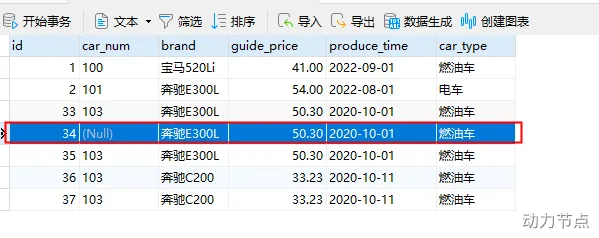
通过测试,看到程序并没有报错。正常执行。不过 #{kk} 的写法导致无法获取到map集合中的数据,最终导致数据库表car_num插入了NULL。
使用Map集合可以传参,那使用pojo (简单普通的java对象)可以完成传参吗?测试一下:
1 2 3 4 5 6 7 8 9 10 11 12 13 14 15 16 17 18 19 20 21 22 23 24 25 26 27 28 29 30 31 32 33 @Data public class Car { private Long id; private String carNum; private String brand; private Double guidePrice; private String produceTime; private String carType; @Override public String toString () { return "Car{" + "id=" + id + ", carNum='" + carNum + '\'' + ", brand='" + brand + '\'' + ", guidePrice=" + guidePrice + ", produceTime='" + produceTime + '\'' + ", carType='" + carType + '\'' + '}' ; } public Car () { } public Car (Long id, String carNum, String brand, Double guidePrice, String produceTime, String carType) { this .id = id; this .carNum = carNum; this .brand = brand; this .guidePrice = guidePrice; this .produceTime = produceTime; this .carType = carType; } }
1 2 3 4 5 6 7 8 9 10 11 12 13 14 15 @Test public void testInsertCarByPOJO () { Car car = new Car (); car.setCarNum("103" ); car.setBrand("奔驰C200" ); car.setGuidePrice(33.23 ); car.setProduceTime("2020-10-11" ); car.setCarType("燃油车" ); SqlSession sqlSession = SqlSessionUtil.openSession(); int count = sqlSession.insert("insertCarByPOJO" , car); System.out.println("插入了几条记录" + count); }
第三步:SQL语句1 2 3 4 <insert id ="insertCarByPOJO" > insert into t_car(car_num,brand,guide_price,produce_time,car_type) values(#{carNum},#{brand},#{guidePrice},#{produceTime},#{carType}) </insert >
#{} 里写的是POJO的属性名,如果写成其他的会有问题吗?
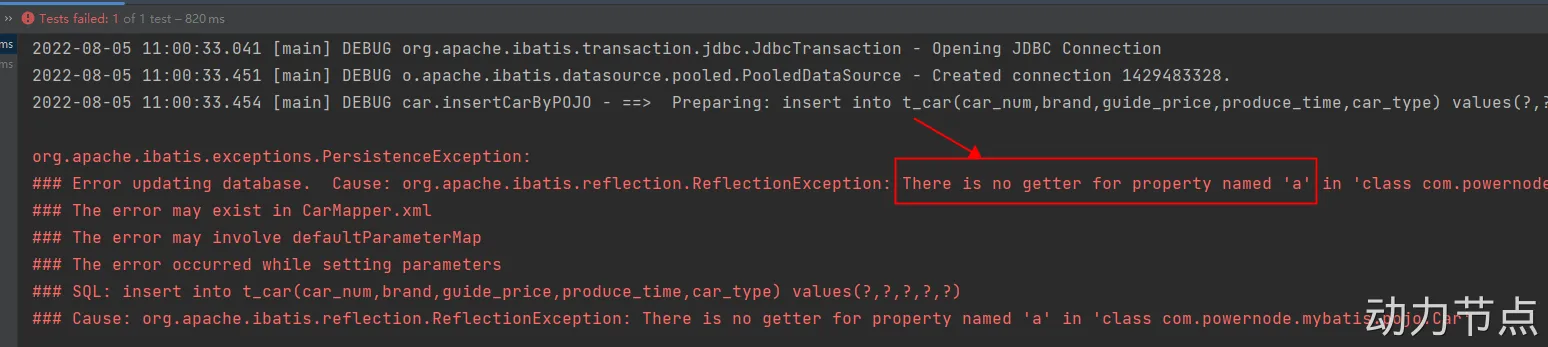
1 2 3 <insert id ="insertCarByPOJO" > insert into t_car(car_num,brand,guide_price,produce_time,car_type) values(#{a},#{brand},#{guidePrice},#{produceTime},#{carType}) </insert >
运行程序,出现了以下异常:
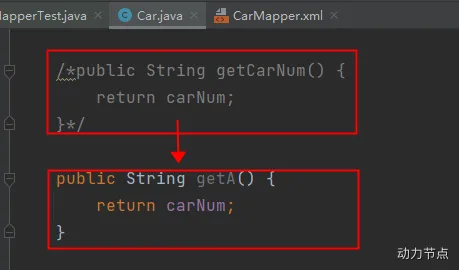
修改POJO类Car的代码,只将getCarNum()方法名修改为getA(),其他代码不变 ,如下:
经过测试得出结论:
如果采用map集合传参,#{} 里写的是map集合的key,如果key不存在不会报错,数据库表中会插入NULL。 如果采用POJO传参,#{} 里写的是get方法的方法名去掉get之后将剩下的单词首字母变小写(例如:getAge对应的是#{age},getUserName对应的是#{userName}),如果这样的get方法不存在会报错。 delete(Delete) SQL语句这样写:
1 2 3 <delete id ="deleteByCarNum" > delete from t_car where car_num = #{SuiBianXie} </delete >
Java程序这样写:
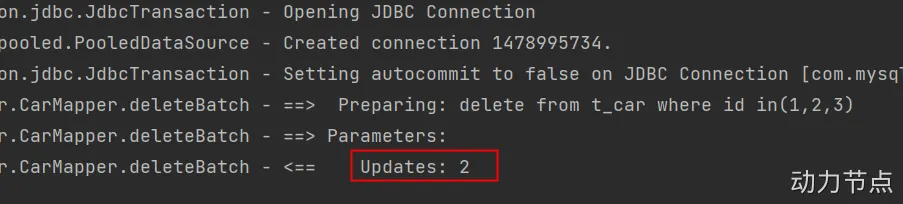
1 2 3 4 5 6 7 8 @Test public void testDeleteByCarNum () { SqlSession sqlSession = SqlSessionUtil.openSession(); int count = sqlSession.delete("deleteByCarNum" , "102" ); System.out.println("删除了几条记录:" + count); }
运行结果:
结论:
如果Mapper接口方法只有一个参数,那么Mybatis会直接获取方法的参数并作为占位符的内容,因此无论占位符内写什么都能正常操作 如果Mapper接口方法有多个参数或者参数是一个对象,那么占位符中的内容必须与参数的属性名对应 update(Update) 修改id=34的Car信息,car_num为102,brand为比亚迪汉,guide_price为30.23,produce_time为2018-09-10,car_type为电车
修改前:
SQL语句如下:
1 2 3 4 5 6 7 <update id="updateCarByPOJO" > update t_car set car_num = #{carNum}, brand = #{brand}, guide_price = #{guidePrice}, produce_time = #{produceTime}, car_type = #{carType} where id = #{id} </update>
Java代码如下:
1 2 3 4 5 6 7 8 9 10 11 12 13 14 15 16 @Test public void testUpdateCarByPOJO () { Car car = new Car (); car.setId(34L ); car.setCarNum("102" ); car.setBrand("比亚迪汉" ); car.setGuidePrice(30.23 ); car.setProduceTime("2018-09-10" ); car.setCarType("电车" ); SqlSession sqlSession = SqlSessionUtil.openSession(); int count = sqlSession.update("updateCarByPOJO" , car); System.out.println("更新了几条记录:" + count); }
运行结果:
select(Retrieve) select语句和其它语句不同的是:查询可能会有一个结果集。
查询一条数据 需求:查询id为1的Car信息
SQL语句如下:
1 2 3 <select id ="selectCarById" > select * from t_car where id = #{id} </select >
1 2 3 4 5 6 7 8 @Test public void testSelectCarById () { SqlSession sqlSession = SqlSessionUtil.openSession(); Object car = sqlSession.selectOne("selectCarById" , 1 ); System.out.println(car); }
1 2 3 ### Error querying database. Cause: org.apache.ibatis.executor.ExecutorException: A query was run and no Result Maps were found for the Mapped Statement 'car.selectCarById'. 【翻译】:对于一个查询语句来说,没有找到查询的结果映射。 It's likely that neither a Result Type nor a Result Map was specified. 【翻译】:很可能既没有指定结果类型,也没有指定结果映射。
运行结果的大致意思是:对于一个查询语句来说,需要指定它的结果类型或者结果映射。
所以如果想让mybatis查询之后返回一个Java对象的话,要告诉mybatis返回一个什么类型的Java对象,可以在<select>标签中添加resultType属性,用来指定查询要转换的类型:
1 2 3 <select id ="selectCarById" resultType ="com.powernode.mybatis.pojo.Car" > select * from t_car where id = #{id} </select >
运行结果:
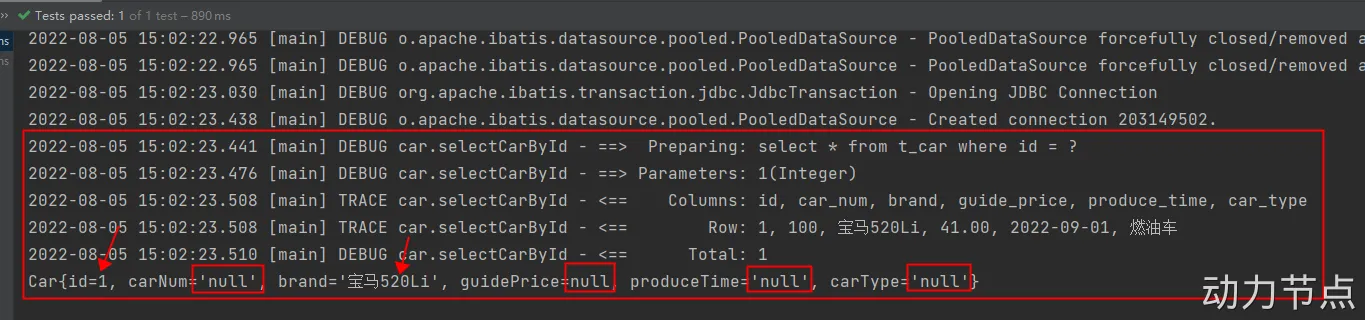
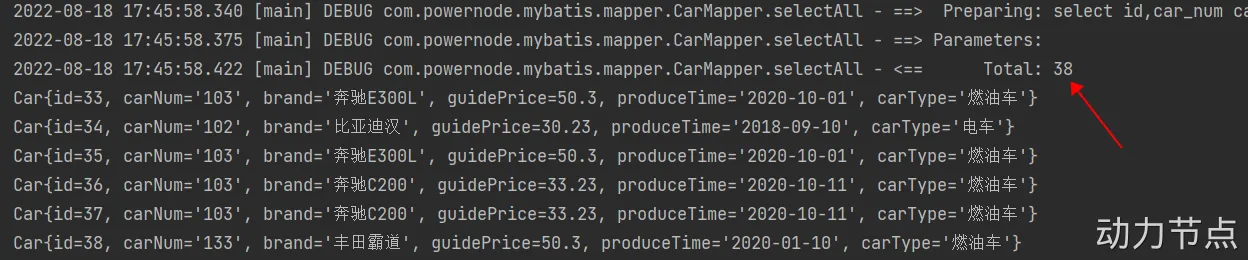
此时就能够成功运行了,但通过控制台的日志信息可以发现Car对象只有id和brand两个属性有值,其他均为null。
查询结果集的列名:id, car_num, brand, guide_price, produce_time, car_type
可以发现:只有id和brand是一致的,其他字段名和属性名对应不上,通过起别名来测试是不是可以解决这个问题。
1 2 3 4 5 6 7 8 <select id ="selectCarById" resultType ="com.powernode.mybatis.pojo.Car" > select id, car_num as carNum, brand, guide_price as guidePrice, produce_time as produceTime, car_type as carType from t_car where id = #{id} </select >
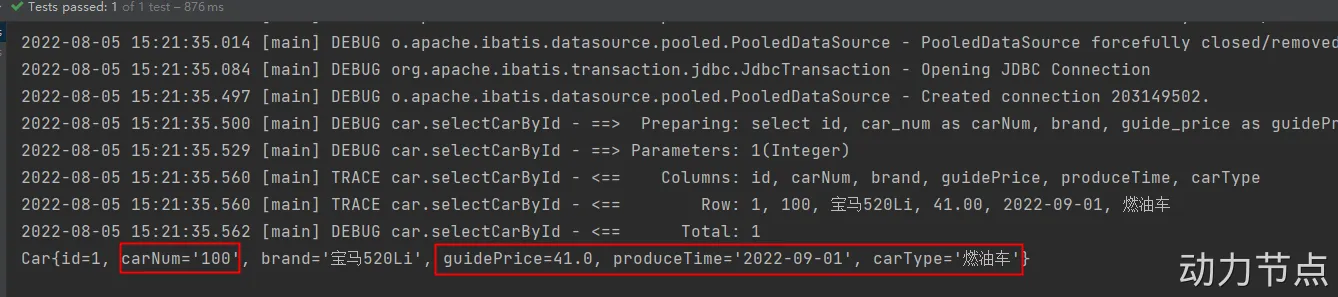
运行结果如下:
通过测试得知,如果当查询结果的字段名和java类的属性名对应不上的话,可以采用as关键字起别名,之后再学习其他方法 。
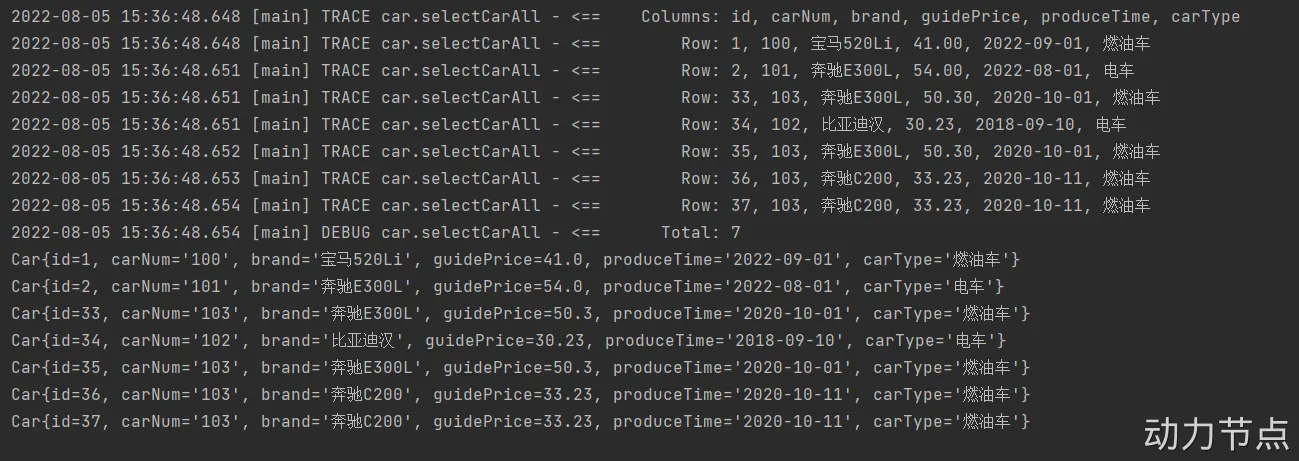
查询多条数据 SQL语句如下:
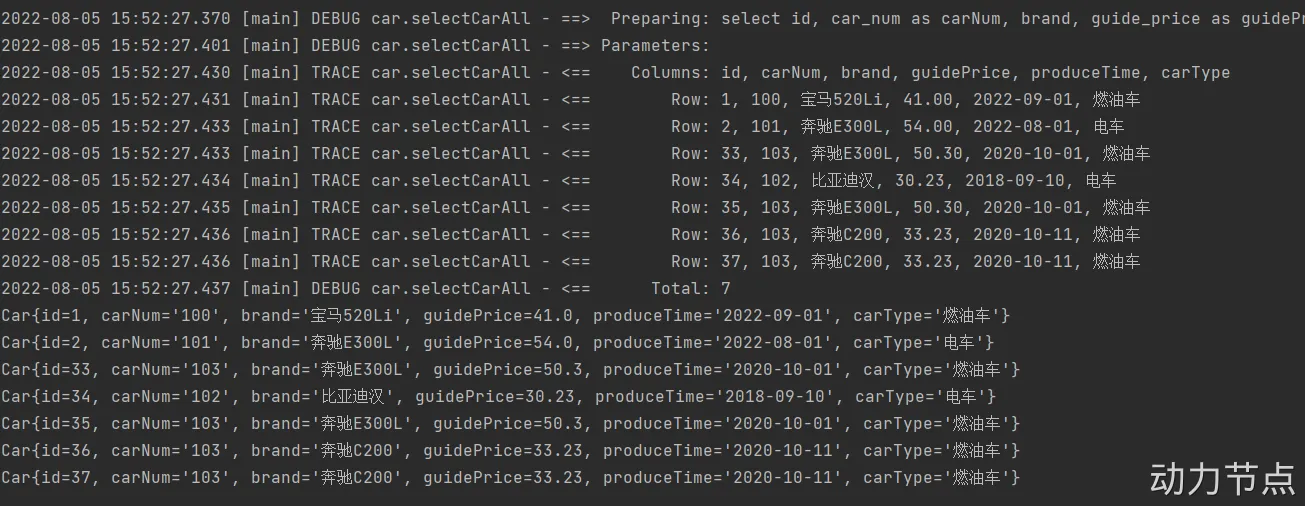
1 2 3 4 5 6 7 8 <select id ="selectCarAll" resultType ="com.powernode.mybatis.pojo.Car" > select id, car_num as carNum, brand, guide_price as guidePrice, produce_time as produceTime, car_type as carType from t_car </select >
Java代码如下:
1 2 3 4 5 6 7 8 9 @Test public void testSelectCarAll () { SqlSession sqlSession = SqlSessionUtil.openSession(); List<Object> cars = sqlSession.selectList("selectCarAll" ); cars.forEach(car -> System.out.println(car)); }
运行结果如下:
Mapper的namespace 在Mapper配置文件中<mapper>标签的namespace属性可以翻译为命名空间,这个命名空间主要是为了防止Id冲突 。
创建CarMapper2.xml文件,代码如下:
1 2 3 4 5 6 7 8 9 10 11 12 13 <?xml version="1.0" encoding="UTF-8" ?> <!DOCTYPE mapper PUBLIC "-//mybatis.org//DTD Mapper 3.0//EN" "http://mybatis.org/dtd/mybatis-3-mapper.dtd" ><mapper namespace ="car2" > <select id ="selectCarAll" resultType ="com.powernode.mybatis.pojo.Car" > select id, car_num as carNum, brand, guide_price as guidePrice, produce_time as produceTime, car_type as carType from t_car </select > </mapper >
此时CarMapper.xml和CarMapper2.xml文件中都有 id=”selectCarAll”。将CarMapper2.xml配置到mybatis-config.xml文件中。
1 2 3 4 <mappers > <mapper resource ="CarMapper.xml" /> <mapper resource ="CarMapper2.xml" /> </mappers >
编写Java代码如下:
1 2 3 4 5 6 7 8 9 @Test public void testNamespace () { SqlSession sqlSession = SqlSessionUtil.openSession(); List<Object> cars = sqlSession.selectList("selectCarAll" ); cars.forEach(car -> System.out.println(car)); }
运行结果如下:
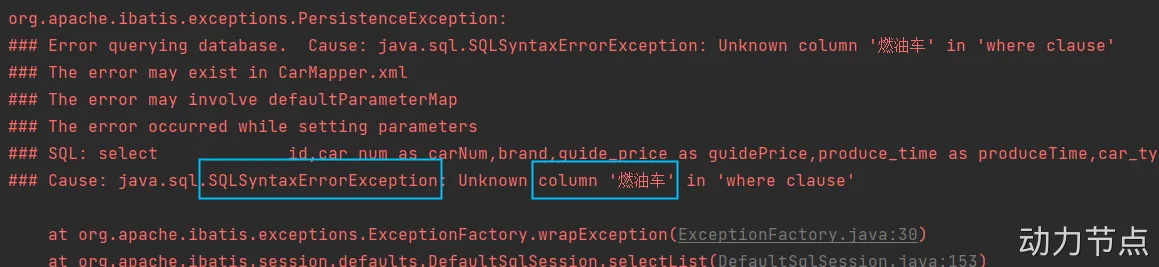
1 2 3 4 5 org.apache.ibatis.exceptions.PersistenceException: ### Error querying database . Cause : java.lang.IllegalArgumentException : selectCarAll is ambiguous in Mapped Statements collection (try using the full name including the namespace , or rename one of the entries ) 【翻译】selectCarAll 在Mapped Statements 集合中不明确(请尝试使用包含名称空间的全名,或重命名其中一个条目) 【大致意思是】selectCarAll 重名了,要么在selectCarAll 前添加一个名称空间,要么改个其它名字。
Java代码修改如下:
1 2 3 4 5 6 7 8 9 10 @Test public void testNamespace () { SqlSession sqlSession = SqlSessionUtil.openSession(); List<Object> cars = sqlSession.selectList("car2.selectCarAll" ); cars.forEach(car -> System.out.println(car)); }
运行结果如下:
MyBatis核心配置文件详解 1 2 3 4 5 6 7 8 9 10 11 12 13 14 15 16 17 18 19 20 21 <?xml version="1.0" encoding="UTF-8" ?> <!DOCTYPE configuration PUBLIC "-//mybatis.org//DTD Config 3.0//EN" "http://mybatis.org/dtd/mybatis-3-config.dtd" ><configuration > <environments default ="development" > <environment id ="development" > <transactionManager type ="JDBC" /> <dataSource type ="POOLED" > <property name ="driver" value ="com.mysql.cj.jdbc.Driver" /> <property name ="url" value ="jdbc:mysql://localhost:3306/powernode" /> <property name ="username" value ="root" /> <property name ="password" value ="root" /> </dataSource > </environment > </environments > <mappers > <mapper resource ="CarMapper.xml" /> <mapper resource ="CarMapper2.xml" /> </mappers > </configuration >
environment mybatis-003-configuration
mybatis-config.xml CarMapper.xml ConfigurationTest 1 2 3 4 5 6 7 8 9 10 11 12 13 14 15 16 17 18 19 20 21 22 23 24 25 26 27 28 29 30 31 32 33 34 <?xml version="1.0" encoding="UTF-8" ?> <!DOCTYPE configuration PUBLIC "-//mybatis.org//DTD Config 3.0//EN" "http://mybatis.org/dtd/mybatis-3-config.dtd" > <configuration > <environments default ="production" > <environment id ="dev" > <transactionManager type ="JDBC" /> <dataSource type ="POOLED" > <property name ="driver" value ="com.mysql.cj.jdbc.Driver" /> <property name ="url" value ="jdbc:mysql://localhost:3306/powernode" /> <property name ="username" value ="root" /> <property name ="password" value ="root" /> </dataSource > </environment > <environment id ="production" > <transactionManager type ="JDBC" /> <dataSource type ="POOLED" > <property name ="driver" value ="com.mysql.cj.jdbc.Driver" /> <property name ="url" value ="jdbc:mysql://localhost:3306/mybatis" /> <property name ="username" value ="root" /> <property name ="password" value ="root" /> </dataSource > </environment > </environments > <mappers > <mapper resource ="CarMapper.xml" /> </mappers > </configuration >
1 2 3 4 5 6 7 8 9 10 <?xml version="1.0" encoding="UTF-8" ?> <!DOCTYPE mapper PUBLIC "-//mybatis.org//DTD Mapper 3.0//EN" "http://mybatis.org/dtd/mybatis-3-mapper.dtd" > <mapper namespace ="car" > <insert id ="insertCar" > insert into t_car(id,car_num,brand,guide_price,produce_time,car_type) values(null,#{carNum},#{brand},#{guidePrice},#{produceTime},#{carType}) </insert > </mapper >
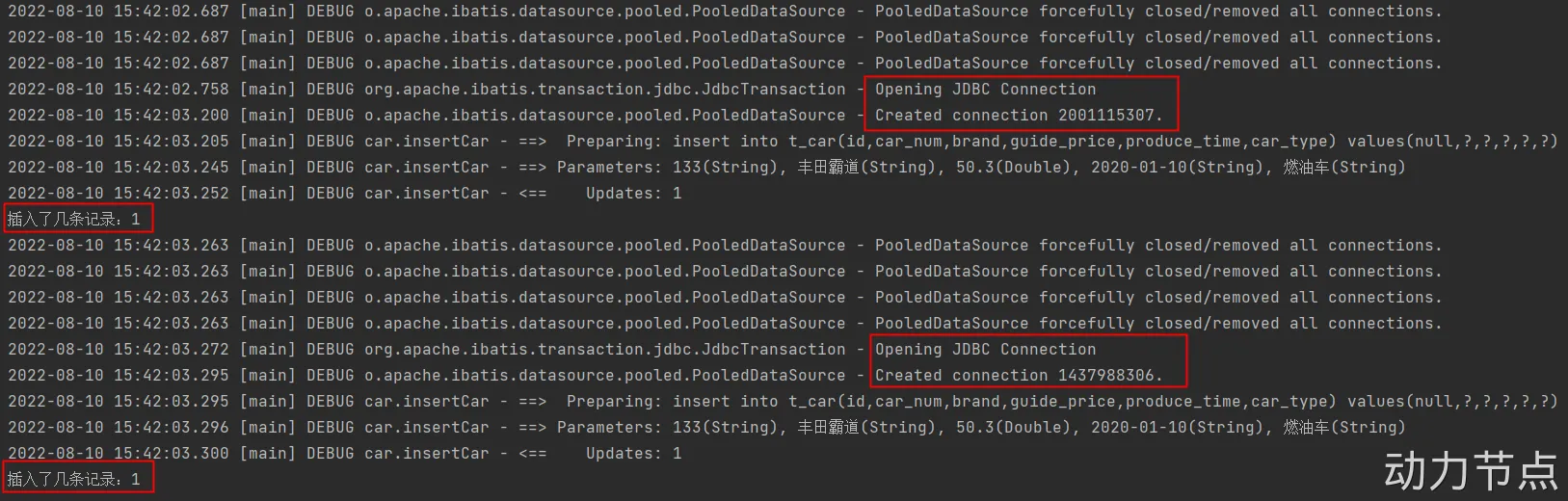
1 2 3 4 5 6 7 8 9 10 11 12 13 14 15 16 17 18 19 20 21 22 23 24 25 26 27 28 29 public class ConfigurationTest { @Test public void testEnvironment () throws Exception{ Car car = new Car (); car.setCarNum("133" ); car.setBrand("丰田霸道" ); car.setGuidePrice(50.3 ); car.setProduceTime("2020-01-10" ); car.setCarType("燃油车" ); SqlSessionFactoryBuilder sqlSessionFactoryBuilder = new SqlSessionFactoryBuilder (); SqlSessionFactory sqlSessionFactory = sqlSessionFactoryBuilder.build(Resources.getResourceAsStream("mybatis-config.xml" )); SqlSession sqlSession = sqlSessionFactory.openSession(true ); int count = sqlSession.insert("insertCar" , car); System.out.println("插入了几条记录:" + count); SqlSessionFactory sqlSessionFactory1 = sqlSessionFactoryBuilder.build(Resources.getResourceAsStream("mybatis-config.xml" ), "dev" ); SqlSession sqlSession1 = sqlSessionFactory1.openSession(true ); int count1 = sqlSession1.insert("insertCar" , car); System.out.println("插入了几条记录:" + count1); } }
执行结果:
transactionManager 1 2 3 4 5 6 7 8 9 10 11 12 13 14 15 16 17 18 19 20 21 22 23 24 25 26 27 28 29 30 31 32 33 34 35 36 37 38 <?xml version="1.0" encoding="UTF-8" ?> <!DOCTYPE configuration PUBLIC "-//mybatis.org//DTD Config 3.0//EN" "http://mybatis.org/dtd/mybatis-3-config.dtd" > <configuration> <environments default ="dev" > <environment id="dev" > <transactionManager type="MANAGED" /> <dataSource type="POOLED" > <property name="driver" value="com.mysql.cj.jdbc.Driver" /> <property name="url" value="jdbc:mysql://localhost:3306/powernode" /> <property name="username" value="root" /> <property name="password" value="root" /> </dataSource> </environment> </environments> <mappers> <mapper resource="CarMapper.xml" /> </mappers> </configuration> @Test public void testTransactionManager () throws Exception{ Car car = new Car (); car.setCarNum("133" ); car.setBrand("丰田霸道" ); car.setGuidePrice(50.3 ); car.setProduceTime("2020-01-10" ); car.setCarType("燃油车" ); SqlSessionFactoryBuilder sqlSessionFactoryBuilder = new SqlSessionFactoryBuilder (); SqlSessionFactory sqlSessionFactory = sqlSessionFactoryBuilder.build(Resources.getResourceAsStream("mybatis-config2.xml" )); SqlSession sqlSession = sqlSessionFactory.openSession(); int count = sqlSession.insert("insertCar" , car); System.out.println("插入了几条记录:" + count); }
当事务管理器是:JDBC
使用JDBC事务管理器的话,底层创建的事务管理器对象: JdbcTransaction对象。
如果你编写的代码是下面的代码:
SqlSession sqlSession = sqlSessionFactory.openSession(true);
表示没有开启事务。因为这种方式压根不会执行: conn.setAutoCommit(false);
在JDBC事务中,没有执行conn.setAutoCommit(false);那么autoCommit就是true。
如果autoCommit是true,就表示没有开启事务。只要执行任意一条DML语句就提交一次。
当事务管理器是:MANAGED
交给容器去管理事务,但目前使用的是本地程序,没有容器的支持,当mybatis找不到容器的支持时:没有事务 。也就是说只要执行一条DML语句,则提交一次。 JDBC中的事务:
如果你没有在JDBC代码中执行: conn.setAutoCommit(fase);的话,默认的autoCommit是true。
重点:
以后注意了,只要你的autoCommit是true,就表示没有开启事务。
只有你的autoCommit是false的时候,就表示开启了事务。
dataSource 1 2 3 4 5 6 7 8 9 10 11 12 13 14 15 16 17 18 19 20 21 22 23 24 25 26 27 28 29 30 31 32 33 34 35 36 37 38 39 40 41 42 43 44 45 46 <?xml version="1.0" encoding="UTF-8" ?> <!DOCTYPE configuration PUBLIC "-//mybatis.org//DTD Config 3.0//EN" "http://mybatis.org/dtd/mybatis-3-config.dtd" ><configuration > <environments default ="dev" > <environment id ="dev" > <transactionManager type ="JDBC" /> <dataSource type ="UNPOOLED" > <property name ="driver" value ="com.mysql.cj.jdbc.Driver" /> <property name ="url" value ="jdbc:mysql://localhost:3306/powernode" /> <property name ="username" value ="root" /> <property name ="password" value ="root" /> </dataSource > </environment > </environments > <mappers > <mapper resource ="CarMapper.xml" /> </mappers > </configuration >
1 2 3 4 5 6 7 8 9 10 11 12 13 14 15 16 17 18 19 20 @Test public void testDataSource () throws Exception{ Car car = new Car (); car.setCarNum("133" ); car.setBrand("丰田霸道" ); car.setGuidePrice(50.3 ); car.setProduceTime("2020-01-10" ); car.setCarType("燃油车" ); SqlSessionFactoryBuilder sqlSessionFactoryBuilder = new SqlSessionFactoryBuilder (); SqlSessionFactory sqlSessionFactory = sqlSessionFactoryBuilder.build(Resources.getResourceAsStream("mybatis-config3.xml" )); SqlSession sqlSession = sqlSessionFactory.openSession(true ); int count = sqlSession.insert("insertCar" , car); System.out.println("插入了几条记录:" + count); sqlSession.close(); }
当type是UNPOOLED,控制台输出:
修改配置文件mybatis-config3.xml中的配置:
1 <dataSource type="POOLED" >
Java测试程序不需要修改,直接执行,看控制台输出:
通过测试得出:UNPOOLED不会使用连接池,每一次都会新建JDBC连接对象。POOLED会使用数据库连接池。【这个连接池是mybatis自己实现的。】
1 <dataSource type="JNDI" >
JNDI的方式:表示对接JNDI服务器中的连接池。这种方式给了我们可以使用第三方连接池的接口。如果想使用dbcp、c3p0、druid(德鲁伊)等,需要使用这种方式。
这种再重点说一下type=”POOLED”的时候,它的属性有哪些?
1 2 3 4 5 6 7 8 9 10 11 12 13 14 15 16 17 18 19 20 21 22 23 24 25 26 27 28 <?xml version="1.0" encoding="UTF-8" ?> <!DOCTYPE configuration PUBLIC "-//mybatis.org//DTD Config 3.0//EN" "http://mybatis.org/dtd/mybatis-3-config.dtd" ><configuration > <environments default ="dev" > <environment id ="dev" > <transactionManager type ="JDBC" /> <dataSource type ="POOLED" > <property name ="driver" value ="com.mysql.cj.jdbc.Driver" /> <property name ="url" value ="jdbc:mysql://localhost:3306/powernode" /> <property name ="username" value ="root" /> <property name ="password" value ="root" /> <property name ="poolMaximumActiveConnections" value ="3" /> <property name ="poolTimeToWait" value ="20000" /> <property name ="poolMaximumCheckoutTime" value ="20000" /> <property name ="poolMaximumIdleConnections" value ="1" /> </dataSource > </environment > </environments > <mappers > <mapper resource ="CarMapper.xml" /> </mappers > </configuration >
poolMaximumActiveConnections:最大的活动的连接数量。默认值10
poolMaximumIdleConnections:最大的空闲连接数量。默认值5
poolMaximumCheckoutTime:强行回归池的时间。默认值20秒。
poolTimeToWait:当无法获取到空闲连接时,每隔20秒打印一次日志,避免因代码配置有误,导致傻等。(时长是可以配置的)
当然,还有其他属性。对于连接池来说,以上几个属性比较重要。
最大的活动的连接数量就是连接池连接数量的上限。默认值10,如果有10个请求正在使用这10个连接,第11个请求只能等待空闲连接。
最大的空闲连接数量。默认值5,如何已经有了5个空闲连接,当第6个连接要空闲下来的时候,连接池会选择关闭该连接对象。来减少数据库的开销。
需要根据系统的并发情况,来合理调整连接池最大连接数以及最多空闲数量。充分发挥数据库连接池的性能。【可以根据实际情况进行测试,然后调整一个合理的数量。】
下图是默认配置:
在以上配置的基础之上,可以编写java程序测试:
1 2 3 4 5 6 7 8 9 10 11 12 @Test public void testPool () throws Exception{SqlSessionFactoryBuilder sqlSessionFactoryBuilder = new SqlSessionFactoryBuilder ();SqlSessionFactory sqlSessionFactory = sqlSessionFactoryBuilder.build(Resources.getResourceAsStream("mybatis-config3.xml" ));for (int i = 0 ; i < 4 ; i++) { SqlSession sqlSession = sqlSessionFactory.openSession(); Object selectCarByCarNum = sqlSession.selectOne("selectCarByCarNum" ); } } <select id="selectCarByCarNum" resultType="com.powernode.mybatis.pojo.Car" > select id,car_num carNum,brand,guide_price guidePrice,produce_time produceTime,car_type carType from t_car where car_num = '100' </select>
4.4 properties mybatis提供了更加灵活的配置,连接数据库的信息可以单独写到一个属性资源文件中,假设在类的根路径下创建jdbc.properties文件,配置如下:
1 2 jdbc.driver =com.mysql.cj.jdbc.Driver jdbc.url =jdbc:mysql://localhost:3306/powernode
在mybatis核心配置文件中引入并使用:
1 2 3 4 5 6 7 8 9 10 11 12 13 14 15 16 17 18 19 20 21 22 23 24 25 26 27 28 <?xml version="1.0" encoding="UTF-8" ?> <!DOCTYPE configuration PUBLIC "-//mybatis.org//DTD Config 3.0//EN" "http://mybatis.org/dtd/mybatis-3-config.dtd" ><configuration > <properties resource ="jdbc.properties" > <property name ="jdbc.username" value ="root" /> <property name ="jdbc.password" value ="root" /> </properties > <environments default ="dev" > <environment id ="dev" > <transactionManager type ="JDBC" /> <dataSource type ="POOLED" > <property name ="driver" value ="${jdbc.driver}" /> <property name ="url" value ="${jdbc.url}" /> <property name ="username" value ="${jdbc.username}" /> <property name ="password" value ="${jdbc.password}" /> </dataSource > </environment > </environments > <mappers > <mapper resource ="CarMapper.xml" /> </mappers > </configuration >
编写Java程序进行测试:
1 2 3 4 5 6 7 8 @Test public void testProperties () throws Exception{SqlSessionFactoryBuilder sqlSessionFactoryBuilder = new SqlSessionFactoryBuilder ();SqlSessionFactory sqlSessionFactory = sqlSessionFactoryBuilder.build(Resources.getResourceAsStream("mybatis-config4.xml" ));SqlSession sqlSession = sqlSessionFactory.openSession();Object car = sqlSession.selectOne("selectCarByCarNum" );System.out.println(car); }
properties两个属性:
resource:这个属性从类的根路径下开始加载。【常用的。】
url:从指定的url加载,假设文件放在d:/jdbc.properties,这个url可以写成:file:///d:/jdbc.properties。注意是三个斜杠哦。
注意:如果不知道mybatis-config.xml文件中标签的编写顺序的话,可以有两种方式知道它的顺序:
第一种方式:查看dtd约束文件。 第二种方式:通过idea的报错提示信息。【一般采用这种方式】 4.5 mapper mapper标签用来指定SQL映射文件的路径,包含多种指定方式,这里先主要看其中两种:
第一种:resource,从类的根路径下开始加载【比url常用】
1 2 3 <mappers > <mapper resource ="CarMapper.xml" /> </mappers >
如果是这样写的话,必须保证类的根下有CarMapper.xml文件。
如果类的根路径下有一个包叫做test,CarMapper.xml如果放在test包下的话,这个配置应该是这样写:
1 2 3 <mappers > <mapper resource ="test/CarMapper.xml" /> </mappers >
第二种:url,从指定的url位置加载
假设CarMapper.xml文件放在d盘的根下,这个配置就需要这样写:
1 2 3 <mappers > <mapper url ="file:///d:/CarMapper.xml" /> </mappers >
mapper还有其他的指定方式,后面再看!!!
五、手写MyBatis框架(掌握原理) 警示:该部分内容有难度,基础较弱的程序员可能有些部分是听不懂的,如果无法跟下来,可直接跳过,不影响后续知识点的学习。当然,如果你要能够跟下来,必然会让你加深对MyBatis框架的理解。
我们给自己的框架起个名:GodBatis(起名灵感来源于:my god!!! 我的天呢!)
5.1 dom4j解析XML文件 该部分内容不再赘述,不会解析XML的,请观看老杜前面讲解的dom4j解析XML文件的视频。
模块名:parse-xml-by-dom4j(普通的Java Maven模块)
第一步:引入dom4j的依赖
1 2 3 4 5 6 7 8 9 10 11 12 13 14 15 16 17 18 19 20 21 22 23 24 25 26 27 28 29 30 31 32 33 34 35 36 37 38 39 <?xml version="1.0" encoding="UTF-8" ?> <project xmlns ="http://maven.apache.org/POM/4.0.0" xmlns:xsi ="http://www.w3.org/2001/XMLSchema-instance" xsi:schemaLocation ="http://maven.apache.org/POM/4.0.0 http://maven.apache.org/xsd/maven-4.0.0.xsd" > <modelVersion > 4.0.0</modelVersion > <groupId > org.group</groupId > <artifactId > parse-xml-by-dom4j</artifactId > <version > 1.0-SNAPSHOT</version > <packaging > jar</packaging > <dependencies > <dependency > <groupId > org.dom4j</groupId > <artifactId > dom4j</artifactId > <version > 2.1.3</version > </dependency > <dependency > <groupId > jaxen</groupId > <artifactId > jaxen</artifactId > <version > 1.2.0</version > </dependency > <dependency > <groupId > junit</groupId > <artifactId > junit</artifactId > <version > 4.13.2</version > <scope > test</scope > </dependency > </dependencies > <properties > <maven.compiler.source > 17</maven.compiler.source > <maven.compiler.target > 17</maven.compiler.target > </properties > </project >
第二步:编写配置文件godbatis-config.xml
1 2 3 4 5 6 7 8 9 10 11 12 13 14 15 16 17 18 <?xml version="1.0" encoding="UTF-8" ?> <configuration > <environments default ="dev" > <environment id ="dev" > <transactionManager type ="JDBC" /> <dataSource type ="POOLED" > <property name ="driver" value ="com.mysql.cj.jdbc.Driver" /> <property name ="url" value ="jdbc:mysql://localhost:3306/powernode" /> <property name ="username" value ="root" /> <property name ="password" value ="root" /> </dataSource > </environment > <mappers > <mapper resource ="sqlmapper.xml" /> </mappers > </environments > </configuration >
第三步:解析godbatis-config.xml
1 2 3 4 5 6 7 8 9 10 11 12 13 14 15 16 17 18 19 20 21 22 23 24 25 26 27 28 29 30 31 32 33 34 35 36 37 38 39 40 41 42 43 44 45 46 47 48 49 50 51 52 53 54 55 56 package com.powernode.dom4j;import org.dom4j.Document;import org.dom4j.Element;import org.dom4j.Node;import org.dom4j.io.SAXReader;import org.junit.Test;import java.util.HashMap;import java.util.List;import java.util.Map;public class ParseXMLByDom4j { @Test public void testGodBatisConfig () throws Exception{ SAXReader saxReader = new SAXReader (); Document document = saxReader.read(Thread.currentThread().getContextClassLoader().getResourceAsStream("godbatis-config.xml" )); Element environmentsElt = (Element)document.selectSingleNode("/configuration/environments" ); String defaultId = environmentsElt.attributeValue("default" ); System.out.println(defaultId); Element environmentElt = (Element)document.selectSingleNode("/configuration/environments/environment[@id='" + defaultId + "']" ); Element transactionManager = environmentElt.element("transactionManager" ); String transactionManagerType = transactionManager.attributeValue("type" ); System.out.println(transactionManagerType); Element dataSource = environmentElt.element("dataSource" ); String dataSourceType = dataSource.attributeValue("type" ); System.out.println(dataSourceType); Map<String,String> dataSourceMap = new HashMap <>(); dataSource.elements().forEach(propertyElt -> { dataSourceMap.put(propertyElt.attributeValue("name" ), propertyElt.attributeValue("value" )); }); dataSourceMap.forEach((k, v) -> System.out.println(k + ":" + v)); Element mappersElt = (Element) document.selectSingleNode("/configuration/environments/mappers" ); mappersElt.elements().forEach(mapper -> { System.out.println(mapper.attributeValue("resource" )); }); } }
执行结果:
第四步:编写配置文件sqlmapper.xml
1 2 3 4 5 6 7 8 9 10 <?xml version="1.0" encoding="UTF-8" ?> <mapper namespace ="car" > <insert id ="insertCar" > insert into t_car(id,car_num,brand,guide_price,produce_time,car_type) values(null,#{carNum},#{brand},#{guidePrice},#{produceTime},#{carType}) </insert > <select id ="selectCarByCarNum" resultType ="com.powernode.mybatis.pojo.Car" > select id,car_num carNum,brand,guide_price guidePrice,produce_time produceTime,car_type carType from t_car where car_num = #{carNum} </select > </mapper >
第五步:解析sqlmapper.xml
1 2 3 4 5 6 7 8 9 10 11 12 13 14 15 16 17 18 19 20 21 22 23 24 25 26 27 28 29 @Test public void testSqlMapper () throws Exception{SAXReader saxReader = new SAXReader ();Document document = saxReader.read(Thread.currentThread().getContextClassLoader().getResourceAsStream("sqlmapper.xml" ));Element mapperElt = (Element) document.selectSingleNode("/mapper" );String namespace = mapperElt.attributeValue("namespace" );System.out.println(namespace); mapperElt.elements().forEach(statementElt -> { String name = statementElt.getName(); System.out.println("name:" + name); if ("select" .equals(name)) { String resultType = statementElt.attributeValue("resultType" ); System.out.println("resultType:" + resultType); } String id = statementElt.attributeValue("id" ); System.out.println("sqlId:" + id); String sql = statementElt.getTextTrim(); System.out.println("sql:" + sql); }); }
执行结果:
5.2 GodBatis 手写框架之前,如果没有思路,可以先参考一下mybatis的客户端程序,通过客户端程序来逆推需要的类,参考代码:
1 2 3 4 5 6 7 8 9 10 11 12 13 14 15 16 17 18 19 20 21 22 23 24 25 26 27 28 29 30 31 32 33 34 35 36 37 38 39 40 41 42 43 44 45 46 47 48 49 50 51 52 53 54 55 56 57 58 @Test public void testInsert () { SqlSession sqlSession = null ; try { SqlSessionFactoryBuilder sqlSessionFactoryBuilder = new SqlSessionFactoryBuilder (); SqlSessionFactory sqlSessionFactory = sqlSessionFactoryBuilder.build(Resources.getResourceAsStream("mybatis-config.xml" )); sqlSession = sqlSessionFactory.openSession(); Car car = new Car (null , "111" , "宝马X7" , "70.3" , "2010-10-11" , "燃油车" ); int count = sqlSession.insert("insertCar" ,car); System.out.println("更新了几条记录:" + count); sqlSession.commit(); } catch (Exception e) { if (sqlSession != null ) { sqlSession.rollback(); } e.printStackTrace(); } finally { if (sqlSession != null ) { sqlSession.close(); } } } @Test public void testSelectOne () { SqlSession sqlSession = null ; try { SqlSessionFactoryBuilder sqlSessionFactoryBuilder = new SqlSessionFactoryBuilder (); SqlSessionFactory sqlSessionFactory = sqlSessionFactoryBuilder.build(Resources.getResourceAsStream("mybatis-config.xml" )); sqlSession = sqlSessionFactory.openSession(); Car car = (Car)sqlSession.selectOne("selectCarByCarNum" , "111" ); System.out.println(car); sqlSession.commit(); } catch (Exception e) { if (sqlSession != null ) { sqlSession.rollback(); } e.printStackTrace(); } finally { if (sqlSession != null ) { sqlSession.close(); } } }
第一步:IDEA中创建模块 模块:godbatis(创建普通的Java Maven模块,打包方式jar),引入相关依赖
1 2 3 4 5 6 7 8 9 10 11 12 13 14 15 16 17 18 19 20 21 22 23 24 25 26 27 28 29 30 31 32 33 34 35 36 37 38 39 <?xml version="1.0" encoding="UTF-8" ?> <project xmlns ="http://maven.apache.org/POM/4.0.0" xmlns:xsi ="http://www.w3.org/2001/XMLSchema-instance" xsi:schemaLocation ="http://maven.apache.org/POM/4.0.0 http://maven.apache.org/xsd/maven-4.0.0.xsd" > <modelVersion > 4.0.0</modelVersion > <groupId > org.god</groupId > <artifactId > godbatis</artifactId > <version > 1.0.0</version > <packaging > jar</packaging > <dependencies > <dependency > <groupId > org.dom4j</groupId > <artifactId > dom4j</artifactId > <version > 2.1.3</version > </dependency > <dependency > <groupId > jaxen</groupId > <artifactId > jaxen</artifactId > <version > 1.2.0</version > </dependency > <dependency > <groupId > junit</groupId > <artifactId > junit</artifactId > <version > 4.13.2</version > <scope > test</scope > </dependency > </dependencies > <properties > <maven.compiler.source > 17</maven.compiler.source > <maven.compiler.target > 17</maven.compiler.target > </properties > </project >
第二步:资源工具类,方便获取指向配置文件的输入流 1 2 3 4 5 6 7 8 9 10 11 12 13 14 15 16 17 18 19 20 21 package org.god.core;import java.io.InputStream;public class Resources { public static InputStream getResourcesAsStream (String config) { return Thread.currentThread().getContextClassLoader().getResourceAsStream(config); } }
第三步:定义SqlSessionFactoryBuilder类 提供一个无参数构造方法,再提供一个build方法,该build方法要返回SqlSessionFactory对象
1 2 3 4 5 6 7 8 9 10 11 12 13 14 15 16 17 18 19 20 21 22 23 24 25 26 27 28 29 30 31 32 33 34 package org.god.core;import java.io.InputStream;public class SqlSessionFactoryBuilder { public SqlSessionFactoryBuilder () { } public SqlSessionFactory build (InputStream inputStream) { return null ; } }
第四步:分析SqlSessionFactory类中有哪些属性 事务管理器
GodJDBCTransaction
SQL映射对象集合
Map
第五步:定义GodJDBCTransaction 事务管理器最好是定义一个接口,然后每一个具体的事务管理器都实现这个接口。
1 2 3 4 5 6 7 8 9 10 11 12 13 14 15 16 17 18 19 20 21 22 23 24 25 26 27 28 29 30 31 32 33 34 35 36 37 38 39 40 41 42 43 44 45 46 47 48 49 50 51 52 53 54 55 56 57 58 59 60 61 62 63 64 65 66 67 68 69 70 71 72 73 74 75 76 77 78 79 80 81 82 83 84 85 86 87 88 89 90 91 92 93 94 95 96 97 98 99 100 101 102 103 104 105 106 107 108 109 110 111 112 113 114 115 116 117 118 119 120 121 122 package org.god.core;import java.sql.Connection;public interface TransactionManager { void commit () ; void rollback () ; void close () ; void openConnection () ; Connection getConnection () ; } package org.god.core;import javax.sql.DataSource;import java.sql.Connection;import java.sql.SQLException;public class GodJDBCTransaction implements TransactionManager { private Connection conn; private DataSource dataSource; private boolean autoCommit; public GodJDBCTransaction (DataSource dataSource, boolean autoCommit) { this .dataSource = dataSource; this .autoCommit = autoCommit; } public void commit () { try { conn.commit(); } catch (SQLException e) { throw new RuntimeException (e); } } public void rollback () { try { conn.rollback(); } catch (SQLException e) { throw new RuntimeException (e); } } @Override public void close () { try { conn.close(); } catch (SQLException e) { throw new RuntimeException (e); } } @Override public void openConnection () { try { this .conn = dataSource.getConnection(); this .conn.setAutoCommit(this .autoCommit); } catch (SQLException e) { throw new RuntimeException (e); } } @Override public Connection getConnection () { return conn; } }
第六步:事务管理器中需要数据源,定义GodUNPOOLEDDataSource 1 2 3 4 5 6 7 8 9 10 11 12 13 14 15 16 17 18 19 20 21 22 23 24 25 26 27 28 29 30 31 32 33 34 35 36 37 38 39 40 41 42 43 44 45 46 47 48 49 50 51 52 53 54 55 56 57 58 59 60 61 62 63 64 65 66 67 68 69 70 71 72 73 74 75 76 77 package org.god.core;import java.io.PrintWriter;import java.sql.Connection;import java.sql.DriverManager;import java.sql.SQLException;import java.sql.SQLFeatureNotSupportedException;import java.util.logging.Logger;public class GodUNPOOLEDDataSource implements javax .sql.DataSource{ private String url; private String username; private String password; public GodUNPOOLEDDataSource (String driver, String url, String username, String password) { try { Class.forName(driver); } catch (ClassNotFoundException e) { throw new RuntimeException (e); } this .url = url; this .username = username; this .password = password; } @Override public Connection getConnection () throws SQLException { return DriverManager.getConnection(url, username, password); } @Override public Connection getConnection (String username, String password) throws SQLException { return null ; } @Override public PrintWriter getLogWriter () throws SQLException { return null ; } @Override public void setLogWriter (PrintWriter out) throws SQLException { } @Override public void setLoginTimeout (int seconds) throws SQLException { } @Override public int getLoginTimeout () throws SQLException { return 0 ; } @Override public Logger getParentLogger () throws SQLFeatureNotSupportedException { return null ; } @Override public <T> T unwrap (Class<T> iface) throws SQLException { return null ; } @Override public boolean isWrapperFor (Class<?> iface) throws SQLException { return false ; } }
第七步:定义GodMappedStatement 1 2 3 4 5 6 7 8 9 10 11 12 13 14 15 16 17 18 19 20 21 22 23 24 25 26 27 28 29 30 31 32 33 34 35 36 37 38 39 40 41 42 43 44 45 46 47 48 49 50 51 52 53 54 55 56 57 58 59 60 61 62 63 64 65 66 67 68 69 70 71 72 73 74 75 package org.god.core;public class GodMappedStatement { private String sqlId; private String resultType; private String sql; private String parameterType; private String sqlType; @Override public String toString () { return "GodMappedStatement{" + "sqlId='" + sqlId + '\'' + ", resultType='" + resultType + '\'' + ", sql='" + sql + '\'' + ", parameterType='" + parameterType + '\'' + ", sqlType='" + sqlType + '\'' + '}' ; } public String getSqlId () { return sqlId; } public void setSqlId (String sqlId) { this .sqlId = sqlId; } public String getResultType () { return resultType; } public void setResultType (String resultType) { this .resultType = resultType; } public String getSql () { return sql; } public void setSql (String sql) { this .sql = sql; } public String getParameterType () { return parameterType; } public void setParameterType (String parameterType) { this .parameterType = parameterType; } public String getSqlType () { return sqlType; } public void setSqlType (String sqlType) { this .sqlType = sqlType; } public GodMappedStatement (String sqlId, String resultType, String sql, String parameterType, String sqlType) { this .sqlId = sqlId; this .resultType = resultType; this .sql = sql; this .parameterType = parameterType; this .sqlType = sqlType; } }
第八步:完善SqlSessionFactory类 1 2 3 4 5 6 7 8 9 10 11 12 13 14 15 16 17 18 19 20 21 22 23 24 25 26 27 28 29 30 31 32 33 34 35 36 37 package org.god.core;import javax.sql.DataSource;import java.util.List;import java.util.Map;public class SqlSessionFactory { private TransactionManager transactionManager; private Map<String, GodMappedStatement> mappedStatements; public SqlSessionFactory (TransactionManager transactionManager, Map<String, GodMappedStatement> mappedStatements) { this .transactionManager = transactionManager; this .mappedStatements = mappedStatements; } public TransactionManager getTransactionManager () { return transactionManager; } public void setTransactionManager (TransactionManager transactionManager) { this .transactionManager = transactionManager; } public Map<String, GodMappedStatement> getMappedStatements () { return mappedStatements; } public void setMappedStatements (Map<String, GodMappedStatement> mappedStatements) { this .mappedStatements = mappedStatements; } }
第九步:完善SqlSessionFactoryBuilder中的build方法 1 2 3 4 5 6 7 8 9 10 11 12 13 14 15 16 17 18 19 20 21 22 23 24 25 26 27 28 29 30 31 32 33 34 35 36 37 38 39 40 41 42 43 44 45 46 47 48 49 50 51 52 53 54 55 56 57 58 59 60 61 62 63 64 65 66 67 68 69 70 71 72 73 74 75 76 77 78 79 80 81 82 83 84 85 86 87 88 89 90 91 92 93 94 95 96 97 98 99 100 101 102 103 104 105 106 107 108 109 110 111 112 113 114 115 116 package org.god.core;import org.dom4j.Document;import org.dom4j.DocumentException;import org.dom4j.Element;import org.dom4j.io.SAXReader;import javax.sql.DataSource;import java.io.InputStream;import java.util.HashMap;import java.util.Map;public class SqlSessionFactoryBuilder { public SqlSessionFactoryBuilder () { } public SqlSessionFactory build (InputStream inputStream) throws DocumentException { SAXReader saxReader = new SAXReader (); Document document = saxReader.read(inputStream); Element environmentsElt = (Element) document.selectSingleNode("/configuration/environments" ); String defaultEnv = environmentsElt.attributeValue("default" ); Element environmentElt = (Element) document.selectSingleNode("/configuration/environments/environment[@id='" + defaultEnv + "']" ); Element dataSourceElt = environmentElt.element("dataSource" ); DataSource dataSource = getDataSource(dataSourceElt); Element transactionManagerElt = environmentElt.element("transactionManager" ); TransactionManager transactionManager = getTransactionManager(transactionManagerElt, dataSource); Element mappers = environmentsElt.element("mappers" ); Map<String, GodMappedStatement> mappedStatements = getMappedStatements(mappers); SqlSessionFactory sqlSessionFactory = new SqlSessionFactory (transactionManager, mappedStatements); return sqlSessionFactory; } private Map<String, GodMappedStatement> getMappedStatements (Element mappers) { Map<String, GodMappedStatement> mappedStatements = new HashMap <>(); mappers.elements().forEach(mapperElt -> { try { String resource = mapperElt.attributeValue("resource" ); SAXReader saxReader = new SAXReader (); Document document = saxReader.read(Resources.getResourcesAsStream(resource)); Element mapper = (Element) document.selectSingleNode("/mapper" ); String namespace = mapper.attributeValue("namespace" ); mapper.elements().forEach(sqlMapper -> { String sqlId = sqlMapper.attributeValue("id" ); String sql = sqlMapper.getTextTrim(); String parameterType = sqlMapper.attributeValue("parameterType" ); String resultType = sqlMapper.attributeValue("resultType" ); String sqlType = sqlMapper.getName().toLowerCase(); GodMappedStatement godMappedStatement = new GodMappedStatement (sqlId, resultType, sql, parameterType, sqlType); mappedStatements.put(namespace + "." + sqlId, godMappedStatement); }); } catch (DocumentException e) { throw new RuntimeException (e); } }); return mappedStatements; } private TransactionManager getTransactionManager (Element transactionManagerElt, DataSource dataSource) { String type = transactionManagerElt.attributeValue("type" ).toUpperCase(); TransactionManager transactionManager = null ; if ("JDBC" .equals(type)) { transactionManager = new GodJDBCTransaction (dataSource, false ); } else if ("MANAGED" .equals(type)) { } return transactionManager; } private DataSource getDataSource (Element dataSourceElt) { Map<String, String> dataSourceMap = new HashMap <>(); dataSourceElt.elements().forEach(propertyElt -> { dataSourceMap.put(propertyElt.attributeValue("name" ), propertyElt.attributeValue("value" )); }); String dataSourceType = dataSourceElt.attributeValue("type" ).toUpperCase(); DataSource dataSource = null ; if ("POOLED" .equals(dataSourceType)) { } else if ("UNPOOLED" .equals(dataSourceType)) { dataSource = new GodUNPOOLEDDataSource (dataSourceMap.get("driver" ), dataSourceMap.get("url" ), dataSourceMap.get("username" ), dataSourceMap.get("password" )); } else if ("JNDI" .equals(dataSourceType)) { } return dataSource; } }
第十步:在SqlSessionFactory中添加openSession方法 1 2 3 4 5 public SqlSession openSession () { transactionManager.openConnection(); SqlSession sqlSession = new SqlSession (transactionManager, mappedStatements); return sqlSession; }
第十一步:编写SqlSession类中commit rollback close方法 1 2 3 4 5 6 7 8 9 10 11 12 13 14 15 16 17 18 19 20 21 22 23 24 25 26 27 28 29 30 31 32 33 34 35 36 37 38 39 40 41 42 43 44 package org.god.core;import java.sql.SQLException;import java.util.Map;public class SqlSession { private TransactionManager transactionManager; private Map<String, GodMappedStatement> mappedStatements; public SqlSession (TransactionManager transactionManager, Map<String, GodMappedStatement> mappedStatements) { this .transactionManager = transactionManager; this .mappedStatements = mappedStatements; } public void commit () { try { transactionManager.getConnection().commit(); } catch (SQLException e) { throw new RuntimeException (e); } } public void rollback () { try { transactionManager.getConnection().rollback(); } catch (SQLException e) { throw new RuntimeException (e); } } public void close () { try { transactionManager.getConnection().close(); } catch (SQLException e) { throw new RuntimeException (e); } } }
第十二步:编写SqlSession类中的insert方法 1 2 3 4 5 6 7 8 9 10 11 12 13 14 15 16 17 18 19 20 21 22 23 24 25 26 27 28 29 30 31 32 33 34 35 36 37 38 39 40 41 42 43 44 45 46 47 48 public int insert (String sqlId, Object obj) { GodMappedStatement godMappedStatement = mappedStatements.get(sqlId); Connection connection = transactionManager.getConnection(); String godbatisSql = godMappedStatement.getSql(); String sql = godbatisSql.replaceAll("#\\{[a-zA-Z0-9_\\$]*}" , "?" ); Map<Integer, String> map = new HashMap <>(); int index = 1 ; while (godbatisSql.indexOf("#" ) >= 0 ) { int beginIndex = godbatisSql.indexOf("#" ) + 2 ; int endIndex = godbatisSql.indexOf("}" ); map.put(index++, godbatisSql.substring(beginIndex, endIndex).trim()); godbatisSql = godbatisSql.substring(endIndex + 1 ); } final PreparedStatement ps; try { ps = connection.prepareStatement(sql); map.forEach((k, v) -> { try { String getMethodName = "get" + v.toUpperCase().charAt(0 ) + v.substring(1 ); Method getMethod = obj.getClass().getDeclaredMethod(getMethodName); ps.setString(k, getMethod.invoke(obj).toString()); } catch (Exception e) { throw new RuntimeException (e); } }); int count = ps.executeUpdate(); ps.close(); return count; } catch (Exception e) { throw new RuntimeException (e); } }
第十三步:编写SqlSession类中的selectOne方法 1 2 3 4 5 6 7 8 9 10 11 12 13 14 15 16 17 18 19 20 21 22 23 24 25 26 27 28 29 30 31 32 33 34 35 36 37 38 39 40 41 42 43 44 45 46 47 48 49 50 51 52 53 54 public Object selectOne (String sqlId, Object parameterObj) { GodMappedStatement godMappedStatement = mappedStatements.get(sqlId); Connection connection = transactionManager.getConnection(); String godbatisSql = godMappedStatement.getSql(); String sql = godbatisSql.replaceAll("#\\{[a-zA-Z0-9_\\$]*}" , "?" ); PreparedStatement ps = null ; ResultSet rs = null ; Object obj = null ; try { ps = connection.prepareStatement(sql); ps.setString(1 , parameterObj.toString()); rs = ps.executeQuery(); if (rs.next()) { String resultType = godMappedStatement.getResultType(); Class<?> aClass = Class.forName(resultType); Constructor<?> con = aClass.getDeclaredConstructor(); obj = con.newInstance(); ResultSetMetaData rsmd = rs.getMetaData(); int columnCount = rsmd.getColumnCount(); for (int i = 1 ; i <= columnCount; i++) { String columnName = rsmd.getColumnName(i); String setMethodName = "set" + columnName.toUpperCase().charAt(0 ) + columnName.substring(1 ); Method setMethod = aClass.getDeclaredMethod(setMethodName, aClass.getDeclaredField(columnName).getType()); setMethod.invoke(obj, rs.getString(columnName)); } } } catch (Exception e) { throw new RuntimeException (e); } finally { if (rs != null ) { try { rs.close(); } catch (SQLException e) { throw new RuntimeException (e); } } try { ps.close(); } catch (SQLException e) { throw new RuntimeException (e); } } return obj; }
5.3 GodBatis使用Maven打包
查看本地仓库中是否已经有jar包:
5.4 使用GodBatis 使用GodBatis就和使用MyBatis是一样的。
第一步:准备数据库表t_user
第二步:创建模块,普通的Java Maven模块:godbatis-test
第三步:引入依赖
1 2 3 4 5 6 7 8 9 10 11 12 13 14 15 16 17 18 19 20 21 22 23 24 25 26 27 28 29 30 31 32 33 34 35 36 37 38 39 <?xml version="1.0" encoding="UTF-8" ?> <project xmlns ="http://maven.apache.org/POM/4.0.0" xmlns:xsi ="http://www.w3.org/2001/XMLSchema-instance" xsi:schemaLocation ="http://maven.apache.org/POM/4.0.0 http://maven.apache.org/xsd/maven-4.0.0.xsd" > <modelVersion > 4.0.0</modelVersion > <groupId > com.powernode</groupId > <artifactId > godbatis-test</artifactId > <version > 1.0-SNAPSHOT</version > <packaging > jar</packaging > <dependencies > <dependency > <groupId > org.god</groupId > <artifactId > godbatis</artifactId > <version > 1.0.0</version > </dependency > <dependency > <groupId > mysql</groupId > <artifactId > mysql-connector-java</artifactId > <version > 8.0.30</version > </dependency > <dependency > <groupId > junit</groupId > <artifactId > junit</artifactId > <version > 4.13.2</version > <scope > test</scope > </dependency > </dependencies > <properties > <maven.compiler.source > 17</maven.compiler.source > <maven.compiler.target > 17</maven.compiler.target > </properties > </project >
第四步:编写pojo类
1 2 3 4 5 6 7 8 9 10 11 12 13 14 15 16 17 18 19 20 21 22 23 24 25 26 27 28 29 30 31 32 33 34 35 36 37 38 39 40 41 42 43 44 45 46 47 48 49 50 51 52 53 54 55 56 57 58 59 60 package com.powernode.godbatis.pojo;public class User { private String id; private String name; private String email; private String address; @Override public String toString () { return "User{" + "id='" + id + '\'' + ", name='" + name + '\'' + ", email='" + email + '\'' + ", address='" + address + '\'' + '}' ; } public String getId () { return id; } public void setId (String id) { this .id = id; } public String getName () { return name; } public void setName (String name) { this .name = name; } public String getEmail () { return email; } public void setEmail (String email) { this .email = email; } public String getAddress () { return address; } public void setAddress (String address) { this .address = address; } public User () { } public User (String id, String name, String email, String address) { this .id = id; this .name = name; this .email = email; this .address = address; } }
第五步:编写核心配置文件:godbatis-config.xml
1 2 3 4 5 6 7 8 9 10 11 12 13 14 15 16 17 18 <?xml version="1.0" encoding="UTF-8" ?> <configuration > <environments default ="dev" > <environment id ="dev" > <transactionManager type ="JDBC" /> <dataSource type ="UNPOOLED" > <property name ="driver" value ="com.mysql.cj.jdbc.Driver" /> <property name ="url" value ="jdbc:mysql://localhost:3306/powernode" /> <property name ="username" value ="root" /> <property name ="password" value ="root" /> </dataSource > </environment > <mappers > <mapper resource ="UserMapper.xml" /> </mappers > </environments > </configuration >
第六步:编写sql映射文件:UserMapper.xml
1 2 3 4 5 6 7 8 9 10 <?xml version="1.0" encoding="UTF-8" ?> <mapper namespace ="user" > <insert id ="insertUser" > insert into t_user(id,name,email,address) values(#{id},#{name},#{email},#{address}) </insert > <select id ="selectUserById" resultType ="com.powernode.godbatis.pojo.User" > select * from t_user where id = #{id} </select > </mapper >
第七步:编写测试类
1 2 3 4 5 6 7 8 9 10 11 12 13 14 15 16 17 18 19 20 21 22 23 24 25 26 27 28 29 30 31 32 33 package com.powernode.godbatis.test;import com.powernode.godbatis.pojo.User;import org.god.core.Resources;import org.god.core.SqlSession;import org.god.core.SqlSessionFactory;import org.god.core.SqlSessionFactoryBuilder;import org.junit.Test;public class GodBatisTest { @Test public void testInsertUser () throws Exception{ User user = new User ("1" , "zhangsan" , "zhangsan@1234.com" , "北京大兴区" ); SqlSessionFactoryBuilder sqlSessionFactoryBuilder = new SqlSessionFactoryBuilder (); SqlSessionFactory sqlSessionFactory = sqlSessionFactoryBuilder.build(Resources.getResourcesAsStream("godbatis-config.xml" )); SqlSession sqlSession = sqlSessionFactory.openSession(); int count = sqlSession.insert("user.insertUser" , user); System.out.println("插入了几条记录:" + count); sqlSession.commit(); sqlSession.close(); } @Test public void testSelectUserById () throws Exception{ SqlSessionFactoryBuilder sqlSessionFactoryBuilder = new SqlSessionFactoryBuilder (); SqlSessionFactory sqlSessionFactory = sqlSessionFactoryBuilder.build(Resources.getResourcesAsStream("godbatis-config.xml" )); SqlSession sqlSession = sqlSessionFactory.openSession(); Object user = sqlSession.selectOne("user.selectUserById" , "1" ); System.out.println(user); sqlSession.close(); } }
第八步:运行结果
5.5 总结MyBatis框架的重要实现原理 1 2 3 4 5 6 7 8 9 10 <?xml version="1.0" encoding="UTF-8" ?> <mapper namespace ="user" > <insert id ="insertUser" > insert into t_user(id,name,email,address) values(#{id},#{name},#{email},#{address}) </insert > <select id ="selectUserById" resultType ="com.powernode.godbatis.pojo.User" > select id,name,email,address from t_user where id = #{id} </select > </mapper >
思考两个问题:
为什么insert语句中 #{} 里填写的必须是属性名? 为什么select语句查询结果列名要属性名一致?
在WEB中应用MyBatis(使用MVC架构模式) 目标:
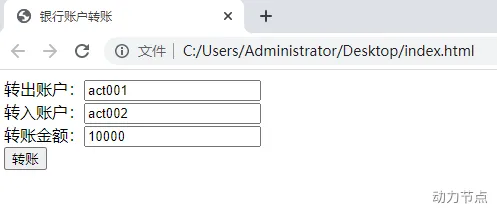
掌握mybatis在web应用中怎么用 mybatis三大对象的作用域和生命周期 ThreadLocal原理及使用 巩固MVC架构模式 为学习MyBatis的接口代理机制做准备 需求描述 实现将钱从A账户转到B账户。
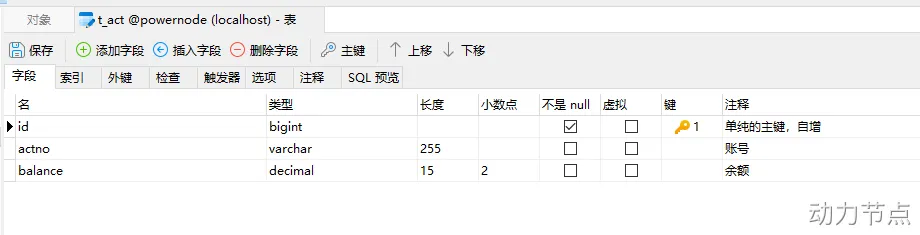
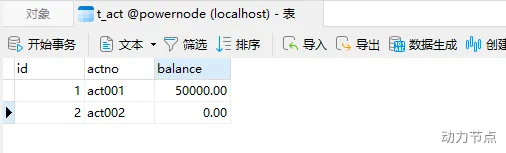
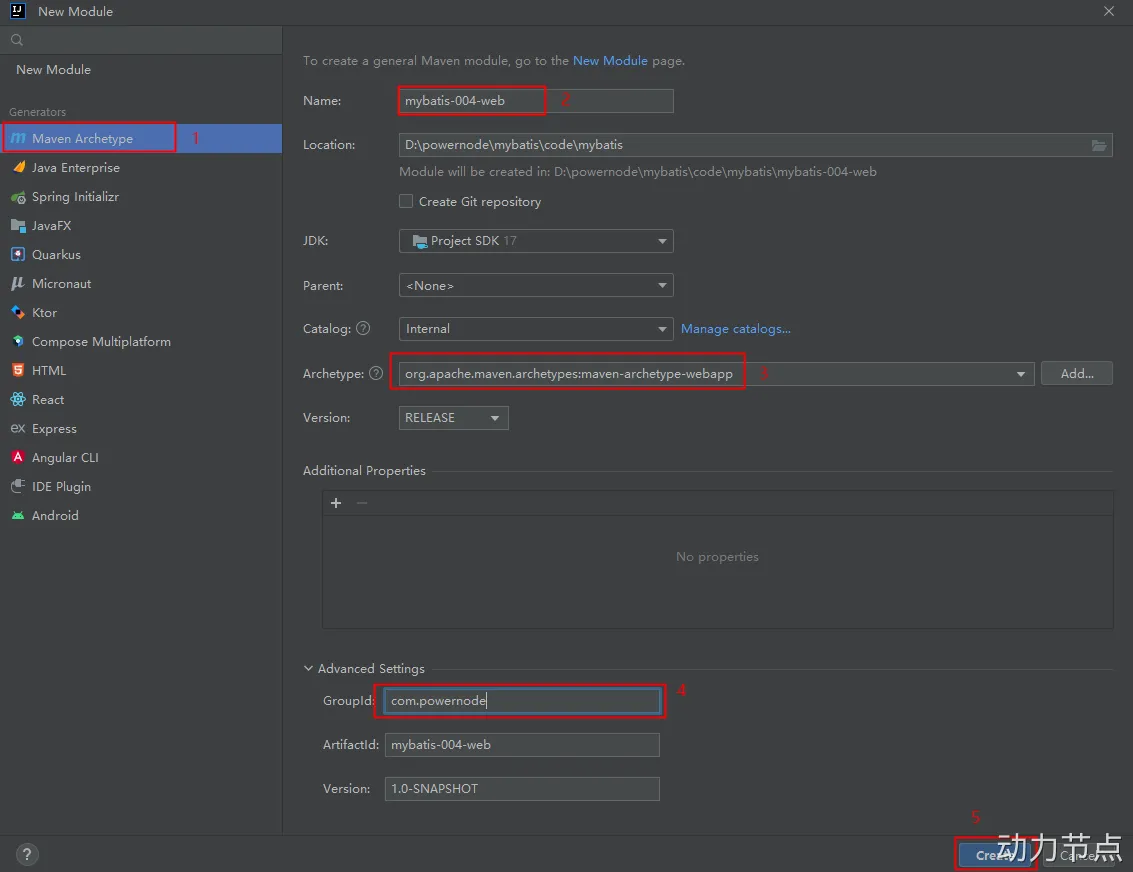
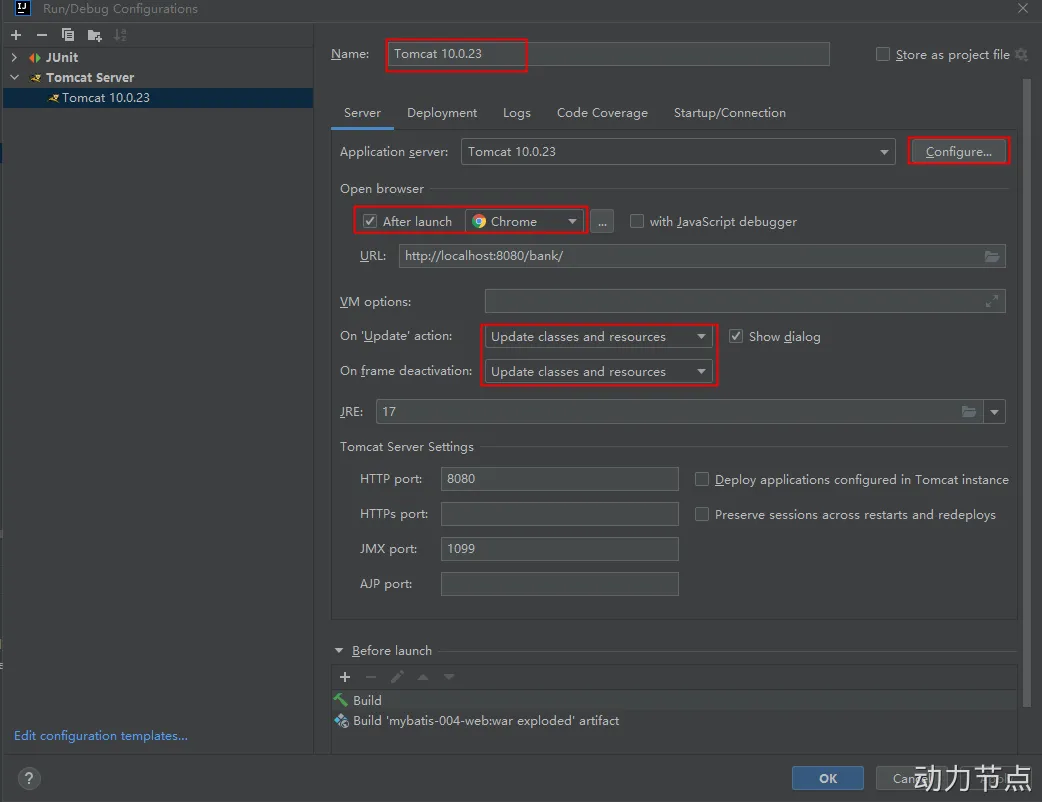
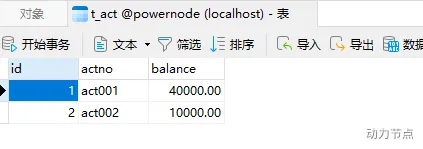
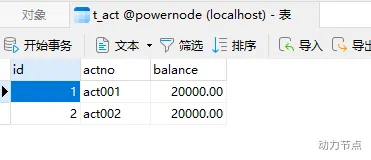
数据库表的设计和准备数据 实现步骤 第一步:环境搭建 IDEA配置Tomcat,这里Tomcat使用10+版本。并部署应用到tomcat。 1 2 3 4 5 6 7 8 9 10 11 12 13 14 <?xml version="1.0" encoding="UTF-8" ?> <web-app xmlns ="https://jakarta.ee/xml/ns/jakartaee" xmlns:xsi ="http://www.w3.org/2001/XMLSchema-instance" xsi:schemaLocation ="https://jakarta.ee/xml/ns/jakartaee https://jakarta.ee/xml/ns/jakartaee/web-app_5_0.xsd" version ="5.0" metadata-complete ="false" > </web-app >
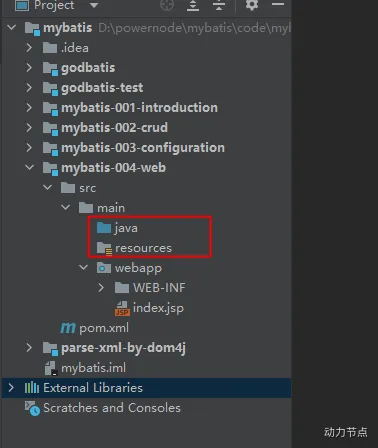
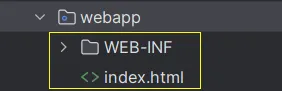
删除index.jsp文件,因为该项目不使用JSP。只使用html。 确定pom.xml文件中的打包方式是war包。 引入相关依赖编译器版本修改为17 引入的依赖包括:mybatis,mysql驱动,junit,logback,servlet。 1 2 3 4 5 6 7 8 9 10 11 12 13 14 15 16 17 18 19 20 21 22 23 24 25 26 27 28 29 30 31 32 33 34 35 36 37 38 39 40 41 42 43 44 45 46 47 48 49 50 51 52 53 54 55 56 57 58 59 60 61 62 63 64 65 66 67 68 69 70 71 72 73 74 75 76 77 78 79 80 81 82 83 84 85 86 87 88 89 90 91 92 <?xml version="1.0" encoding="UTF-8" ?> <project xmlns ="http://maven.apache.org/POM/4.0.0" xmlns:xsi ="http://www.w3.org/2001/XMLSchema-instance" xsi:schemaLocation ="http://maven.apache.org/POM/4.0.0 http://maven.apache.org/xsd/maven-4.0.0.xsd" > <modelVersion > 4.0.0</modelVersion > <groupId > com.powernode</groupId > <artifactId > mybatis-004-web</artifactId > <version > 1.0-SNAPSHOT</version > <packaging > war</packaging > <name > mybatis-004-web</name > <url > http://localhost:8080/bank</url > <properties > <project.build.sourceEncoding > UTF-8</project.build.sourceEncoding > <maven.compiler.source > 17</maven.compiler.source > <maven.compiler.target > 17</maven.compiler.target > </properties > <dependencies > <dependency > <groupId > org.mybatis</groupId > <artifactId > mybatis</artifactId > <version > 3.5.10</version > </dependency > <dependency > <groupId > mysql</groupId > <artifactId > mysql-connector-java</artifactId > <version > 8.0.30</version > </dependency > <dependency > <groupId > junit</groupId > <artifactId > junit</artifactId > <version > 4.13.2</version > <scope > test</scope > </dependency > <dependency > <groupId > ch.qos.logback</groupId > <artifactId > logback-classic</artifactId > <version > 1.2.11</version > </dependency > <dependency > <groupId > jakarta.servlet</groupId > <artifactId > jakarta.servlet-api</artifactId > <version > 5.0.0</version > <scope > provided</scope > </dependency > </dependencies > <build > <finalName > mybatis-004-web</finalName > <pluginManagement > <plugins > <plugin > <artifactId > maven-clean-plugin</artifactId > <version > 3.1.0</version > </plugin > <plugin > <artifactId > maven-resources-plugin</artifactId > <version > 3.0.2</version > </plugin > <plugin > <artifactId > maven-compiler-plugin</artifactId > <version > 3.8.0</version > </plugin > <plugin > <artifactId > maven-surefire-plugin</artifactId > <version > 2.22.1</version > </plugin > <plugin > <artifactId > maven-war-plugin</artifactId > <version > 3.2.2</version > </plugin > <plugin > <artifactId > maven-install-plugin</artifactId > <version > 2.5.2</version > </plugin > <plugin > <artifactId > maven-deploy-plugin</artifactId > <version > 2.8.2</version > </plugin > </plugins > </pluginManagement > </build > </project >
引入相关配置文件,放到resources目录下(全部放到类的根路径下)mybatis-config.xml AccountMapper.xml logback.xml jdbc.properties mybatis-config.xml AccountMapper.xml logback.xml jdbc.properties 1 2 3 4 5 6 7 8 9 10 11 12 13 14 15 16 17 18 19 20 21 22 23 24 <?xml version="1.0" encoding="UTF-8" ?> <!DOCTYPE configuration PUBLIC "-//mybatis.org//DTD Config 3.0//EN" "http://mybatis.org/dtd/mybatis-3-config.dtd" > <configuration > <properties resource ="jdbc.properties" /> <environments default ="dev" > <environment id ="dev" > <transactionManager type ="JDBC" /> <dataSource type ="POOLED" > <property name ="driver" value ="${jdbc.driver}" /> <property name ="url" value ="${jdbc.url}" /> <property name ="username" value ="${jdbc.username}" /> <property name ="password" value ="${jdbc.password}" /> </dataSource > </environment > </environments > <mappers > <mapper resource ="AccountMapper.xml" /> </mappers > </configuration >
1 2 3 4 5 6 7 8 <?xml version="1.0" encoding="UTF-8" ?> <!DOCTYPE mapper PUBLIC "-//mybatis.org//DTD Mapper 3.0//EN" "http://mybatis.org/dtd/mybatis-3-mapper.dtd" > <mapper namespace ="account" > </mapper >
1 2 3 4 5 6 7 8 9 10 <?xml version="1.0" encoding="UTF-8" ?> <configuration debug ="false" > <appender name ="STDOUT" class ="ch.qos.logback.core.ConsoleAppender" > <encoder class ="ch.qos.logback.classic.encoder.PatternLayoutEncoder" > <pattern > %d{yyyy-MM-dd HH:mm:ss.SSS} [%thread] %-5level %logger{50} - %msg%n</pattern > </encoder > </appender >
1 2 3 4 jdbc.driver =com.mysql.cj.jdbc.Driver jdbc.url =jdbc:mysql://localhost:3306/powernode jdbc.username =root jdbc.password =root
第二步:编写前端页面index.html 1 2 3 4 5 6 7 8 9 10 11 12 13 14 15 16 <!DOCTYPE html > <html lang ="en" > <head > <meta charset ="UTF-8" > <title > 银行账户转账</title > </head > <body > <form action ="/bank/transfer" method ="post" > 转出账户:<input type ="text" name ="fromActno" /> <br > 转入账户:<input type ="text" name ="toActno" /> <br > 转账金额:<input type ="text" name ="money" /> <br > <input type ="submit" value ="转账" /> </form > </body > </html >
第三步:创建项目的包结构 创建包结构:
com.powernode.bank.pojo com.powernode.bank.service com.powernode.bank.service.impl com.powernode.bank.dao com.powernode.bank.dao.impl com.powernode.bank.web.controller com.powernode.bank.exception com.powernode.bank.utils:将之前编写的SqlSessionUtil工具类拷贝到该包下。 第四步:定义实体类 1 2 3 4 5 6 7 8 9 10 11 12 13 14 15 16 @Data public class Account { private Long id; private String actno; private Double balance; public Account () { } public Account (Long id, String actno, Double balance) { this .id = id; this .actno = actno; this .balance = balance; } }
第五步:编写DAO层接口和实现类 分析dao中至少要提供几个方法,才能完成转账:
转账前需要查询余额是否充足:selectByActno 转账时要更新账户:update 1 2 3 4 5 6 7 8 9 10 11 12 13 14 15 16 17 public interface AccountDao { Account selectByActno (String actno) ; int update (Account act) ; }
1 2 3 4 5 6 7 8 9 10 11 12 13 14 15 16 17 18 public class AccountDaoImpl implements AccountDao { @Override public Account selectByActno (String actno) { SqlSession sqlSession = SqlSessionUtil.openSession(); Account act = (Account)sqlSession.selectOne("selectByActno" , actno); sqlSession.close(); return act; } @Override public int update (Account act) { SqlSession sqlSession = SqlSessionUtil.openSession(); int count = sqlSession.update("update" , act); sqlSession.commit(); sqlSession.close(); return count; } }
第六步:编写SQL映射文件 1 2 3 4 5 6 7 8 9 10 11 12 13 <?xml version="1.0" encoding="UTF-8" ?> <!DOCTYPE mapper PUBLIC "-//mybatis.org//DTD Mapper 3.0//EN" "http://mybatis.org/dtd/mybatis-3-mapper.dtd" > <mapper namespace ="account" > <select id ="selectByActno" resultType ="com.powernode.bank.pojo.Account" > select * from t_act where actno = #{actno} </select > <update id ="update" > update t_act set balance = #{balance} where actno = #{actno} </update > </mapper >
第七步:编写Service层接口和实现类 AccountService AccountServiceImpl 余额不足异常 应用异常 1 2 3 4 5 6 7 8 9 10 11 12 13 14 15 16 17 18 public interface AccountService { void transfer (String fromActno, String toActno, double money) throws MoneyNotEnoughException, AppException; }
1 2 3 4 5 6 7 8 9 10 11 12 13 14 15 16 17 18 19 20 21 22 23 24 25 26 public class AccountServiceImpl implements AccountService { private AccountDao accountDao = new AccountDaoImpl (); @Override public void transfer (String fromActno, String toActno, double money) throws MoneyNotEnoughException, AppException { Account fromAct = accountDao.selectByActno(fromActno); if (fromAct.getBalance() < money) { throw new MoneyNotEnoughException ("对不起,您的余额不足。" ); } try { Account toAct = accountDao.selectByActno(toActno); fromAct.setBalance(fromAct.getBalance() - money); toAct.setBalance(toAct.getBalance() + money); accountDao.update(fromAct); accountDao.update(toAct); } catch (Exception e) { throw new AppException ("转账失败,未知原因!" ); } } }
1 2 3 4 5 6 7 8 9 10 11 12 package com.powernode.bank.exception;public class MoneyNotEnoughException extends Exception { public MoneyNotEnoughException () {} public MoneyNotEnoughException (String msg) { super (msg); } }
1 2 3 4 5 6 7 8 9 10 public class AppException extends Exception { public AppException () {} public AppException (String msg) { super (msg); } }
第八步:编写AccountController 1 2 3 4 5 6 7 8 9 10 11 12 13 14 15 16 17 18 19 20 21 22 23 24 25 26 27 28 29 30 31 32 @WebServlet("/transfer") public class AccountController extends HttpServlet { private AccountService accountService = new AccountServiceImpl (); @Override protected void doPost (HttpServletRequest request, HttpServletResponse response) throws ServletException, IOException { response.setContentType("text/html;charset=UTF-8" ); PrintWriter out = response.getWriter(); String fromActno = request.getParameter("fromActno" ); String toActno = request.getParameter("toActno" ); double money = Integer.parseInt(request.getParameter("money" )); try { accountService.transfer(fromActno, toActno, money); out.print("<h1>转账成功!!!</h1>" ); } catch (MoneyNotEnoughException e) { out.print(e.getMessage()); } catch (AppException e) { out.print(e.getMessage()); } } }
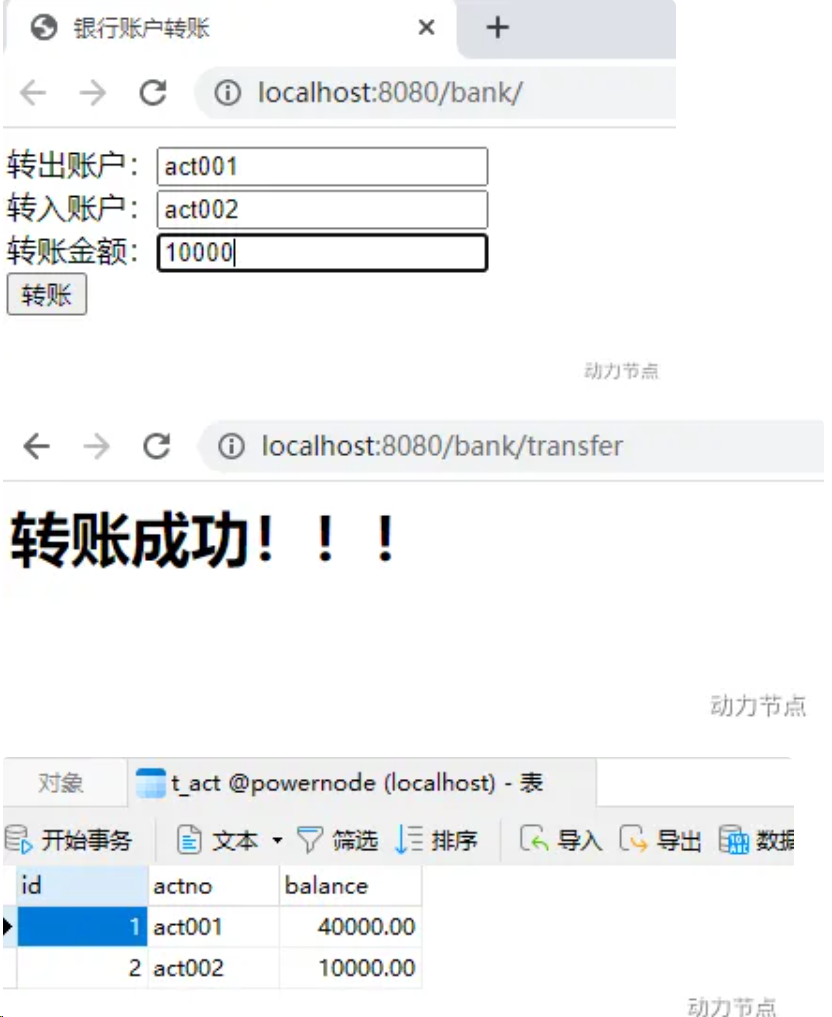
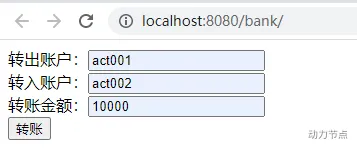
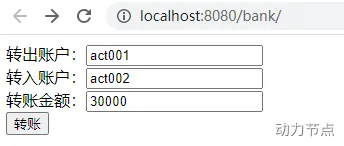
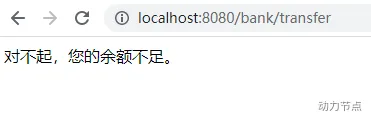
启动服务器,打开浏览器,输入地址:http://localhost:8080/bank ,测试:
MyBatis对象作用域以及事务问题 MyBatis核心对象的作用域 SqlSessionFactoryBuilder 这个类可以被实例化、使用和丢弃,一旦创建了 SqlSessionFactory,就不再需要它了。 因此 SqlSessionFactoryBuilder 实例的最佳作用域是方法作用域(也就是局部方法变量),该类不建议长期复用,应当在创建完成后立即丢弃
SqlSessionFactory 该类是应用程序中唯一的SqlSession生产者,合理的用法是在整个应用程序运行期间只创建一次,因为创建它的过程代价昂贵(需要解析全部配置和映射文件)。因此,SqlSessionFactory 实例的最佳作用域是应用作用域(Application Scope),也就是单例。 它是线程安全的,所有线程都可以安全地共享这同一个实例,并用它来获取各自独立的 SqlSession。
SqlSession 这个类代表了与数据库的一次会话,类似于 JDBC 中的 Connection 对象,它负责执行SQL语句、管理事务,并维护着会话级别的一级缓存。 SqlSession是非线程安全的,它绝不能被多个线程共享。 因此,SqlSession 实例的最佳作用域是请求作用域或方法作用域。 你应该在开始一个数据库操作或事务时打开它,并确保在操作结束时立即关闭它(即使发生异常),以释放它所持有的数据库连接资源。 如果忘记关闭,将导致严重的并发问题和数据库连接池耗尽。
事务问题 在之前的转账业务中,更新了两个账户,我们需要保证它们的同时成功或同时失败,这个时候就需要使用事务机制,在transfer方法开始执行时开启事务,直到两个更新都成功之后,再提交事务,我们尝试将transfer方法进行如下修改:
1 2 3 4 5 6 7 8 9 10 11 12 13 14 15 16 17 18 19 20 21 22 23 24 25 26 27 28 29 30 31 public class AccountServiceImpl implements AccountService { private AccountDao accountDao = new AccountDaoImpl (); @Override public void transfer (String fromActno, String toActno, double money) throws MoneyNotEnoughException, AppException { Account fromAct = accountDao.selectByActno(fromActno); if (fromAct.getBalance() < money) { throw new MoneyNotEnoughException ("对不起,您的余额不足。" ); } try { Account toAct = accountDao.selectByActno(toActno); fromAct.setBalance(fromAct.getBalance() - money); toAct.setBalance(toAct.getBalance() + money); SqlSession sqlSession = SqlSessionUtil.openSession(); accountDao.update(fromAct); String s = null ; s.toString(); accountDao.update(toAct); sqlSession.commit(); sqlSession.close(); } catch (Exception e) { throw new AppException ("转账失败,未知原因!" ); } } }
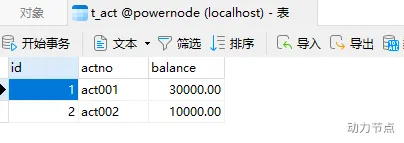
明明转账失败了,但钱却少了,而对面的钱没有增加,这是为什么?主要是因为service和dao中使用的SqlSession对象不是同一个
解决方法:为了保证service和dao中使用的SqlSession对象是同一个,可以将SqlSession对象存放到ThreadLocal当中。修改SqlSessionUtil工具类
1 2 3 4 5 6 7 8 9 10 11 12 13 14 15 16 17 18 19 20 21 22 23 24 25 26 27 28 29 30 31 32 33 34 35 36 37 38 39 40 41 42 public class SqlSessionUtil { private static SqlSessionFactory sqlSessionFactory; static { try { SqlSessionFactoryBuilder sqlSessionFactoryBuilder = new SqlSessionFactoryBuilder (); sqlSessionFactory = sqlSessionFactoryBuilder.build(Resources.getResourceAsStream("mybatis-config.xml" )); } catch (Exception e) { e.printStackTrace(); } } private static ThreadLocal<SqlSession> local = new ThreadLocal <>(); public static SqlSession openSession () { SqlSession sqlSession = local.get(); if (sqlSession == null ) { sqlSession = sqlSessionFactory.openSession(); local.set(sqlSession); } return sqlSession; } public static void close (SqlSession sqlSession) { if (sqlSession != null ) { sqlSession.close(); } local.remove(); } }
修改dao中的方法:将AccountDaoImpl中所有方法中的提交commit和关闭close代码全部删除。
1 2 3 4 5 6 7 8 9 10 11 12 13 14 15 public class AccountDaoImpl implements AccountDao { @Override public Account selectByActno (String actno) { SqlSession sqlSession = SqlSessionUtil.openSession(); Account act = (Account)sqlSession.selectOne("account.selectByActno" , actno); return act; } @Override public int update (Account act) { SqlSession sqlSession = SqlSessionUtil.openSession(); int count = sqlSession.update("account.update" , act); return count; } }
修改service中的方法:
1 2 3 4 5 6 7 8 9 10 11 12 13 14 15 16 17 18 19 20 21 22 23 24 25 26 27 28 29 30 31 public class AccountServiceImpl implements AccountService { private AccountDao accountDao = new AccountDaoImpl (); @Override public void transfer (String fromActno, String toActno, double money) throws MoneyNotEnoughException, AppException { Account fromAct = accountDao.selectByActno(fromActno); if (fromAct.getBalance() < money) { throw new MoneyNotEnoughException ("对不起,您的余额不足。" ); } try { Account toAct = accountDao.selectByActno(toActno); fromAct.setBalance(fromAct.getBalance() - money); toAct.setBalance(toAct.getBalance() + money); SqlSession sqlSession = SqlSessionUtil.openSession(); accountDao.update(fromAct); String s = null ; s.toString(); accountDao.update(toAct); sqlSession.commit(); SqlSessionUtil.close(sqlSession); } catch (Exception e) { throw new AppException ("转账失败,未知原因!" ); } } }
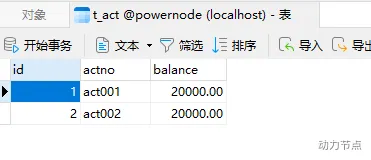
再次测试:
分析当前程序存在的问题 我们来看一下DaoImpl的代码
1 2 3 4 5 6 7 8 9 10 11 12 13 14 15 public class AccountDaoImpl implements AccountDao { @Override public Account selectByActno (String actno) { SqlSession sqlSession = SqlSessionUtil.openSession(); Account act = (Account)sqlSession.selectOne("account.selectByActno" , actno); return act; } @Override public int update (Account act) { SqlSession sqlSession = SqlSessionUtil.openSession(); int count = sqlSession.update("account.update" , act); return count; } }
不难发现,这个dao实现类中的方法代码很固定,基本上就是一行代码,通过SqlSession对象调用insert、delete、update、select等方法,这个类中的方法没有任何业务逻辑,既然是这样,这个类我们能不能动态的生成 ,以后可以不写这个类吗?答案:可以。
使用javassist生成类 来自百度百科:
Javassist是一个开源的分析、编辑和创建Java字节码的类库。是由东京工业大学的数学和计算机科学系的 Shigeru Chiba (千叶 滋)所创建的。它已加入了开放源代码JBoss 应用服务器项目,通过使用Javassist对字节码操作为JBoss实现动态”AOP”框架。
Javassist的使用 要使用javassist,首先要引入它的依赖
1 2 3 4 5 <dependency > <groupId > org.javassist</groupId > <artifactId > javassist</artifactId > <version > 3.29.1-GA</version > </dependency >
样例代码:
1 2 3 4 5 6 7 8 9 10 11 12 13 14 15 16 17 18 19 20 21 22 public class JavassistTest { public static void main (String[] args) throws Exception { ClassPool pool = ClassPool.getDefault(); CtClass ctClass = pool.makeClass("com.powernode.javassist.Test" ); CtMethod ctMethod = new CtMethod (CtClass.voidType, "execute" , new CtClass []{}, ctClass); ctMethod.setModifiers(Modifier.PUBLIC); ctMethod.setBody("{System.out.println(\"hello world\");}" ); ctClass.addMethod(ctMethod); Class<?> aClass = ctClass.toClass(); Object o = aClass.newInstance(); Method method = aClass.getDeclaredMethod("execute" ); method.invoke(o); } }
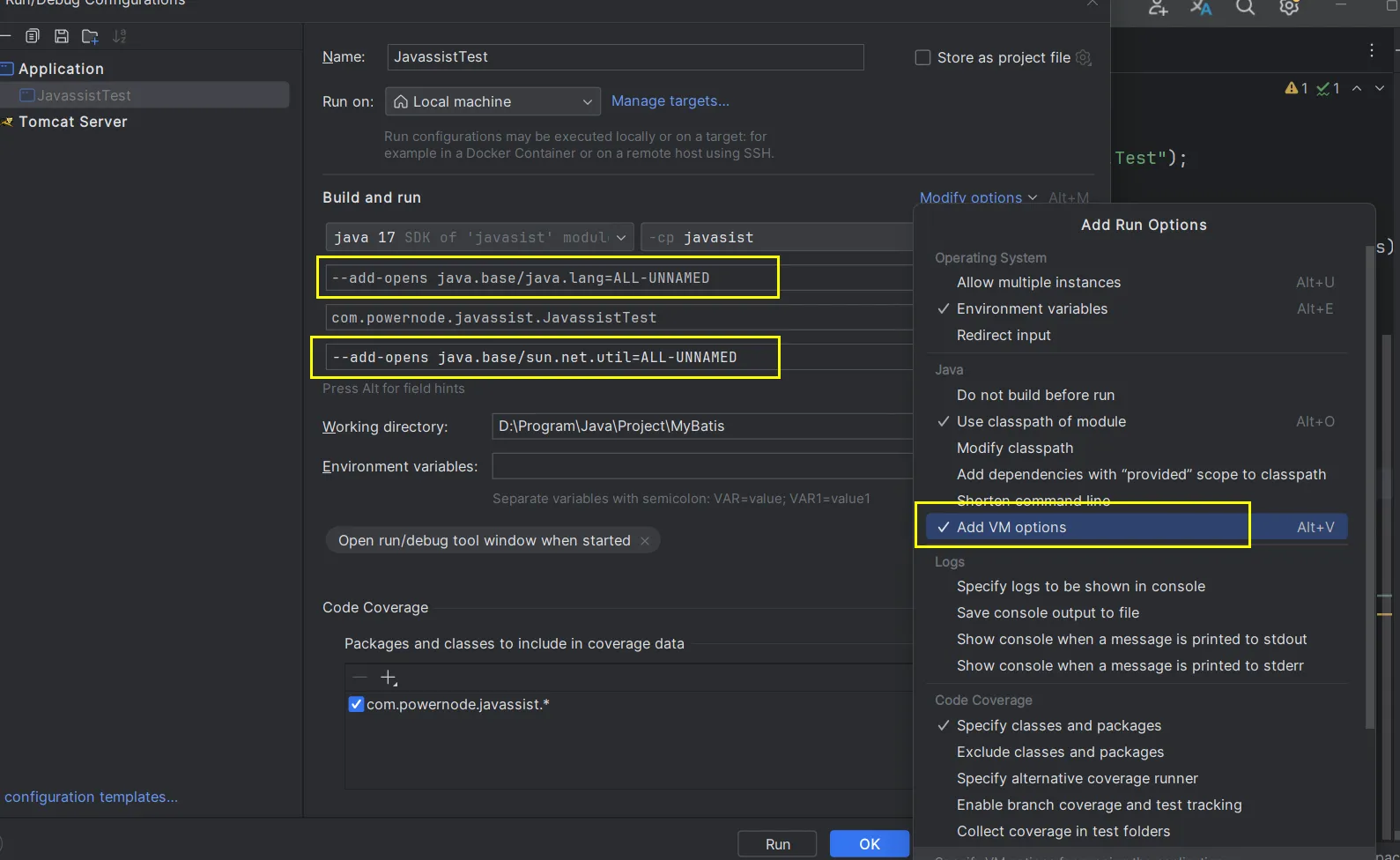
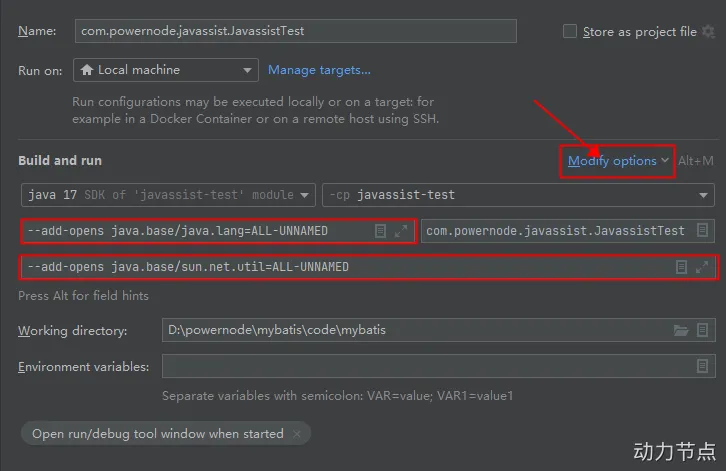
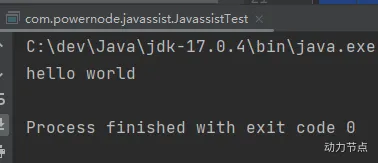
运行要注意:加两个参数,要不然会有异常。
—add-opens java.base/java.lang=ALL-UNNAMED —add-opens java.base/sun.net.util=ALL-UNNAMED IDEA 2023新版及以后 IDEA 旧版 运行结果 使用Javassist生成DaoImpl类 使用Javassist动态生成DaoImpl类
1 2 3 4 5 6 7 8 9 10 11 12 13 14 15 16 17 18 19 20 21 22 23 24 25 26 27 28 29 30 31 32 33 34 35 36 37 38 39 40 41 42 43 44 45 46 47 48 49 50 51 52 53 54 55 56 57 58 59 60 61 62 63 64 65 66 67 68 69 70 71 72 73 74 75 public class GenerateDaoByJavassist { public static Object getMapper (SqlSession sqlSession, Class daoInterface) { ClassPool pool = ClassPool.getDefault(); CtClass ctClass = pool.makeClass(daoInterface.getPackageName() + ".impl." + daoInterface.getSimpleName() + "Impl" ); CtClass ctInterface = pool.makeClass(daoInterface.getName()); ctClass.addInterface(ctInterface); Method[] methods = daoInterface.getDeclaredMethods(); Arrays.stream(methods).forEach(method -> { StringBuilder methodStr = new StringBuilder (); String returnTypeName = method.getReturnType().getName(); methodStr.append(returnTypeName); methodStr.append(" " ); String methodName = method.getName(); methodStr.append(methodName); methodStr.append("(" ); Class<?>[] parameterTypes = method.getParameterTypes(); for (int i = 0 ; i < parameterTypes.length; i++) { methodStr.append(parameterTypes[i].getName()); methodStr.append(" arg" ); methodStr.append(i); if (i != parameterTypes.length - 1 ) { methodStr.append("," ); } } methodStr.append("){" ); String sqlId = daoInterface.getName() + "." + methodName; String sqlCommondTypeName = sqlSession.getConfiguration().getMappedStatement(sqlId).getSqlCommandType().name(); if ("SELECT" .equals(sqlCommondTypeName)) { methodStr.append("org.apache.ibatis.session.SqlSession sqlSession = com.powernode.bank.utils.SqlSessionUtil.openSession();" ); methodStr.append("Object obj = sqlSession.selectOne(\"" + sqlId + "\", arg0);" ); methodStr.append("return (" + returnTypeName + ")obj;" ); } else if ("UPDATE" .equals(sqlCommondTypeName)) { methodStr.append("org.apache.ibatis.session.SqlSession sqlSession = com.powernode.bank.utils.SqlSessionUtil.openSession();" ); methodStr.append("int count = sqlSession.update(\"" + sqlId + "\", arg0);" ); methodStr.append("return count;" ); } methodStr.append("}" ); System.out.println(methodStr); try { CtMethod ctMethod = CtMethod.make(methodStr.toString(), ctClass); ctMethod.setModifiers(Modifier.PUBLIC); ctClass.addMethod(ctMethod); } catch (CannotCompileException e) { throw new RuntimeException (e); } }); try { Class<?> aClass = ctClass.toClass(); Constructor<?> defaultCon = aClass.getDeclaredConstructor(); Object o = defaultCon.newInstance(); return o; } catch (Exception e) { throw new RuntimeException (e); } } }
修改AccountMapper.xml文件:namespace必须是dao接口的全限定名称,id必须是dao接口中的方法名:
1 2 3 4 5 6 7 8 9 10 11 12 13 <?xml version="1.0" encoding="UTF-8" ?> <!DOCTYPE mapper PUBLIC "-//mybatis.org//DTD Mapper 3.0//EN" "http://mybatis.org/dtd/mybatis-3-mapper.dtd" > <mapper namespace ="com.powernode.bank.dao.AccountDao" > <select id ="selectByActno" resultType ="com.powernode.bank.pojo.Account" > select * from t_act where actno = #{actno} </select > <update id ="update" > update t_act set balance = #{balance} where actno = #{actno} </update > </mapper >
修改service类中获取dao对象的代码:
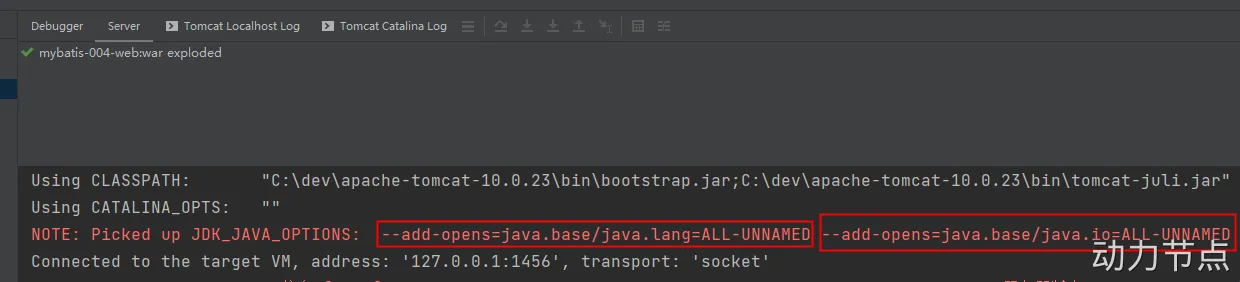
启动服务器:启动过程中显示,tomcat服务器自动添加了以下的两个运行参数。所以不需要再单独配置。
MyBatis中接口代理机制及使用 其实以上所讲内容mybatis内部已经实现了。直接调用以下代码即可获取dao接口的代理类
1 AccountDao accountDao = (AccountDao)sqlSession.getMapper(AccountDao.class);
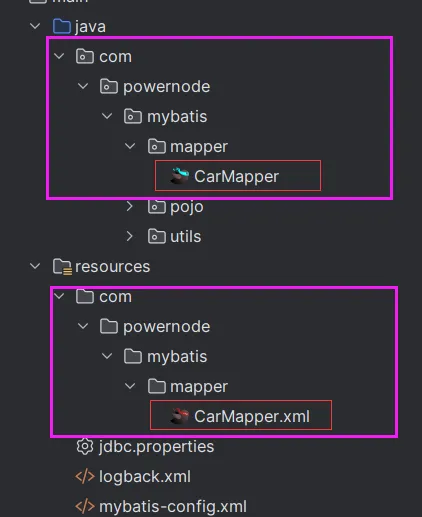
使用以上代码的前提是:AccountMapper.xml文件中的namespace必须和dao接口的全限定名称一致,id必须和dao接口中方法名一致。
将service中获取dao对象的代码再次修改,如下:
MyBatis小技巧 #{}和${} #{} 环境准备:
pom.xml jdbc.properties logback.xml utils工具类 1 2 3 4 5 6 7 8 9 10 11 12 13 14 15 16 17 18 19 20 21 22 23 24 25 26 27 28 29 30 31 32 33 34 35 36 37 38 39 40 41 42 43 44 45 <?xml version="1.0" encoding="UTF-8" ?> <project xmlns ="http://maven.apache.org/POM/4.0.0" xmlns:xsi ="http://www.w3.org/2001/XMLSchema-instance" xsi:schemaLocation ="http://maven.apache.org/POM/4.0.0 http://maven.apache.org/xsd/maven-4.0.0.xsd" > <modelVersion > 4.0.0</modelVersion > <groupId > com.powernode</groupId > <artifactId > mybatis-005-antic</artifactId > <version > 1.0-SNAPSHOT</version > <packaging > jar</packaging > <dependencies > <dependency > <groupId > org.mybatis</groupId > <artifactId > mybatis</artifactId > <version > 3.5.10</version > </dependency > <dependency > <groupId > mysql</groupId > <artifactId > mysql-connector-java</artifactId > <version > 8.0.30</version > </dependency > <dependency > <groupId > junit</groupId > <artifactId > junit</artifactId > <version > 4.13.2</version > <scope > test</scope > </dependency > <dependency > <groupId > ch.qos.logback</groupId > <artifactId > logback-classic</artifactId > <version > 1.2.11</version > </dependency > </dependencies > <properties > <maven.compiler.source > 17</maven.compiler.source > <maven.compiler.target > 17</maven.compiler.target > </properties > </project >
1 2 3 4 jdbc.driver =com.mysql.cj.jdbc.Driver jdbc.url =jdbc:mysql://localhost:3306/powernode jdbc.username =root jdbc.password =root
1 2 3 4 5 6 7 8 9 10 11 12 13 14 15 16 17 18 19 20 21 22 23 24 25 26 27 28 29 30 31 32 33 34 35 36 37 38 39 40 41 <?xml version="1.0" encoding="UTF-8" ?> <configuration debug ="false" > <appender name ="STDOUT" class ="ch.qos.logback.core.ConsoleAppender" > <encoder class ="ch.qos.logback.classic.encoder.PatternLayoutEncoder" > <pattern > %d{yyyy-MM-dd HH:mm:ss.SSS} [%thread] %-5level %logger{50} - %msg%n</pattern > </encoder > </appender > <appender name ="FILE" class ="ch.qos.logback.core.rolling.RollingFileAppender" > <rollingPolicy class ="ch.qos.logback.core.rolling.TimeBasedRollingPolicy" > <FileNamePattern > ${LOG_HOME}/TestWeb.log.%d{yyyy-MM-dd}.log</FileNamePattern > <MaxHistory > 30</MaxHistory > </rollingPolicy > <encoder class ="ch.qos.logback.classic.encoder.PatternLayoutEncoder" > <pattern > %d{yyyy-MM-dd HH:mm:ss.SSS} [%thread] %-5level %logger{50} - %msg%n</pattern > </encoder > <triggeringPolicy class ="ch.qos.logback.core.rolling.SizeBasedTriggeringPolicy" > <MaxFileSize > 100MB</MaxFileSize > </triggeringPolicy > </appender > <logger name ="com.apache.ibatis" level ="TRACE" /> <logger name ="java.sql.Connection" level ="DEBUG" /> <logger name ="java.sql.Statement" level ="DEBUG" /> <logger name ="java.sql.PreparedStatement" level ="DEBUG" /> <root level ="DEBUG" > <appender-ref ref ="STDOUT" /> <appender-ref ref ="FILE" /> </root > </configuration >
1 2 3 4 5 6 7 8 9 10 11 12 13 14 15 16 17 18 19 20 21 22 23 24 25 26 27 28 29 30 31 32 33 34 35 36 37 38 39 40 41 42 public class SqlSessionUtil { private static SqlSessionFactory sqlSessionFactory; static { try { SqlSessionFactoryBuilder sqlSessionFactoryBuilder = new SqlSessionFactoryBuilder (); sqlSessionFactory = sqlSessionFactoryBuilder.build(Resources.getResourceAsStream("mybatis-config.xml" )); } catch (Exception e) { e.printStackTrace(); } } private static ThreadLocal<SqlSession> local = new ThreadLocal <>(); public static SqlSession openSession () { SqlSession sqlSession = local.get(); if (sqlSession == null ) { sqlSession = sqlSessionFactory.openSession(); local.set(sqlSession); } return sqlSession; } public static void close (SqlSession sqlSession) { if (sqlSession != null ) { sqlSession.close(); } local.remove(); } }
Car mapper接口 mybatis-config.xml 1 2 3 4 5 6 7 8 9 10 11 12 public class Car { private Long id; private String carNum; private String brand; private Double guidePrice; private String produceTime; private String carType; }
1 2 3 4 5 6 7 8 9 10 public interface CarMapper { List<Car> selectByCarType (String carType) ; }
1 2 3 4 5 6 7 8 9 10 11 12 13 14 15 16 17 18 19 20 21 <?xml version="1.0" encoding="UTF-8" ?> <!DOCTYPE configuration PUBLIC "-//mybatis.org//DTD Config 3.0//EN" "http://mybatis.org/dtd/mybatis-3-config.dtd" > <configuration > <properties resource ="jdbc.properties" /> <environments default ="dev" > <environment id ="dev" > <transactionManager type ="JDBC" /> <dataSource type ="POOLED" > <property name ="driver" value ="${jdbc.driver}" /> <property name ="url" value ="${jdbc.url}" /> <property name ="username" value ="${jdbc.username}" /> <property name ="password" value ="${jdbc.password}" /> </dataSource > </environment > </environments > <mappers > <mapper resource ="CarMapper.xml" /> </mappers > </configuration >
编写测试程序:
1 2 3 4 5 6 7 8 9 10 11 12 public class CarMapperTest { @Test public void testSelectByCarType () { CarMapper mapper = (CarMapper) SqlSessionUtil.openSession().getMapper(CarMapper.class); List<Car> cars = mapper.selectByCarType("燃油车" ); cars.forEach(car -> System.out.println(car)); } }
执行结果:
通过执行可以清楚的看到,sql语句中是带有 ? 的,这个 ? 就是之前在JDBC中所学的占位符,专门用来接收值的。
把“燃油车”以String类型的值,传递给 ?
#{}它会先进行sql语句的预编译,然后再给占位符传值
${} 同样的需求,我们使用${}来完成
CarMapper.xml文件修改如下:
1 2 3 4 5 6 7 8 9 10 11 12 13 14 15 16 <?xml version="1.0" encoding="UTF-8" ?> <!DOCTYPE mapper PUBLIC "-//mybatis.org//DTD Mapper 3.0//EN" "http://mybatis.org/dtd/mybatis-3-mapper.dtd" > <mapper namespace ="com.powernode.mybatis.mapper.CarMapper" > <select id ="selectByCarType" resultType ="com.powernode.mybatis.pojo.Car" > select id,car_num as carNum,brand,guide_price as guidePrice,produce_time as produceTime,car_type as carType from t_car where car_type = ${carType} </select > </mapper >
再次运行测试程序:
这时候会抛出异常,观察生成的sql语句:
显然${}是先进行sql语句的拼接,然后再编译,燃油车是一个字符串,在Sql语句中应当添加单引号
修改:
1 2 3 4 5 6 7 8 9 10 11 12 13 14 15 16 17 <?xml version="1.0" encoding="UTF-8" ?> <!DOCTYPE mapper PUBLIC "-//mybatis.org//DTD Mapper 3.0//EN" "http://mybatis.org/dtd/mybatis-3-mapper.dtd" > <mapper namespace ="com.powernode.mybatis.mapper.CarMapper" > <select id ="selectByCarType" resultType ="com.powernode.mybatis.pojo.Car" > select id,car_num as carNum,brand,guide_price as guidePrice,produce_time as produceTime,car_type as carType from t_car where car_type = '${carType}' </select > </mapper >
在日常的普通需求中,还是建议使用#{}的方式。原则:能用 #{} 就不用 ${}
什么情况下必须使用${} 关键字拼接 当需要进行sql语句关键字拼接的时候。必须使用${}
需求:通过向sql语句中注入asc或desc关键字,来完成数据的升序或降序排列。
CarMapper.java CarMapper.xml 1 2 3 4 5 6 List<Car> selectAll (String ascOrDesc) ;
1 2 3 4 5 6 7 <select id ="selectAll" resultType ="com.powernode.mybatis.pojo.Car" > select id,car_num as carNum,brand,guide_price as guidePrice,produce_time as produceTime,car_type as carType from t_car order by carNum #{key} </select >
测试程序:
1 2 3 4 5 6 @Test public void testSelectAll () { CarMapper mapper = (CarMapper) SqlSessionUtil.openSession().getMapper(CarMapper.class); List<Car> cars = mapper.selectAll("desc" ); cars.forEach(car -> System.out.println(car)); }
运行:
报错的原因是sql语句不合法,因为采用这种方式传值,程序会认为desc是一个字段名,而不是一个关键字,最终SQL语句会是这样:
select id,car_num as carNum,brand,guide_price as guidePrice,produce_time as produceTime,car_type as carType from t_car order by carNum ‘desc’
desc是一个关键字,不能带单引号的,所以在进行sql语句关键字拼接的时候,必须使用${}
修改xml文件中的#{}为${}
1 2 3 4 5 6 7 8 <select id ="selectAll" resultType ="com.powernode.mybatis.pojo.Car" > select id,car_num as carNum,brand,guide_price as guidePrice,produce_time as produceTime,car_type as carType from t_car order by carNum ${key} </select >
再次执行测试程序:
拼接表名 业务背景:实际开发中,若数据量巨大可能采用分表的方式进行存储,比如每天生成一张表,表的名字与日期挂钩,例如:2022年8月1日生成的表:t_user20220108,2000年1月1日生成的表:t_user20000101。此时前端查询时会提交一个具体的日期,而后端则根据日期动态拼接表名。
使用#{}拼接表名会是这样:select from ‘t_car’${}拼接表名会是这样:select from t_car
1 2 3 4 5 6 List<Car> selectAllByTableName (String tableName) ;
1 2 3 4 5 6 <select id ="selectAllByTableName" resultType ="car" > select id,car_num as carNum,brand,guide_price as guidePrice,produce_time as produceTime,car_type as carType from ${tableName} </select >
测试程序:
1 2 3 4 5 6 @Test public void testSelectAllByTableName () { CarMapper mapper = SqlSessionUtil.openSession().getMapper(CarMapper.class); List<Car> cars = mapper.selectAllByTableName("t_car" ); cars.forEach(car -> System.out.println(car)); }
批量删除 对应的sql语句:
delete from t_user where id = 1 or id = 2 or id = 3; delete from t_user where id in(1, 2, 3); 假设现在使用in的方式处理,前端传过来的字符串:1, 2, 3
使用#{} :delete from t_user where id in(‘1,2,3’)执行错误:1292 - Truncated incorrect DOUBLE value: ‘1,2,3’
使用${} :delete from t_user where id in(1, 2, 3)
1 2 3 4 5 6 int deleteBatch (String ids) ;
1 2 3 <delete id ="deleteBatch" > delete from t_car where id in(${ids}) </delete >
测试程序:
1 2 3 4 5 6 7 @Test public void testDeleteBatch () { CarMapper mapper = SqlSessionUtil.openSession().getMapper(CarMapper.class); int count = mapper.deleteBatch("1,2,3" ); System.out.println("删除了几条记录:" + count); SqlSessionUtil.openSession().commit(); }
模糊查询 需求:查询奔驰系列的汽车。【只要品牌brand中含有奔驰两个字的都查询出来。】
使用${} 1 2 3 4 5 6 List<Car> selectLikeByBrand (String likeBrank) ;
1 2 3 4 5 6 7 8 <select id ="selectLikeByBrand" resultType ="Car" > select id,car_num as carNum,brand,guide_price as guidePrice,produce_time as produceTime,car_type as carType from t_car where brand like '%${brand}%' </select >
测试程序:
1 2 3 4 5 6 @Test public void testSelectLikeByBrand () { CarMapper mapper = SqlSessionUtil.openSession().getMapper(CarMapper.class); List<Car> cars = mapper.selectLikeByBrand("奔驰" ); cars.forEach(car -> System.out.println(car)); }
使用#{} 第一种:concat函数
1 2 3 4 5 6 7 8 <select id ="selectLikeByBrand" resultType ="Car" > select id,car_num as carNum,brand,guide_price as guidePrice,produce_time as produceTime,car_type as carType from t_car where brand like concat('%',#{brand},'%') </select >
执行结果:
第二种:双引号方式
1 2 3 4 5 6 7 8 <select id ="selectLikeByBrand" resultType ="Car" > select id,car_num as carNum,brand,guide_price as guidePrice,produce_time as produceTime,car_type as carType from t_car where brand like "%"#{brand}"%" </select >
执行结果:
typeAliases 在CarMapper.xml配置信息:
1 2 3 4 5 6 7 8 9 10 11 12 13 14 15 16 17 18 19 20 21 22 23 24 <?xml version="1.0" encoding="UTF-8" ?> <!DOCTYPE mapper PUBLIC "-//mybatis.org//DTD Mapper 3.0//EN" "http://mybatis.org/dtd/mybatis-3-mapper.dtd" > <mapper namespace ="com.powernode.mybatis.mapper.CarMapper" > <select id ="selectAll" resultType ="com.powernode.mybatis.pojo.Car" > select id,car_num as carNum,brand,guide_price as guidePrice,produce_time as produceTime,car_type as carType from t_car order by carNum ${key} </select > <select id ="selectByCarType" resultType ="com.powernode.mybatis.pojo.Car" > select id,car_num as carNum,brand,guide_price as guidePrice,produce_time as produceTime,car_type as carType from t_car where car_type = '${carType}' </select > </mapper >
resultType属性用来指定查询结果集的封装类型,一般情况下需要写包的全类名,但我们可以通过typeAliases标签来起别名,这样,以后使用别名来代替包名+类名的方式来获取对象。
第一种方式:typeAlias 1 2 3 <typeAliases > <typeAlias type ="com.powernode.mybatis.pojo.Car" alias ="Car" /> </typeAliases >
首先要注意typeAliases标签的放置位置,如果不清楚的话,可以看看错误提示信息。 typeAliases标签中的typeAlias可以写多个。 typeAlias:type属性:指定给哪个类起别名 alias属性:别名。alias属性不是必须的, 如果缺省的话,type属性指定的类型名的简类名作为别名。alias是大小写不敏感的。 也就是说假设alias=”Car”,再用的时候,可以CAR,也可以car,也可以Car,都行。 第二种方式:package 如果一个包下的类太多,每个类都要起别名,会导致typeAlias标签配置较多,所以mybatis也提供package的配置方式,只需要指定包名,该包下的所有类都自动起别名,别名就是简类名。并且别名不区分大小写。
1 2 3 <typeAliases > <package name ="com.powernode.mybatis.pojo" /> </typeAliases >
package也可以配置多个,通常使用逗号分隔。
1 2 3 4 5 6 7 8 9 10 <typeAliases > <package name ="com.example.model,com.example.dto" /> </typeAliases >
实际上,MyBatis 在解析包名列表时,支持的默认分隔符包括逗号(,)、分号(;)、空格()、制表符(\t)和换行符(\n)。但逗号是最常用和推荐的方式。
在SQL映射文件中用一下 1 2 3 4 5 6 7 8 9 10 11 12 13 14 15 16 17 18 19 20 21 22 23 24 <?xml version="1.0" encoding="UTF-8" ?> <!DOCTYPE mapper PUBLIC "-//mybatis.org//DTD Mapper 3.0//EN" "http://mybatis.org/dtd/mybatis-3-mapper.dtd" > <mapper namespace ="com.powernode.mybatis.mapper.CarMapper" > <select id ="selectAll" resultType ="CAR" > select id,car_num as carNum,brand,guide_price as guidePrice,produce_time as produceTime,car_type as carType from t_car order by carNum ${key} </select > <select id ="selectByCarType" resultType ="car" > select id,car_num as carNum,brand,guide_price as guidePrice,produce_time as produceTime,car_type as carType from t_car where car_type = '${carType}' </select > </mapper >
mappers SQL映射文件的配置方式包括四种:
resource:从类路径中加载 url:从指定的全限定资源路径中加载 class:使用映射器接口实现类的完全限定类名 package:将包内的映射器接口实现全部注册为映射器 resource 这种方式是从类路径中加载配置文件,所以这种方式要求SQL映射文件必须放在resources目录下或其子目录下。
1 2 3 4 5 <mappers > <mapper resource ="org/mybatis/builder/AuthorMapper.xml" /> <mapper resource ="org/mybatis/builder/BlogMapper.xml" /> <mapper resource ="org/mybatis/builder/PostMapper.xml" /> </mappers >
url 这种方式显然使用了绝对路径的方式,这种配置对SQL映射文件存放的位置没有要求,随意。
1 2 3 4 5 <mappers > <mapper url ="file:///var/mappers/AuthorMapper.xml" /> <mapper url ="file:///var/mappers/BlogMapper.xml" /> <mapper url ="file:///var/mappers/PostMapper.xml" /> </mappers >
class 如果使用这种方式必须满足以下条件:
SQL映射文件和mapper接口放在同一个目录下。 SQL映射文件的名字也必须和mapper接口名一致。 1 2 3 4 5 6 <mappers > <mapper class ="org.mybatis.builder.AuthorMapper" /> <mapper class ="org.mybatis.builder.BlogMapper" /> <mapper class ="org.mybatis.builder.PostMapper" /> </mappers >
将CarMapper.xml文件移动到和mapper接口同一个目录下:
在resources目录下新建:com/powernode/mybatis/mapper【这里千万要注意:不能这样新建 com.powernode.mybatis.dao 】 将CarMapper.xml文件移动到mapper目录下 修改mybatis-config.xml文件 1 2 3 <mappers > <mapper class ="com.powernode.mybatis.mapper.CarMapper" /> </mappers >
package 如果class较多,可以使用这种package的方式,但前提条件和上一种方式一样。
1 2 3 4 <mappers > <package name ="com.powernode.mybatis.mapper" /> </mappers >
idea配置文件模板 mybatis-config.xml和SqlMapper.xml文件可以在IDEA中提前创建好模板,以后通过模板创建配置文件。
插入数据时获取自动生成的主键 前提:主键是自动生成的。
需求:插入一个用户数据的同时需要给该用户分配角色:需要将生成的用户的id插入到角色表的user_id字段上。如何获得该主键?
Mybatis提供的方法:
1 2 3 4 5 void insertUseGeneratedKeys (Car car) ;
1 2 3 4 5 6 7 <insert id ="insertUseGeneratedKeys" useGeneratedKeys ="true" keyProperty ="id" > insert into t_car(id,car_num,brand,guide_price,produce_time,car_type) values(null,#{carNum},#{brand},#{guidePrice},#{produceTime},#{carType}) </insert >
MyBatis参数处理 表:t_student
表中现有数据:
pojo类:
1 2 3 4 5 6 7 8 9 10 11 public class Student { private Long id; private String name; private Integer age; private Double height; private Character sex; private Date birth; }
单个简单类型参数 简单类型包括:
byte short int long float double char Byte Short Integer Long Float Double Character String java.util.Date java.sql.Date 需求:根据name查、根据id查、根据birth查、根据sex查
StudentMapper接口 StudentMapper.xml 测试方法 1 2 3 4 5 6 7 8 9 10 11 12 13 14 15 16 17 18 19 20 21 22 23 24 25 26 27 28 29 30 31 32 33 34 35 public interface StudentMapper { List<Student> selectByName (String name) ; Student selectById (Long id) ; List<Student> selectByBirth (Date birth) ; List<Student> selectBySex (Character sex) ; }
1 2 3 4 5 6 7 8 9 10 11 12 13 14 15 16 17 18 19 <?xml version="1.0" encoding="UTF-8" ?> <!DOCTYPE mapper PUBLIC "-//mybatis.org//DTD Mapper 3.0//EN" "http://mybatis.org/dtd/mybatis-3-mapper.dtd" > <mapper namespace ="com.powernode.mybatis.mapper.StudentMapper" > <select id ="selectByName" resultType ="student" > select * from t_student where name = #{name} </select > <select id ="selectById" resultType ="student" > select * from t_student where id = #{id} </select > <select id ="selectByBirth" resultType ="student" > select * from t_student where birth = #{birth} </select > <select id ="selectBySex" resultType ="student" > select * from t_student where sex = #{sex} </select > </mapper >
1 2 3 4 5 6 7 8 9 10 11 12 13 14 15 16 17 18 19 20 21 22 23 24 25 26 27 28 29 30 31 public class StudentMapperTest { StudentMapper mapper = SqlSessionUtil.openSession().getMapper(StudentMapper.class); @Test public void testSelectByName () { List<Student> students = mapper.selectByName("张三" ); students.forEach(student -> System.out.println(student)); } @Test public void testSelectById () { Student student = mapper.selectById(2L ); System.out.println(student); } @Test public void testSelectByBirth () { try { Date birth = new SimpleDateFormat ("yyyy-MM-dd" ).parse("2022-08-16" ); List<Student> students = mapper.selectByBirth(birth); students.forEach(student -> System.out.println(student)); } catch (ParseException e) { throw new RuntimeException (e); } } @Test public void testSelectBySex () { List<Student> students = mapper.selectBySex('男' ); students.forEach(student -> System.out.println(student)); } }
通过测试得知,简单类型对于mybatis来说可以自动类型识别的:
也就是说对于mybatis来说,它是可以自动推断出ps.setXxxx()方法的。ps.setString()还是ps.setInt()。它可以自动推断。 其实SQL映射文件中的配置比较完整的写法是:
1 2 3 <select id ="selectByName" resultType ="student" parameterType ="java.lang.String" > select * from t_student where name = #{name, javaType=String, jdbcType=VARCHAR} </select >
其中sql语句中的javaType,jdbcType,以及select标签中的parameterType属性,都是用来帮助mybatis进行类型确定的。不过这些配置多数是可以省略的。因为mybatis它有强大的自动类型推断机制。
javaType:可以省略 jdbcType:可以省略 parameterType:可以省略 如果参数只有一个的话,#{} 里面的内容就随便写了。对于 ${} 来说,注意加单引号。
Map参数 StudentMapper接口 StudentMapper.xml 1 2 3 4 5 6 List<Student> selectByParamMap (Map<String,Object> paramMap) ;
1 2 3 <select id ="selectByParamMap" resultType ="student" > select * from t_student where name = #{nameKey} and age = #{ageKey} </select >
该方式是手动封装Map集合,将每个条件以key和value的形式存放到集合中。然后在使用的时候通过#{map集合的key}来取值。
实体类参数 StudentMapper接口 studentMapper.xml 测试方法 1 2 3 4 5 6 int insert (Student student) ;
1 2 3 <insert id ="insert" > insert into t_student values(null,#{name},#{age},#{height},#{birth},#{sex}) </insert >
1 2 3 4 5 6 7 8 9 10 11 @Test public void testInsert () { Student student = new Student (); student.setName("李四" ); student.setAge(30 ); student.setHeight(1.70 ); student.setSex('男' ); student.setBirth(new Date ()); int count = mapper.insert(student); SqlSessionUtil.openSession().commit(); }
这里需要注意的是:#{} 里面写的是属性名字。这个属性名其本质上是:set/get方法名去掉set/get之后的名字。
多参数 StudentMapper接口 StudentMapper.xml 测试方法 1 2 3 4 5 6 7 List<Student> selectByNameAndSex (String name, Character sex) ;
1 2 3 <select id ="selectByNameAndSex" resultType ="student" > select * from t_student where name = #{name} and sex = #{sex} </select >
1 2 3 4 5 @Test public void testSelectByNameAndSex () { List<Student> students = mapper.selectByNameAndSex("张三" , '女' ); students.forEach(student -> System.out.println(student)); }
执行结果:
该异常信息描述了:name参数找不到,可用的参数包括[arg1, arg0, param1, param2]
修改StudentMapper.xml配置文件:尝试使用[arg1, arg0, param1, param2]
1 2 3 4 <select id ="selectByNameAndSex" resultType ="student" > select * from t_student where name = #{arg0} and sex = #{arg1} </select >
运行结果:
再次尝试修改StudentMapper.xml文件
1 2 3 4 5 6 <select id ="selectByNameAndSex" resultType ="student" > select * from t_student where name = #{arg0} and sex = #{param2} </select >
通过测试可以看到:
arg0 是第一个参数 param1是第一个参数 arg1 是第二个参数 param2是第二个参数 实现原理:实际上在mybatis底层会创建一个map集合,以arg0/param1为key,以方法上的参数为value
1 2 3 4 5 6 7 8 Map<String,Object> map = new HashMap <>(); map.put("arg0" , name); map.put("arg1" , sex); map.put("param1" , name); map.put("param2" , sex);
@Param注解(命名参数) 可以不用arg0 arg1 param1 param2,使用@Param注解来使用自定义的key,这样可以增强可读性。
StudentMapper接口 StudentMapper.xml 测试方法 1 2 3 4 5 6 7 List<Student> selectByNameAndAge (@Param(value="name") String name, @Param("age") int age) ;
1 2 3 <select id ="selectByNameAndAge" resultType ="student" > select * from t_student where name = #{name} and age = #{age} </select >
1 2 3 4 5 @Test public void testSelectByNameAndAge () { List<Student> stus = mapper.selectByNameAndAge("张三" , 20 ); stus.forEach(student -> System.out.println(student)); }
@Param源码分析 MyBatis查询语句专题 环境准备 引入依赖:mysql驱动依赖、mybatis依赖、logback依赖、junit依赖。
返回Car实体类 当查询的结果,有对应的实体类,并且查询结果只有一条时:
CarMapper.selectById CarMapper.xml 测试方法 1 2 3 4 5 6 7 8 9 public interface CarMapper { Car selectById (Long id) ; }
1 2 3 4 5 6 7 8 9 10 <?xml version="1.0" encoding="UTF-8" ?> <!DOCTYPE mapper PUBLIC "-//mybatis.org//DTD Mapper 3.0//EN" "http://mybatis.org/dtd/mybatis-3-mapper.dtd" > <mapper namespace ="com.powernode.mybatis.mapper.CarMapper" > <select id ="selectById" resultType ="Car" > select id,car_num carNum,brand,guide_price guidePrice,produce_time produceTime,car_type carType from t_car where id = #{id} </select > </mapper >
1 2 3 4 5 6 7 8 9 public class CarMapperTest { @Test public void testSelectById () { CarMapper mapper = SqlSessionUtil.openSession().getMapper(CarMapper.class); Car car = mapper.selectById(35L ); System.out.println(car); } }
执行结果:
查询结果是一条的话也可以使用List集合
返回List 当查询的记录条数是多条的时候,必须使用集合接收。如果使用单个实体类接收会出现异常。
CarMapper.selectAll CarMapper.xml 测试方法 1 2 3 4 5 List<Car> selectAll () ;
1 2 3 <select id ="selectAll" resultType ="Car" > select id,car_num carNum,brand,guide_price guidePrice,produce_time produceTime,car_type carType from t_car </select >
1 2 3 4 5 6 @Test public void testSelectAll () { CarMapper mapper = SqlSessionUtil.openSession().getMapper(CarMapper.class); List<Car> cars = mapper.selectAll(); cars.forEach(car -> System.out.println(car)); }
执行结果:
返回Map 当返回的数据,没有合适的实体类对应的话,可以采用Map集合接收。将字段名做key,字段值作为value。
查询如果可以保证只有一条数据,则返回一个Map集合即可。
CarMapper.selectByIdRetMap CarMapper.xml 测试方法 1 2 3 4 5 6 Map<String, Object> selectByIdRetMap (Long id) ;
1 2 3 <select id ="selectByIdRetMap" resultType ="map" > select id,car_num carNum,brand,guide_price guidePrice,produce_time produceTime,car_type carType from t_car where id = #{id} </select >
1 2 3 4 5 6 @Test public void testSelectAllByResultMap () { CarMapper carMapper = SqlSessionUtil.openSession().getMapper(CarMapper.class); List<Car> cars = carMapper.selectAllByResultMap(); System.out.println(cars); }
resultMap=”map”,这是因为mybatis内置了很多别名。【参见mybatis开发手册】
1 2 3 4 5 6 @Test public void testSelectByIdRetMap () { CarMapper mapper = SqlSessionUtil.openSession().getMapper(CarMapper.class); Map<String,Object> car = mapper.selectByIdRetMap(35L ); System.out.println(car); }
如果返回一条记录则直接返回Map集合即可,但如果返回多条记录。则最好返回一个List集合,否则会出现异常:TooManyResultsException
返回List 查询结果条数大于等于1条数据,则可以返回一个存储Map集合的List集合。List<Map>等同于List<Car>
只是返回的接收值换为List<Map>,其他不需要改变。
resultMap结果映射 查询结果的列名和java对象的属性名对应不上怎么办?
第一种方式:as 给列起别名 第二种方式:使用resultMap进行结果映射 第三种方式:是否开启驼峰命名自动映射(配置settings) 使用resultMap进行结果映射 主要为CarMapper.xml文件,添加一个resultMap标签
1 2 3 4 5 List<Car> selectAllByResultMap () ;
执行结果正常。
是否开启驼峰命名自动映射 使用这种方式的前提是:属性名遵循Java的命名规范,数据库表的列名遵循SQL的命名规范。
Java命名规范:首字母小写,后面每个单词首字母大写,遵循驼峰命名方式。
SQL命名规范:全部小写,单词之间采用下划线分割。
比如以下的对应关系:
实体类中的属性名 数据库表的列名 carNum car_num carType car_type produceTime produce_time
如何启用该功能,在mybatis-config.xml文件中进行配置:
1 2 3 4 5 6 7 8 9 10 11 12 13 14 15 16 17 18 <settings > <setting name ="mapUnderscoreToCamelCase" value ="true" /> </settings > /** * 查询所有Car,启用驼峰命名自动映射 * @return */ List<Car > selectAllByMapUnderscoreToCamelCase(); <select id ="selectAllByMapUnderscoreToCamelCase" resultType ="Car" > select * from t_car </select > @Test public void testSelectAllByMapUnderscoreToCamelCase(){ CarMapper carMapper = SqlSessionUtil.openSession().getMapper(CarMapper.class); List<Car > cars = carMapper.selectAllByMapUnderscoreToCamelCase(); System.out.println(cars); }
执行结果正常。
动态SQL 有的业务场景也需要SQL语句进行动态拼接,例如:
1 delete from t_car where id in (1 ,2 ,3 ,4 ,5 ,6 ,......这里的值是动态的,根据用户选择的id不同,值是不同的);
多条件查询时,根据用户选择的条件不同,查询不同数据。 1 select * from t_car where brand like '丰田%' and guide_price > 30 and .....;
if标签 可能的条件包括:品牌(brand)、指导价格(guide_price)、汽车类型(car_type)
先初步尝试一下编写SQL语句:
CarMapper接口 CarMapper.xml 测试程序 1 2 3 public interface CarMapper { List<Car> selectByMultiCondition (@Param("brand") String brand, @Param("guidePrice") Double guidePrice, @Param("carType") String carType) ; }
1 2 3 4 5 6 7 8 9 10 11 12 13 14 15 16 17 18 19 20 21 <?xml version="1.0" encoding="UTF-8" ?> <!DOCTYPE mapper PUBLIC "-//mybatis.org//DTD Mapper 3.0//EN" "http://mybatis.org/dtd/mybatis-3-mapper.dtd" > <mapper namespace ="com.powernode.mybatis.mapper.CarMapper" > <select id ="selectByMultiCondition" resultType ="car" > select * from t_car where <if test ="brand != null and brand != ''" > brand like #{brand}"%" </if > <if test ="guidePrice != null and guidePrice != ''" > and guide_price >= #{guidePrice} </if > <if test ="carType != null and carType != ''" > and car_type = #{carType} </if > </select > </mapper >
1 2 3 4 5 6 7 8 public class CarMapperTest { @Test public void testSelectByMultiCondition () { CarMapper mapper = SqlSessionUtil.openSession().getMapper(CarMapper.class); List<Car> cars = mapper.selectByMultiCondition("丰田" , 20.0 , "燃油车" ); System.out.println(cars); } }
执行结果:
如果第一个条件为空,剩下两个条件不为空,会是怎样呢,后面两条语句的and还会保留吗?
1 List<Car> cars = mapper.selectByMultiCondition("" , 20.0 , "燃油车" );
执行结果:
发现报错了,说明SQL语法有问题,where后面出现了and。这该怎么解决呢?
执行结果:
发现如果三个条件都是空,此时能够正常运行。
1 List<Car> cars = mapper.selectByMultiCondition("" , null , "" );
执行结果:
三个条件都不为空呢?
1 List<Car> cars = mapper.selectByMultiCondition("丰田" , 20.0 , "燃油车" );
执行结果:
where标签 where标签的作用:让where子句更加动态智能
所有条件都为空时,where标签保证不会生成where子句。 自动去除某些条件前面 多余的and或or。。 继续使用if标签中的需求。
1 2 3 4 5 6 7 8 List<Car> selectByMultiConditionWithWhere (@Param("brand") String brand, @Param("guidePrice") Double guidePrice, @Param("carType") String carType) ;
1 2 3 4 5 6 7 8 9 10 11 12 13 14 <select id ="selectByMultiConditionWithWhere" resultType ="car" > select * from t_car <where > <if test ="brand != null and brand != ''" > and brand like #{brand}"%" </if > <if test ="guidePrice != null and guidePrice != ''" > and guide_price >= #{guidePrice} </if > <if test ="carType != null and carType != ''" > and car_type = #{carType} </if > </where > </select >
运行结果:
如果所有条件都是空呢?
1 List<Car> cars = mapper.selectByMultiConditionWithWhere("" , null , "" );
运行结果:
它可以自动去掉前面多余的and,那可以自动去掉后面多余的and吗?
1 2 3 4 5 6 7 8 9 10 11 12 13 14 <select id ="selectByMultiConditionWithWhere" resultType ="car" > select * from t_car <where > <if test ="brand != null and brand != ''" > brand like #{brand}"%" and </if > <if test ="guidePrice != null and guidePrice != ''" > guide_price >= #{guidePrice} and </if > <if test ="carType != null and carType != ''" > car_type = #{carType} </if > </where > </select >
1 2 List<Car> cars = mapper.selectByMultiConditionWithWhere("丰田" , 20.0 , "" );
运行结果:
很显然,后面多余的and是不会被去除的。
trim标签 trim标签的属性:
prefix:在trim标签中的语句前添加 内容 suffix:在trim标签中的语句后添加 内容 prefixOverrides:前缀覆盖掉(去掉) suffixOverrides:后缀覆盖掉(去掉) CarMapper接口 CarMapper.xml 测试程序 1 List<Car> selectByMultiConditionWithTrim (@Param("brand") String brand, @Param("guidePrice") Double guidePrice, @Param("carType") String carType) ;
1 2 3 4 5 6 7 8 9 10 11 12 13 14 <select id ="selectByMultiConditionWithTrim" resultType ="car" > select * from t_car <trim prefix ="where" suffixOverrides ="and|or" > <if test ="brand != null and brand != ''" > brand like #{brand}"%" and </if > <if test ="guidePrice != null and guidePrice != ''" > guide_price >= #{guidePrice} and </if > <if test ="carType != null and carType != ''" > car_type = #{carType} </if > </trim > </select >
1 2 3 4 5 6 @Test public void testSelectByMultiConditionWithTrim () { CarMapper mapper = SqlSessionUtil.openSession().getMapper(CarMapper.class); List<Car> cars = mapper.selectByMultiConditionWithTrim("丰田" , 20.0 , "" ); System.out.println(cars); }
如果所有条件为空,where会被加上吗?
1 List<Car> cars = mapper.selectByMultiConditionWithTrim("" , null , "" );
执行结果:
set标签 主要使用在update语句中,用来生成set关键字,同时去掉最后多余的“,”
比如只更新提交不为空的字段,如果提交的数据是空或者””,那么这个字段我们将不更新。
CarMapper接口 CarMapper.xml 测试程序 1 int updateWithSet (Car car) ;
1 2 3 4 5 6 7 8 9 10 11 <update id ="updateWithSet" > update t_car <set > <if test ="carNum != null and carNum != ''" > car_num = #{carNum},</if > <if test ="brand != null and brand != ''" > brand = #{brand},</if > <if test ="guidePrice != null and guidePrice != ''" > guide_price = #{guidePrice},</if > <if test ="produceTime != null and produceTime != ''" > produce_time = #{produceTime},</if > <if test ="carType != null and carType != ''" > car_type = #{carType},</if > </set > where id = #{id} </update >
1 2 3 4 5 6 7 8 @Test public void testUpdateWithSet () { CarMapper mapper = SqlSessionUtil.openSession().getMapper(CarMapper.class); Car car = new Car (38L ,"1001" ,"丰田霸道2" ,10.0 ,"" ,null ); int count = mapper.updateWithSet(car); System.out.println(count); SqlSessionUtil.openSession().commit(); }
choose when otherwise 这三个标签是在一起使用的:
1 2 3 4 5 6 <choose > <when > </when > <when > </when > <when > </when > <otherwise > </otherwise > </choose >
等同于:
1 2 3 4 5 6 7 8 9 10 11 if (){ }else if (){ }else if (){ }else if (){ }else { }
只有一个分支会被选择!!!!
需求:先根据品牌查询,如果没有提供品牌,再根据指导价格查询,如果没有提供指导价格,就根据生产日期查询。
1 List<Car> selectWithChoose (@Param("brand") String brand, @Param("guidePrice") Double guidePrice, @Param("produceTime") String produceTime) ;
1 2 3 4 5 6 7 8 9 10 11 12 13 14 15 16 <select id ="selectWithChoose" resultType ="car" > select * from t_car <where > <choose > <when test ="brand != null and brand != ''" > brand like #{brand}"%" </when > <when test ="guidePrice != null and guidePrice != ''" > guide_price >= #{guidePrice} </when > <otherwise > produce_time >= #{produceTime} </otherwise > </choose > </where > </select >
foreach标签 循环数组或集合,动态生成sql,比如这样的SQL:
1 2 delete from t_car where id in (1 ,2 ,3 );delete from t_car where id = 1 or id = 2 or id = 3 ;
1 2 3 4 insert into t_car values (null ,'1001' ,'凯美瑞' ,35.0 ,'2010-10-11' ,'燃油车' ), (null ,'1002' ,'比亚迪唐' ,31.0 ,'2020-11-11' ,'新能源' ), (null ,'1003' ,'比亚迪宋' ,32.0 ,'2020-10-11' ,'新能源' )
批量删除 CarMapper接口 CarMapper.xml 测试程序 1 2 3 4 5 6 int deleteBatchByForeach (@Param("ids") Long[] ids) ;
1 2 3 4 5 6 <delete id ="deleteBatchByForeach" > delete from t_car where id in <foreach collection ="ids" item ="id" separator ="," open ="(" close =")" > #{id} </foreach > </delete >
1 2 3 4 5 6 7 @Test public void testDeleteBatchByForeach () { CarMapper mapper = SqlSessionUtil.openSession().getMapper(CarMapper.class); int count = mapper.deleteBatchByForeach(new Long []{40L , 41L , 42L }); System.out.println("删除了几条记录:" + count); SqlSessionUtil.openSession().commit(); }
执行结果:
CarMapper接口 CarMapper.xml 测试程序 1 2 3 4 5 6 int deleteBatchByForeach2 (@Param("ids") Long[] ids) ;
1 2 3 4 5 6 <delete id ="deleteBatchByForeach2" > delete from t_car where <foreach collection ="ids" item ="id" separator ="or" > id = #{id} </foreach > </delete >
1 2 3 4 5 6 7 @Test public void testDeleteBatchByForeach2 () { CarMapper mapper = SqlSessionUtil.openSession().getMapper(CarMapper.class); int count = mapper.deleteBatchByForeach2(new Long []{40L , 41L , 42L }); System.out.println("删除了几条记录:" + count); SqlSessionUtil.openSession().commit(); }
执行结果:
批量添加 CarMapper接口 CarMapper.xml 测试代码 1 int insertBatchByForeach (@Param("cars") List<Car> cars) ;
1 2 3 4 5 6 <insert id ="insertBatchByForeach" > insert into t_car values <foreach collection ="cars" item ="car" separator ="," > (null,#{car.carNum},#{car.brand},#{car.guidePrice},#{car.produceTime},#{car.carType}) </foreach > </insert >
1 2 3 4 5 6 7 8 9 10 11 @Test public void testInsertBatchByForeach () { CarMapper mapper = SqlSessionUtil.openSession().getMapper(CarMapper.class); Car car1 = new Car (null , "2001" , "兰博基尼" , 100.0 , "1998-10-11" , "燃油车" ); Car car2 = new Car (null , "2001" , "兰博基尼" , 100.0 , "1998-10-11" , "燃油车" ); Car car3 = new Car (null , "2001" , "兰博基尼" , 100.0 , "1998-10-11" , "燃油车" ); List<Car> cars = Arrays.asList(car1, car2, car3); int count = mapper.insertBatchByForeach(cars); System.out.println("插入了几条记录" + count); SqlSessionUtil.openSession().commit(); }
执行结果:
sql标签与include标签 sql标签用来声明sql片段include标签用来将声明的sql片段包含到某个sql语句当中
1 2 3 4 5 6 7 8 9 10 11 12 13 <sql id ="carCols" > id,car_num carNum,brand,guide_price guidePrice,produce_time produceTime,car_type carType</sql > <select id ="selectAllRetMap" resultType ="map" > select <include refid ="carCols" /> from t_car </select > <select id ="selectAllRetListMap" resultType ="map" > select <include refid ="carCols" /> carType from t_car </select > <select id ="selectByIdRetMap" resultType ="map" > select <include refid ="carCols" /> from t_car where id = #{id} </select >
MyBatis的高级映射及延迟加载 环境准备 依赖:mybatis依赖、mysql驱动依赖、junit依赖、logback依赖
配置文件:mybatis-config.xml、logback.xml、jdbc.properties
拷贝工具类:SqlSessionUtil
准备数据库表:一个班级对应多个学生。班级表:t_clazz。学生表:t_student
创建pojo:Student、Clazz
1 2 3 4 5 public class Student { private Integer sid; private String sname; }
1 2 3 4 5 public class Clazz { private Integer cid; private String cname; }
创建mapper接口:StudentMapper、ClazzMapper
1 2 3 public interface StudentMapper { Student selectBySid (Integer id) ; }
1 2 3 public interface ClazzMapper { Clazz selectByCid (Integer id) ; }
创建mapper映射文件:StudentMapper.xml、ClazzMapper.xml
多对一 多种方式,常见的包括三种:
第一种方式:一条SQL语句,级联属性映射。 第二种方式:一条SQL语句,association。 第三种方式:两条SQL语句,分步查询。(这种方式常用:优点一是可复用。优点二是支持懒加载。) 多对一的理解
第一种方式:级联属性映射 pojo类Student中添加一个属性:Clazz clazz; 表示学生关联的班级对象。
Student StudentMapper.xml 测试程序 1 2 3 4 5 6 7 @Data public class Student { private Integer sid; private String sname; private Clazz clazz; }
1 2 3 4 5 6 7 8 9 10 11 12 13 14 15 16 17 18 19 <?xml version="1.0" encoding="UTF-8" ?> <!DOCTYPE mapper PUBLIC "-//mybatis.org//DTD Mapper 3.0//EN" "http://mybatis.org/dtd/mybatis-3-mapper.dtd" > <mapper namespace ="com.powernode.mybatis.mapper.StudentMapper" > <resultMap id ="studentResultMap" type ="Student" > <id property ="sid" column ="sid" /> <result property ="sname" column ="sname" /> <result property ="clazz.cid" column ="cid" /> <result property ="clazz.cname" column ="cname" /> </resultMap > <select id ="selectBySid" resultMap ="studentResultMap" > select s.*, c.* from t_student s join t_clazz c on s.cid = c.cid where sid = #{sid} </select > </mapper >
1 2 3 4 5 6 7 8 public class StudentMapperTest { @Test public void testSelectBySid () { StudentMapper mapper = SqlSessionUtil.openSession().getMapper(StudentMapper.class); Student student = mapper.selectBySid(1 ); System.out.println(student); } }
执行结果:
第二种方式:association 其他位置都不需要修改,只需要修改resultMap中的配置:association即可。
1 2 3 4 5 6 7 8 <resultMap id ="studentResultMap" type ="Student" > <id property ="sid" column ="sid" /> <result property ="sname" column ="sname" /> <association property ="clazz" javaType ="Clazz" > <id property ="cid" column ="cid" /> <result property ="cname" column ="cname" /> </association > </resultMap >
association翻译为:关联。
第三种方式:分步查询 其他位置不需要修改,只需要修改以及添加以下三处:
第一处:association中select位置填写sqlId。sqlId=namespace+id。其中column属性作为这条子sql语句的条件。
1 2 3 4 5 6 7 8 9 10 11 <resultMap id ="studentResultMap" type ="Student" > <id property ="sid" column ="sid" /> <result property ="sname" column ="sname" /> <association property ="clazz" select ="com.powernode.mybatis.mapper.ClazzMapper.selectByCid" column ="cid" /> </resultMap > <select id ="selectBySid" resultMap ="studentResultMap" > select s.* from t_student s where sid = #{sid} </select >
第二处:在ClazzMapper接口中添加方法
1 2 3 4 5 6 7 8 9 10 11 12 13 14 15 16 17 18 19 package com.powernode.mybatis.mapper;import com.powernode.mybatis.pojo.Clazz;public interface ClazzMapper { Clazz selectByCid (Integer cid) ; }
第三处:在ClazzMapper.xml文件中进行配置
1 2 3 4 5 6 7 8 9 10 <?xml version="1.0" encoding="UTF-8" ?> <!DOCTYPE mapper PUBLIC "-//mybatis.org//DTD Mapper 3.0//EN" "http://mybatis.org/dtd/mybatis-3-mapper.dtd" > <mapper namespace ="com.powernode.mybatis.mapper.ClazzMapper" > <select id ="selectByCid" resultType ="Clazz" > select * from t_clazz where cid = #{cid} </select > </mapper >
执行结果,可以很明显看到先后有两条sql语句执行:
分步优点:
第一个优点:代码复用性增强。 第二个优点:支持延迟加载。【暂时访问不到的数据可以先不查询。提高程序的执行效率。】 13.2 多对一延迟加载 要想支持延迟加载,非常简单,只需要在association标签中添加fetchType=”lazy”即可。
修改StudentMapper.xml文件:
1 2 3 4 5 6 7 8 <resultMap id ="studentResultMap" type ="Student" > <id property ="sid" column ="sid" /> <result property ="sname" column ="sname" /> <association property ="clazz" select ="com.powernode.mybatis.mapper.ClazzMapper.selectByCid" column ="cid" fetchType ="lazy" /> </resultMap >
我们现在只查询学生名字,修改测试程序:
1 2 3 4 5 6 7 8 9 10 11 public class StudentMapperTest { @Test public void testSelectBySid () { StudentMapper mapper = SqlSessionUtil.openSession().getMapper(StudentMapper.class); Student student = mapper.selectBySid(1 ); String sname = student.getSname(); System.out.println("学生姓名:" + sname); } }
如果后续需要使用到学生所在班级的名称,这个时候才会执行关联的sql语句,修改测试程序:
1 2 3 4 5 6 7 8 9 10 11 12 13 14 public class StudentMapperTest { @Test public void testSelectBySid () { StudentMapper mapper = SqlSessionUtil.openSession().getMapper(StudentMapper.class); Student student = mapper.selectBySid(1 ); String sname = student.getSname(); System.out.println("学生姓名:" + sname); String cname = student.getClazz().getCname(); System.out.println("学生的班级名称:" + cname); } }
通过以上的执行结果可以看到,只有当使用到班级名称之后,才会执行关联的sql语句,这就是延迟加载。
在mybatis中如何开启全局的延迟加载呢?需要setting配置,如下:
1 2 3 <settings > <setting name ="lazyLoadingEnabled" value ="true" /> </settings >
把fetchType=”lazy”去掉。
执行以下程序:
1 2 3 4 5 6 7 8 9 10 11 12 13 14 public class StudentMapperTest { @Test public void testSelectBySid () { StudentMapper mapper = SqlSessionUtil.openSession().getMapper(StudentMapper.class); Student student = mapper.selectBySid(1 ); String sname = student.getSname(); System.out.println("学生姓名:" + sname); String cname = student.getClazz().getCname(); System.out.println("学生的班级名称:" + cname); } }
通过以上的测试可以看出,我们已经开启了全局延迟加载策略。
开启全局延迟加载之后,所有的sql都会支持延迟加载,如果某个sql你不希望它支持延迟加载怎么办呢?将fetchType设置为eager:
1 2 3 4 5 6 7 8 <resultMap id ="studentResultMap" type ="Student" > <id property ="sid" column ="sid" /> <result property ="sname" column ="sname" /> <association property ="clazz" select ="com.powernode.mybatis.mapper.ClazzMapper.selectByCid" column ="cid" fetchType ="eager" /> </resultMap >
这样的话,针对某个特定的sql,你就关闭了延迟加载机制。
后期我们要不要开启延迟加载机制,主要看实际的业务需求是怎样的。
13.3 一对多 一对多的实现,通常是在一的一方中有List集合属性。
在Clazz类中添加Liststus; 属性。
1 2 3 4 5 6 7 8 public class Clazz { private Integer cid; private String cname; private List<Student> stus; }
一对多的实现通常包括两种实现方式:
第一种方式:collection 第二种方式:分步查询 一对多的理解
第一种方式:collection 1 2 3 4 5 6 7 8 9 10 11 12 13 14 15 16 17 18 19 20 21 22 23 24 25 26 27 28 29 30 31 32 33 34 35 36 37 38 package com.powernode.mybatis.mapper;import com.powernode.mybatis.pojo.Clazz;public interface ClazzMapper { Clazz selectByCid (Integer cid) ; Clazz selectClazzAndStusByCid (Integer cid) ; } <resultMap id="clazzResultMap" type="Clazz" > <id property="cid" column="cid" /> <result property="cname" column="cname" /> <collection property="stus" ofType="Student" > <id property="sid" column="sid" /> <result property="sname" column="sname" /> </collection> </resultMap> <select id="selectClazzAndStusByCid" resultMap="clazzResultMap" > select * from t_clazz c join t_student s on c.cid = s.cid where c.cid = #{cid} </select>
注意是ofType,表示“集合中的类型”。
1 2 3 4 5 6 7 8 9 10 11 12 13 14 15 package com.powernode.mybatis.test;import com.powernode.mybatis.mapper.ClazzMapper;import com.powernode.mybatis.pojo.Clazz;import com.powernode.mybatis.utils.SqlSessionUtil;import org.junit.Test;public class ClazzMapperTest { @Test public void testSelectClazzAndStusByCid () { ClazzMapper mapper = SqlSessionUtil.openSession().getMapper(ClazzMapper.class); Clazz clazz = mapper.selectClazzAndStusByCid(1001 ); System.out.println(clazz); } }
执行结果:
第二种方式:分步查询 修改以下三个位置即可:
1 2 3 4 5 6 7 8 9 10 11 12 13 14 15 16 17 18 19 20 21 22 <resultMap id ="clazzResultMap" type ="Clazz" > <id property ="cid" column ="cid" /> <result property ="cname" column ="cname" /> <collection property ="stus" select ="com.powernode.mybatis.mapper.StudentMapper.selectByCid" column ="cid" /> </resultMap > <select id ="selectClazzAndStusByCid" resultMap ="clazzResultMap" > select * from t_clazz c where c.cid = #{cid} </select > /** * 根据班级编号获取所有的学生。 * @param cid * @return */ List<Student > selectByCid(Integer cid); <select id ="selectByCid" resultType ="Student" > select * from t_student where cid = #{cid} </select >
执行结果:
13.4 一对多延迟加载 一对多延迟加载机制和多对一是一样的。同样是通过两种方式:
第一种:fetchType=”lazy” 第二种:修改全局的配置setting,lazyLoadingEnabled=true, 如果开启全局延迟加载,想让某个sql不使用延迟加载:fetchType=”eager”
MyBatis的缓存 缓存的作用:通过减少IO的方式,来提高程序的执行效率。
mybatis的缓存:将select语句的查询结果放到缓存(内存)当中,下一次还是这条select语句的话,直接从缓存中取,不再查数据库。一方面是减少了IO。另一方面不再执行繁琐的查找算法。效率大大提升。
mybatis缓存包括:
一级缓存:将查询到的数据存储到SqlSession中。 二级缓存:将查询到的数据存储到SqlSessionFactory中。 集成其它第三方的缓存:比如EhCache【Java语言开发的】、Memcache【C语言开发的】等。 缓存只针对于DQL语句,也就是说缓存机制只对应select语句。
一级缓存 一级缓存默认开启,不需要做任何配置。
原理:只要使用同一个SqlSession对象执行同一条SQL语句,就会走缓存。
CarMapper接口 CarMapper.xml 测试程序 1 2 3 4 5 6 7 8 9 public interface CarMapper { Car selectById (Long id) ; }
1 2 3 4 5 6 7 8 9 10 11 12 <?xml version="1.0" encoding="UTF-8" ?> <!DOCTYPE mapper PUBLIC "-//mybatis.org//DTD Mapper 3.0//EN" "http://mybatis.org/dtd/mybatis-3-mapper.dtd" > <mapper namespace ="com.powernode.mybatis.mapper.CarMapper" > <select id ="selectById" resultType ="Car" > select * from t_car where id = #{id} </select > </mapper >
1 2 3 4 5 6 7 8 9 10 11 12 13 14 15 16 17 18 19 20 21 22 23 24 25 26 27 28 29 30 public class CarMapperTest { @Test public void testSelectById () throws Exception{ SqlSessionFactoryBuilder builder = new SqlSessionFactoryBuilder (); SqlSessionFactory sqlSessionFactory = builder.build(Resources.getResourceAsStream("mybatis-config.xml" )); SqlSession sqlSession1 = sqlSessionFactory.openSession(); CarMapper mapper1 = sqlSession1.getMapper(CarMapper.class); Car car1 = mapper1.selectById(83L ); System.out.println(car1); CarMapper mapper2 = sqlSession1.getMapper(CarMapper.class); Car car2 = mapper2.selectById(83L ); System.out.println(car2); SqlSession sqlSession2 = sqlSessionFactory.openSession(); CarMapper mapper3 = sqlSession2.getMapper(CarMapper.class); Car car3 = mapper3.selectById(83L ); System.out.println(car3); CarMapper mapper4 = sqlSession2.getMapper(CarMapper.class); Car car4 = mapper4.selectById(83L ); System.out.println(car4); } }
执行结果:
什么情况下不走缓存?
第一种:使用不同的SqlSession对象。 第二种:查询条件变化。 一级缓存失效情况包括两种:
第一种:第一次查询和第二次查询之间,手动清空了一级缓存。 1 sqlSession.clearCache();
第二种:第一次查询和第二次查询之间,执行了增删改操作。【这个增删改和哪张表没有关系,只要有insert delete update操作,一级缓存就会失效。】 CarMapper接口 CarMapper.xml 执行程序 1 2 3 4 void insertAccount () ;
1 2 3 <insert id ="insertAccount" > insert into t_act values(3, 'act003', 10000) </insert >
执行结果:
二级缓存 二级缓存的范围是SqlSessionFactory。
使用二级缓存需要具备以下几个条件:
<setting name="cacheEnabled" value="true"> 全局性地开启或关闭所有映射器配置文件中已配置的任何缓存。默认就是true,无需设置。在需要使用二级缓存的SqlMapper.xml文件中添加配置:<cache /> 使用二级缓存的实体类对象必须是可序列化的,也就是必须实现java.io.Serializable接口 SqlSession对象关闭或提交之后,一级缓存中的数据才会被写入到二级缓存当中。此时二级缓存才可用。 测试二级缓存:
1 2 3 public class Car implements Serializable {}
二级缓存的失效:只要两次查询之间出现了增删改操作。二级缓存就会失效。【一级缓存也会失效】
二级缓存的相关配置:
eviction:指定从缓存中移除某个对象的淘汰算法。默认采用LRU策略。
LRU:Least Recently Used。最近最少使用。优先淘汰在间隔时间内使用频率最低的对象。(其实还有一种淘汰算法LFU,最不常用。) FIFO:First In First Out。一种先进先出的数据缓存器。先进入二级缓存的对象最先被淘汰。 SOFT:软引用。淘汰软引用指向的对象。具体算法和JVM的垃圾回收算法有关。 WEAK:弱引用。淘汰弱引用指向的对象。具体算法和JVM的垃圾回收算法有关。 flushInterval:
二级缓存的刷新时间间隔。单位毫秒。如果没有设置。就代表不刷新缓存,只要内存足够大,一直会向二级缓存中缓存数据。除非执行了增删改。 readOnly:
true:多条相同的sql语句执行之后返回的对象是共享的同一个。性能好。但是多线程并发可能会存在安全问题。 false:多条相同的sql语句执行之后返回的对象是副本,调用了clone方法。性能一般。但安全。 size:
设置二级缓存中最多可存储的java对象数量。默认值1024。 MyBatis集成EhCache 集成EhCache是为了代替mybatis自带的二级缓存。一级缓存是无法替代的。
mybatis对外提供了接口,也可以集成第三方的缓存组件。比如EhCache、Memcache等。都可以。
EhCache是Java写的。Memcache是C语言写的。所以mybatis集成EhCache较为常见,按照以下步骤操作,就可以完成集成:
第一步:引入mybatis整合ehcache的依赖。
1 2 3 4 5 6 <dependency > <groupId > org.mybatis.caches</groupId > <artifactId > mybatis-ehcache</artifactId > <version > 1.2.2</version > </dependency >
第二步:在类的根路径下新建echcache.xml文件,并提供以下配置信息。
1 2 3 4 5 6 7 8 9 10 11 12 13 14 15 16 17 18 19 20 21 22 <?xml version="1.0" encoding="UTF-8" ?> <ehcache xmlns:xsi ="http://www.w3.org/2001/XMLSchema-instance" xsi:noNamespaceSchemaLocation ="http://ehcache.org/ehcache.xsd" updateCheck ="false" > <diskStore path ="e:/ehcache" /> <defaultCache eternal ="false" maxElementsInMemory ="1000" overflowToDisk ="false" diskPersistent ="false" timeToIdleSeconds ="0" timeToLiveSeconds ="600" memoryStoreEvictionPolicy ="LRU" /> </ehcache >
第三步:修改SqlMapper.xml文件中的标签,添加type属性。
1 <cache type ="org.mybatis.caches.ehcache.EhcacheCache" />
第四步:编写测试程序使用。
1 2 3 4 5 6 7 8 9 10 11 12 13 14 15 16 @Test public void testSelectById2 () throws Exception{ SqlSessionFactory sqlSessionFactory = new SqlSessionFactoryBuilder ().build(Resources.getResourceAsStream("mybatis-config.xml" )); SqlSession sqlSession1 = sqlSessionFactory.openSession(); CarMapper mapper1 = sqlSession1.getMapper(CarMapper.class); Car car1 = mapper1.selectById(83L ); System.out.println(car1); sqlSession1.close(); SqlSession sqlSession2 = sqlSessionFactory.openSession(); CarMapper mapper2 = sqlSession2.getMapper(CarMapper.class); Car car2 = mapper2.selectById(83L ); System.out.println(car2); }
MyBatis逆向工程 所谓的逆向工程是:根据数据库表逆向生成Java的pojo类,SqlMapper.xml文件,以及Mapper接口类等。
要完成这个工作,需要借助别人写好的逆向工程插件。
思考:使用这个插件的话,需要给这个插件配置哪些信息?
pojo类名、包名以及生成位置。 SqlMapper.xml文件名以及生成位置。 Mapper接口名以及生成位置。 连接数据库的信息。 指定哪些表参与逆向工程。 …… 逆向工程配置与生成 1 2 3 4 5 6 7 8 9 10 11 12 13 14 15 16 17 18 19 20 21 22 23 24 25 26 <build > <plugins > <plugin > <groupId > org.mybatis.generator</groupId > <artifactId > mybatis-generator-maven-plugin</artifactId > <version > 1.4.1</version > <configuration > <overwrite > true</overwrite > </configuration > <dependencies > <dependency > <groupId > mysql</groupId > <artifactId > mysql-connector-java</artifactId > <version > 8.0.30</version > </dependency > </dependencies > </plugin > </plugins > </build >
该文件必须放在类的根路径下,且文件名必须叫做:generatorConfig.xml
1 2 3 4 5 6 7 8 9 10 11 12 13 14 15 16 17 18 19 20 21 22 23 24 25 26 27 28 29 30 31 32 33 34 35 36 37 38 39 40 41 42 43 44 45 46 47 48 49 50 51 52 53 54 55 56 <?xml version="1.0" encoding="UTF-8" ?> <!DOCTYPE generatorConfiguration PUBLIC "-//mybatis.org//DTD MyBatis Generator Configuration 1.0//EN" "http://mybatis.org/dtd/mybatis-generator-config_1_0.dtd" > <generatorConfiguration > <context id ="DB2Tables" targetRuntime ="MyBatis3" > <plugin type ="org.mybatis.generator.plugins.UnmergeableXmlMappersPlugin" /> <commentGenerator > <property name ="suppressDate" value ="true" /> <property name ="suppressAllComments" value ="true" /> </commentGenerator > <jdbcConnection driverClass ="com.mysql.cj.jdbc.Driver" connectionURL ="jdbc:mysql://localhost:3306/powernode" userId ="root" password ="root" > </jdbcConnection > <javaModelGenerator targetPackage ="com.powernode.mybatis.pojo" targetProject ="src/main/java" > <property name ="enableSubPackages" value ="true" /> <property name ="trimStrings" value ="true" /> </javaModelGenerator > <sqlMapGenerator targetPackage ="com.powernode.mybatis.mapper" targetProject ="src/main/resources" > <property name ="enableSubPackages" value ="true" /> </sqlMapGenerator > <javaClientGenerator type ="xmlMapper" targetPackage ="com.powernode.mybatis.mapper" targetProject ="src/main/java" > <property name ="enableSubPackages" value ="true" /> </javaClientGenerator > <table tableName ="t_car" domainObjectName ="Car" /> </context > </generatorConfiguration >
第四步:运行插件 测试逆向工程 依赖:mybatis依赖、mysql驱动依赖、junit依赖、logback依赖、Lombok依赖 jdbc.properties mybatis-config.xml logback.xml 1 2 3 4 5 6 7 8 9 10 11 12 13 14 15 16 17 18 19 20 21 22 23 24 25 26 27 28 29 30 31 32 33 34 35 36 37 38 39 40 41 42 43 44 45 46 47 48 49 50 51 52 53 public class GeneratorTest { @Test public void testGenerator () throws Exception{ SqlSessionFactory sqlSessionFactory = new SqlSessionFactoryBuilder ().build(Resources.getResourceAsStream("mybatis-config.xml" )); SqlSession sqlSession = sqlSessionFactory.openSession(); CarMapper mapper = sqlSession.getMapper(CarMapper.class); Car car = mapper.selectByPrimaryKey(89L ); System.out.println(car); List<Car> cars = mapper.selectByExample(null ); cars.forEach(c -> System.out.println(c)); CarExample carExample = new CarExample (); carExample.createCriteria() .andBrandEqualTo("丰田霸道" ) .andGuidePriceGreaterThan(new BigDecimal (60.0 )); carExample.or().andProduceTimeBetween("2000-10-11" , "2022-10-11" ); mapper.selectByExample(carExample); sqlSession.commit(); } }
MyBatis使用PageHelper limit分页 mysql的limit后面两个数字:
第一个数字:startIndex(起始下标。下标从0开始。) 第二个数字:pageSize(每页显示的记录条数) 假设已知页码pageNum,还有每页显示的记录条数pageSize,第一个数字可以动态的获取吗?
startIndex = (pageNum - 1) * pageSize 所以,标准通用的mysql分页SQL:
1 2 3 4 5 6 select * from tableName ...... limit (pageNum - 1 ) * pageSize, pageSize
使用mybatis应该怎么做?
CarMapper接口 CarMapper.xml 测试程序 1 2 3 4 5 6 7 8 9 public interface CarMapper { List<Car> selectAllByPage (@Param("startIndex") Integer startIndex, @Param("pageSize") Integer pageSize) ; }
1 2 3 4 5 6 7 8 9 10 11 <?xml version="1.0" encoding="UTF-8" ?> <!DOCTYPE mapper PUBLIC "-//mybatis.org//DTD Mapper 3.0//EN" "http://mybatis.org/dtd/mybatis-3-mapper.dtd" > <mapper namespace ="com.powernode.mybatis.mapper.CarMapper" > <select id ="selectAllByPage" resultType ="Car" > select * from t_car limit #{startIndex},#{pageSize} </select > </mapper >
1 2 3 4 5 6 7 8 9 10 11 12 13 14 15 16 17 18 19 20 21 public class PageTest { @Test public void testPage () throws Exception{ SqlSessionFactory sqlSessionFactory = new SqlSessionFactoryBuilder ().build(Resources.getResourceAsStream("mybatis-config.xml" )); SqlSession sqlSession = sqlSessionFactory.openSession(); CarMapper mapper = sqlSession.getMapper(CarMapper.class); Integer pageNum = 2 ; Integer pageSize = 3 ; Integer startIndex = (pageNum - 1 ) * pageSize; List<Car> cars = mapper.selectAllByPage(startIndex, pageSize); cars.forEach(car -> System.out.println(car)); sqlSession.commit(); sqlSession.close(); } }
执行结果:
获取数据不难,难的是获取分页相关的数据比较难。可以借助mybatis的PageHelper插件。
PageHelper插件 使用PageHelper插件进行分页,更加的便捷。
1 2 3 4 5 <dependency > <groupId > com.github.pagehelper</groupId > <artifactId > pagehelper</artifactId > <version > 5.3.1</version > </dependency >
第二步:在mybatis-config.xml文件中配置插件 typeAliases标签下面进行配置:
1 2 3 <plugins > <plugin interceptor ="com.github.pagehelper.PageInterceptor" > </plugin > </plugins >
1 2 3 4 List<Car> selectAll () ; <select id="selectAll" resultType="Car" > select * from t_car </select>
关键点:
在查询语句之前开启分页功能。 在查询语句之后封装PageInfo对象。(PageInfo对象将来会存储到request域当中。在页面上展示。) 1 2 3 4 5 6 7 8 9 10 11 12 13 14 15 16 17 @Test public void testPageHelper () throws Exception{ SqlSessionFactory sqlSessionFactory = new SqlSessionFactoryBuilder ().build(Resources.getResourceAsStream("mybatis-config.xml" )); SqlSession sqlSession = sqlSessionFactory.openSession(); CarMapper mapper = sqlSession.getMapper(CarMapper.class); PageHelper.startPage(2 , 2 ); List<Car> cars = mapper.selectAll(); PageInfo<Car> pageInfo = new PageInfo <>(cars, 5 ); System.out.println(pageInfo); }
执行结果:
PageInfo{pageNum=2, pageSize=2, size=2, startRow=3, endRow=4, total=6, pages=3, list=Page{count=true, pageNum=2, pageSize=2, startRow=2, endRow=4, total=6, pages=3, reasonable=false, pageSizeZero=false}[Car{id=86, carNum=’1234’, brand=’丰田霸道’, guidePrice=50.5, produceTime=’2020-10-11’, carType=’燃油车’}, Car{id=87, carNum=’1234’, brand=’丰田霸道’, guidePrice=50.5, produceTime=’2020-10-11’, carType=’燃油车’}], prePage=1, nextPage=3, isFirstPage=false, isLastPage=false, hasPreviousPage=true, hasNextPage=true, navigatePages=5, navigateFirstPage=1, navigateLastPage=3, navigatepageNums=[1, 2, 3]}
对执行结果进行格式化:
1 2 3 4 5 6 7 8 PageInfo{ pageNum=2, pageSize=2, size=2, startRow=3, endRow=4, total=6, pages=3, list=Page{count=true, pageNum=2, pageSize=2, startRow=2, endRow=4, total=6, pages=3, reasonable=false, pageSizeZero=false} [Car{id=86, carNum='1234', brand='丰田霸道', guidePrice=50.5, produceTime='2020-10-11', carType='燃油车'}, Car{id=87, carNum='1234', brand='丰田霸道', guidePrice=50.5, produceTime='2020-10-11', carType='燃油车'}], prePage=1, nextPage=3, isFirstPage=false, isLastPage=false, hasPreviousPage=true, hasNextPage=true, navigatePages=5, navigateFirstPage=1, navigateLastPage=3, navigatepageNums=[1, 2, 3] }
MyBatis的注解式开发 mybatis中也提供了注解式开发方式,采用注解可以减少Sql映射文件的配置。
官方说明:
使用注解来映射简单语句会使代码显得更加简洁,但对于稍微复杂一点的语句,Java 注解不仅力不从心,还会让你本就复杂的 SQL 语句更加混乱不堪。 因此,如果你需要做一些很复杂的操作,最好用 XML 来映射语句。
@Insert 1 2 3 4 5 public interface CarMapper { @Insert(value="insert into t_car values(null,#{carNum},#{brand},#{guidePrice},#{produceTime},#{carType})") int insert (Car car) ; }
1 2 3 4 5 6 7 8 9 10 11 12 13 public class AnnotationTest { @Test public void testInsert () throws Exception{ SqlSessionFactory sqlSessionFactory = new SqlSessionFactoryBuilder ().build(Resources.getResourceAsStream("mybatis-config.xml" )); SqlSession sqlSession = sqlSessionFactory.openSession(); CarMapper mapper = sqlSession.getMapper(CarMapper.class); Car car = new Car (null , "1112" , "卡罗拉" , 30.0 , "2000-10-10" , "燃油车" ); int count = mapper.insert(car); System.out.println("插入了几条记录:" + count); sqlSession.commit(); sqlSession.close(); } }
@Delete 1 2 @Delete("delete from t_car where id = #{id}") int deleteById (Long id) ;
1 2 3 4 5 6 7 8 9 @Test public void testDelete () throws Exception{ SqlSessionFactory sqlSessionFactory = new SqlSessionFactoryBuilder ().build(Resources.getResourceAsStream("mybatis-config.xml" )); SqlSession sqlSession = sqlSessionFactory.openSession(); CarMapper mapper = sqlSession.getMapper(CarMapper.class); mapper.deleteById(89L ); sqlSession.commit(); sqlSession.close(); }
@Update 1 2 @Update("update t_car set car_num=#{carNum},brand=#{brand},guide_price=#{guidePrice},produce_time=#{produceTime},car_type=#{carType} where id=#{id}") int update (Car car) ;
1 2 3 4 5 6 7 8 9 10 @Test public void testUpdate () throws Exception{ SqlSessionFactory sqlSessionFactory = new SqlSessionFactoryBuilder ().build(Resources.getResourceAsStream("mybatis-config.xml" )); SqlSession sqlSession = sqlSessionFactory.openSession(); CarMapper mapper = sqlSession.getMapper(CarMapper.class); Car car = new Car (88L ,"1001" , "凯美瑞" , 30.0 ,"2000-11-11" , "新能源" ); mapper.update(car); sqlSession.commit(); sqlSession.close(); }
@Select 1 2 3 4 5 6 7 8 9 10 @Select("select * from t_car where id = #{id}") @Results({ @Result(column = "id", property = "id", id = true), @Result(column = "car_num", property = "carNum"), @Result(column = "brand", property = "brand"), @Result(column = "guide_price", property = "guidePrice"), @Result(column = "produce_time", property = "produceTime"), @Result(column = "car_type", property = "carType") }) Car selectById (Long id) ;
1 2 3 4 5 6 7 8 @Test public void testSelectById () throws Exception{ SqlSessionFactory sqlSessionFactory = new SqlSessionFactoryBuilder ().build(Resources.getResourceAsStream("mybatis-config.xml" )); SqlSession sqlSession = sqlSessionFactory.openSession(); CarMapper carMapper = sqlSession.getMapper(CarMapper.class); Car car = carMapper.selectById(88L ); System.out.println(car); }